
You are using an out of date browser. It may not display this or other websites correctly.
You should upgrade or use an alternative browser.
You should upgrade or use an alternative browser.
How do I disconnect a burglar alarm sensor?
- Thread starter markjg123
- Start date


A
Alarm
Carefully, is the first answer.
Have you the engineering code?
Without this the panel will activate and go into alarm.
It might be programmed for user reset.
Take detector apart or lift the lid on the panel and then refit and use your code. If it resets your in luck. If not you need an engineer to assist.
Have you the engineering code?
Without this the panel will activate and go into alarm.
It might be programmed for user reset.
Take detector apart or lift the lid on the panel and then refit and use your code. If it resets your in luck. If not you need an engineer to assist.
The only code I have is the user PIN to set/reset the system. The system was installed before I moved in and I wasn't left any documentation. Clearly I should have asked the previous owner who the installer was. This may be a very dumb question but if I manage to find a local engineer how will he know the engineer code? Is this a specific code known only to registered installers or could it have been set by the installer?

The only code I have is the user PIN to set/reset the system. The system was installed before I moved in and I wasn't left any documentation. Clearly I should have asked the previous owner who the installer was. This may be a very dumb question but if I manage to find a local engineer how will he know the engineer code? Is this a specific code known only to registered installers or could it have been set by the installer?
He wont know the code as this is specific to the installer, it may even still be set to default but this is unlikely.
Any engineer worth his salt can reset the code to default for you.
A
Alarm
As Mr Y says.
For local assistance use these leads.
http://www.ssaib.co.uk/
Or
http://www.nsi.org.uk/
For local assistance use these leads.
http://www.ssaib.co.uk/
Or
http://www.nsi.org.uk/
A
Alarm
Sorry for the poor spelling of assistance.
It seems this will not let me edit.
It seems this will not let me edit.
A
Alarm
Sorry for the poor spelling of assistance.
It seems this will not let me edit.
Now it does!!!!!!!!
OK. I've taken the front panel off the 2 sensors and the wiring is very different. I've attached photos. The first is the sensor I want to keep. The second is the one I want to remove. The 'surplus wiring' from the sensor I want to remove is just tucked behind the one I want to keep.
So what do I do now?
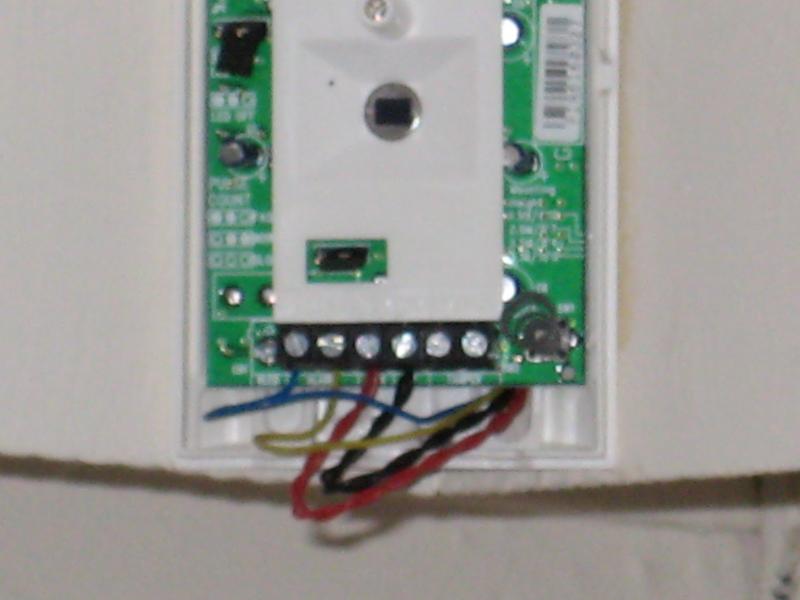
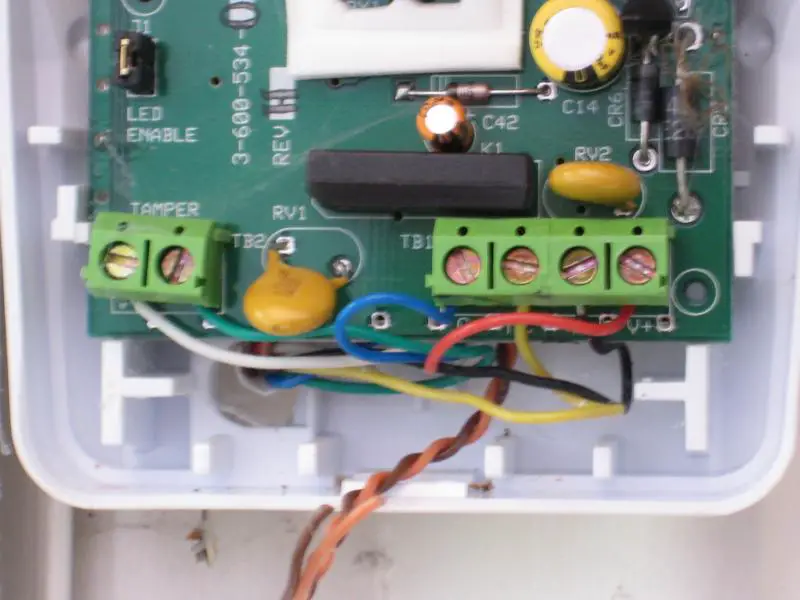
So what do I do now?
A
Alarm
The first one is fitted incorrectly.
The second is correct.
REd and Black being the power.
Alarm is Blue/Yellow.
Tamper Green and White.
Drop the green and white into the spare terimnals of the first pir. As it is "back to back".
The second is correct.
REd and Black being the power.
Alarm is Blue/Yellow.
Tamper Green and White.
Drop the green and white into the spare terimnals of the first pir. As it is "back to back".
OK. Can you explain why the first one has a twisted pair of red and black wires? Do I need to do anything with them?
Once I've connected the green and white to the first PIR, am I good to completely remove the second one?
Once I've connected the green and white to the first PIR, am I good to completely remove the second one?
Both PIRs are supplied by an eight core wire - red/black/blue/yellow/green/white/orange/brown.
The PIR I want to keep is connected directly to the control panel. It has red/black/blue/yellow connected to terminals as shown. The green/white wires are not connected to anything. The brown wire is connected to the yellow wire (using insulation tape) that runs to the other PIR. The orange wire is connected to the blue wire (using insulation tape) that runs to the other PIR.
The PIR I want to remove is the one with the orange/brown wires on show but are not connected to any terminals. It has red/black connected to red/black in the PIR I want to keep. The green/white/orange/brown wires are not connected to anything even though green/white are connected to terminals in the PIR. The yellow/blue wires are connected as described above.
Can you please decipher for me and explain how to (a) disconnect the PIR I want to remove and (b) correctly wire the PIR I want to keep?
The PIR I want to keep is connected directly to the control panel. It has red/black/blue/yellow connected to terminals as shown. The green/white wires are not connected to anything. The brown wire is connected to the yellow wire (using insulation tape) that runs to the other PIR. The orange wire is connected to the blue wire (using insulation tape) that runs to the other PIR.
The PIR I want to remove is the one with the orange/brown wires on show but are not connected to any terminals. It has red/black connected to red/black in the PIR I want to keep. The green/white/orange/brown wires are not connected to anything even though green/white are connected to terminals in the PIR. The yellow/blue wires are connected as described above.
Can you please decipher for me and explain how to (a) disconnect the PIR I want to remove and (b) correctly wire the PIR I want to keep?
A
Alarm
The twisted pair are the power.
The others are alarm and tamper.
It even tells you on the board/PCB in the detectors which is which.
The others are alarm and tamper.
It even tells you on the board/PCB in the detectors which is which.
Sorry, I worked out that much.
I can't figure out why:
1) The tamper wires from the panel are not connected to the PIR I want to keep.
2) One end of the tamper wires from the spur cable are connected to PIR I want to remove but the other end is not connected to anything.
3) The alarm wires from the spur cable are connected to orange/brown from the panel cable.
Do I stop worrying about this and simply:
A) Disconnect the power wires in the spur cable from the PIR I am keeping.
B) Disconnect the alarm wires from the spur cable that are connected to orange/brown from the panel cable.
C) Connect the tamper wires from the panel cable to the PIR I want to keep.
I assume brown/orange are not required.
I can't figure out why:
1) The tamper wires from the panel are not connected to the PIR I want to keep.
2) One end of the tamper wires from the spur cable are connected to PIR I want to remove but the other end is not connected to anything.
3) The alarm wires from the spur cable are connected to orange/brown from the panel cable.
Do I stop worrying about this and simply:
A) Disconnect the power wires in the spur cable from the PIR I am keeping.
B) Disconnect the alarm wires from the spur cable that are connected to orange/brown from the panel cable.
C) Connect the tamper wires from the panel cable to the PIR I want to keep.
I assume brown/orange are not required.
A
Alarm
Without looking and tracing all cables back.
It would be difficult to comment correctly.
But to answer as much as I can.
1,sloppy fitting.
2,See above.
3,Joints somewhere, hence the "series" fitting.
A, drop them the pir will stop working.
B,take them out see what happens. My guess is you will lose a circuit and the panel will not set.
C,Deffo keep the tamper, as you never know!
I assume the brown are needed, as its been fitted back to back. You will need to close that circuit off.
It would be difficult to comment correctly.
But to answer as much as I can.
1,sloppy fitting.
2,See above.
3,Joints somewhere, hence the "series" fitting.
A, drop them the pir will stop working.
B,take them out see what happens. My guess is you will lose a circuit and the panel will not set.
C,Deffo keep the tamper, as you never know!
I assume the brown are needed, as its been fitted back to back. You will need to close that circuit off.

All sorted!
Have completely removed the unwanted PIR and it's wiring.
Have connected the tamper wires on the PIR I kept - all the other PIRs in the house have been connected in this way.
Have completed a walk test and all is fine.
I initially got a zone open fault on the walk test for the zone where I'd removed the PIR. This was rectified once I joined brown/orange.
Thanks very much for all your help.

DIYnot Local
Staff member
If you need to find a tradesperson to get your job done, please try our local search below, or if you are doing it yourself you can find suppliers local to you.
Select the supplier or trade you require, enter your location to begin your search.
Please select a service and enter a location to continue...
Are you a trade or supplier? You can create your listing free at DIYnot Local
Similar threads

- Replies
- 8
- Views
- 1K
- Replies
- 1
- Views
- 2K
