Search results
-

Alarm menu
- Tazer
- Album
- Comments: 0
-
T
Texecom 48 install....East London
Hi All, Im back again. Been a while had to finish of the renovations around the house and put the alram install on hold. Now that the house is finally done Ive gone back to the Alarm project to get this finalised. Ok here is where I am at now..... Ive managed to sort the issue out with...- Tazer
- Post #72
- Forum: Alarms, CCTV & Telephones
-
T
Alarm randomly sounds - Ei141 ionisation smoke alarm
I usually get this 1-2am in the morning and then odd times through out the early hours. During the day its pretty quite then kicks back in. Its a loud beep every few mins not continous. And its always the first two one in the porch and one in the ground floor hallway. When I took those two...- Tazer
- Post #8
- Forum: Alarms, CCTV & Telephones
-
T
Alarm randomly sounds - Ei141 ionisation smoke alarm
Hi I have exactly the same problem. I have 4 of these units with a CO2 unit and half way through the night or odd times during the day it gives out a loud beep (Sounds like the battery is dying out) Which it cant be as its electric powered as well as having a back up battery.... which lasts...- Tazer
- Post #6
- Forum: Alarms, CCTV & Telephones
-
T
Texecom Ricochet Install
Ok Ive managed to solve the problem. Richochet is now on the network. I assigned an IP address to the ComIP via the Premier Panel and Keypad. Once assigned took it back out again and plugged it into the Wireless Expander. Hey presto.....its now seen on the network.- Tazer
- Post #2
- Forum: Alarms, CCTV & Telephones
-
T
Texecom Ricochet Install
Hi All, Part 2 to my installation now. Ive recently purchased the ComIP module for the 32Xp Wireless expander which Ive installed. How do I assign an IP address or what is the IP address. Ive tried everything and searched the net as well as reading the manul but doesnt tell me how to...- Tazer
- Thread
- Replies: 2
- Forum: Alarms, CCTV & Telephones
-
T
Texecom 48 install....East London
Hi All, Just a quick update, got the new antenna come through yesterday, had a quick play around with it and still no joy. Seems to be stuck on -113 and not moving at all. Will try again over the weekend with different sim cards to see if that makes a difference or not. Dont know what...- Tazer
- Post #70
- Forum: Alarms, CCTV & Telephones
-
T
Texecom 48 install....East London
Lol :D They said a good signal is about -90 -95 but anything that ranges from I think he said -13 I have a semi victorian. The currnet panel is in the side extension with no metal interferance. Also the antenna does go out the window which ive left to dangle and test. Still nothing seems...- Tazer
- Post #69
- Forum: Alarms, CCTV & Telephones
-
T
Texecom 48 install....East London
Just having a quick browse through on eBay. Is the antenna something like this I need to replace it with http://cgi.ebay.co.uk/12dB-GSM-Cell-Phone-Mobile-Gain-Signal-Booster-Antenna-/290398555794?pt=UK_Computing_Networking_SM&hash=item439d1a4e92 12dbi gain. There are others which are...- Tazer
- Post #65
- Forum: Alarms, CCTV & Telephones
-
T
Texecom 48 install....East London
Hi Alarm Yes, everytime any change was made to the GSM modem, the panel including the battery were all disconnected. Also when I disconnected the old unit and plug in the new complete unit, power supply and battery lead was taken out. Once connected, pressed the kick start button, restored...- Tazer
- Post #64
- Forum: Alarms, CCTV & Telephones
-
T
Texecom 48 install....East London
Hi Alarm Looks like Ive still got the same problem with the new GSM unit. I got the new one delivered on Friday and decided to install it. Once fitted, same thing I still get the same error messages Com2 Fault, ATS error. With the signal strength I still get -113. I called up texe on...- Tazer
- Post #62
- Forum: Alarms, CCTV & Telephones
-
T
Texecom 48 install....East London
Hi All, After contacting Texecom Technical yesterday who were very rude and not willing to help at all, never answered any of my emails so thought let me call their technical support. Not much help so had to be very persistant and the end result is I may have a faulty GSM module. As my signal...- Tazer
- Post #60
- Forum: Alarms, CCTV & Telephones
-
T
Texecom 48 install....East London
Hi Alarm, ALL Ok over the weekend I had another attempt and changed the dip on the expander to 1. It now recognises the Expander on 1 and RKP 1 and 2 all on seperate networks. Still no joy in connceting the devices up. Howeevr after googling all day yesterday I came across the offical...- Tazer
- Post #58
- Forum: Alarms, CCTV & Telephones
-
T
Texecom 48 install....East London
Yes I did notice the Com Ip port on the expander. I thought it will be more hassel in terms of taking it out of the premier panel and plugging it in the exapnder. I do have the Wireless software. Ok cool i will give that a shot over the weekend and see how I get on with that. I will set...- Tazer
- Post #56
- Forum: Alarms, CCTV & Telephones
-
T
Texecom 48 install....East London
Hi Alarm To make the Expander 1 do I change the dip switches on all keypads and expander? Thanks- Tazer
- Post #54
- Forum: Alarms, CCTV & Telephones
-
T
Texecom 48 install....East London
Hi All Thanks, excellent had a play around last night and got all the PIRs working. Carried out the Walktest and everything seems to fine on that front. Apprecaited the assistance. Ok, two final issues that I have. The first being the Wireless Expander, still cant seem to get that going...- Tazer
- Post #52
- Forum: Alarms, CCTV & Telephones
-
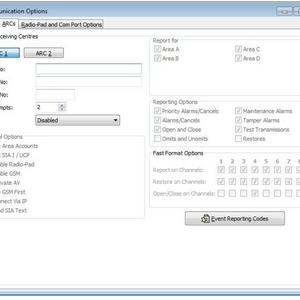
Coms Options ARC
- Tazer
- Media item
- Comments: 1
- Album: Alarm