
Search results
-
B
Scantronic 9448+ Alarm
Hi All, I have changed the front door magnetic switch. I've wired it in and now I got no tamper alarm (which is good) however, there is no chime happening either when opening the door. I have set the chime setting to zone 7 (Entry/Exit) in the engineers section as per the user manual. I have...- BrettRogersUK
- Post #39
- Forum: Alarms, CCTV & Telephones
-
B
Scantronic 9448+ Alarm
Here goes: Red / Yellow are the zone wires Blue / Black are tamper. Red to Black - Meter Reading OL Red to Blue - Meter Reading OL Yellow to Black - Meter Reading OL Yellow to Blue - Meter Reading OL Continuity Test - Negative on all as above Black to Blue - 2.0 ohms (give or take .1 ohms...- BrettRogersUK
- Post #38
- Forum: Alarms, CCTV & Telephones
-
B
Scantronic 9448+ Alarm
How do I do that? I've got my Multimeter. Do I just check the AT Wires for Voltage? I've already checked them on the ohms range and getting a steady 2.0 ohms.- BrettRogersUK
- Post #36
- Forum: Alarms, CCTV & Telephones
-
B
Scantronic 9448+ Alarm
Damage Report: 1. PIR With Anti Tamper connected - No Tamper Light on when coming out of programming mode. YAY! 2. E/E With Tamper Connected (no PIR/Anti Tamper Connected) - Tamper Light ON / Internal sounder screeching 3. PIR Disconnected & E/E Disconnected (including relevant AT) Bell Tamper...- BrettRogersUK
- Post #34
- Forum: Alarms, CCTV & Telephones
-
B
Scantronic 9448+ Alarm
Thanks for the help. I'll send a message on here when I've done it and let you know how I got on- BrettRogersUK
- Post #33
- Forum: Alarms, CCTV & Telephones
-
B
Scantronic 9448+ Alarm
is it safe now to put the E/E contact back in and the anti tamper circuit and see what happens?- BrettRogersUK
- Post #31
- Forum: Alarms, CCTV & Telephones
-
B
Scantronic 9448+ Alarm
Right then, I've just stretched the spring out a little and now when I put power to the box and turn it on the internal sounder sounds, I put my code in to stop the sounder and then my code again and NO TAMPER LIGHT now. Just the Green power LED is lit.- BrettRogersUK
- Post #30
- Forum: Alarms, CCTV & Telephones
-
B
Scantronic 9448+ Alarm
Yes it does go to constant tone. then when I release the switch it starts beeping again.- BrettRogersUK
- Post #28
- Forum: Alarms, CCTV & Telephones
-
B
Scantronic 9448+ Alarm
Hi, Sorry for the late reply. Yes that's on the lower connectors on the board 12v & 0v. 14.0v. I did a walk test today and I gather, from the user manual I downloaded, that during the walk test it is supposed to give out a continuous tone then when a detector is triggered it interrupts the...- BrettRogersUK
- Post #24
- Forum: Alarms, CCTV & Telephones
-
B
Scantronic 9448+ Alarm
I take it that needs to be done in the bell box outside sparkymarka.- BrettRogersUK
- Post #20
- Forum: Alarms, CCTV & Telephones
-
B
Scantronic 9448+ Alarm
Have tried doing that and it didn't make any difference. The battery is brand new (as mentioned previously) as are the fuses that are in it. One thing I didn't do is reset everything to defaults when I did the factory reset on it to get the code back to default one before I changed it again.- BrettRogersUK
- Post #18
- Forum: Alarms, CCTV & Telephones
-
B
Scantronic 9448+ Alarm
Now then! I've managed to set it all up. I've managed to change the user code etc. Now though I'm getting a tamper light on when I turn the panel on. I put my user code in to stop the internal sounder. Then I get a light on number 2. Then when I put the code in again it goes to tamper light...- BrettRogersUK
- Post #16
- Forum: Alarms, CCTV & Telephones
-
B
Scantronic 9448+ Alarm
Sorry about that, here's the pics :D Keypad: 20190816_215018 by BrettRogersUK posted 16 Aug 2019 at 10:10 PM PCB: 20190816_215007 by BrettRogersUK posted 16 Aug 2019 at 10:10 PM- BrettRogersUK
- Post #15
- Forum: Alarms, CCTV & Telephones
-
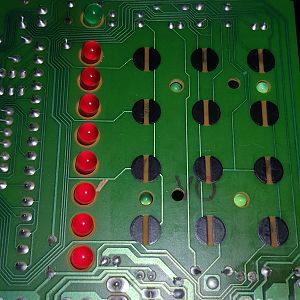
20190816_215007
- BrettRogersUK
- Media item
- Comments: 0
- Album: Scantronic 9448+ keypad
-
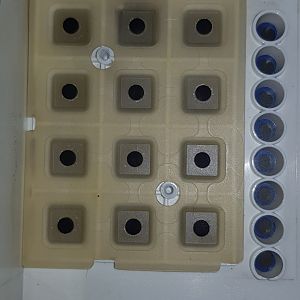
20190816_215018
- BrettRogersUK
- Media item
- Comments: 0
- Album: Scantronic 9448+ keypad
-
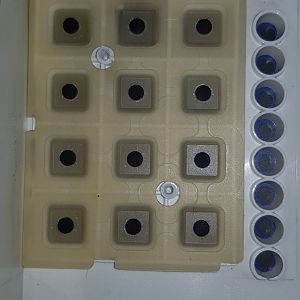
Scantronic 9448+ keypad
- BrettRogersUK
- Album
- Comments: 0
-
B
Scantronic 9448+ Alarm
- BrettRogersUK
- Post #14
- Forum: Alarms, CCTV & Telephones
-
B
Scantronic 9448+ Alarm
Thanks for the suggestion. I've already tried using some acetone (nail varnish remover) and still have to really prod the keypad to get some of the keys working. Most of the keys do work without much force now. I'm guessing it's just a question of cleaning and more cleaning??- BrettRogersUK
- Post #12
- Forum: Alarms, CCTV & Telephones