Search results
-
S
Texecom elite power supply
Thanks... I think it was definitely an issue with charging... I will have to wait until I can get to the panel and open it up when the noise wont wake someone to check the charging rate. I have the 24 with a 17Ah battery. Yes the EN calc shows alarm power as well. I have the 4 soundbomb...- Siclark
- Post #5
- Forum: Alarms, CCTV & Telephones
-
S
External alarm cabling
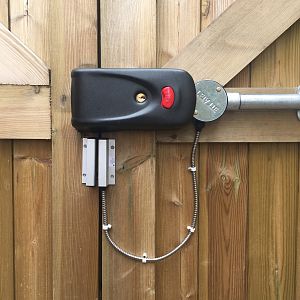
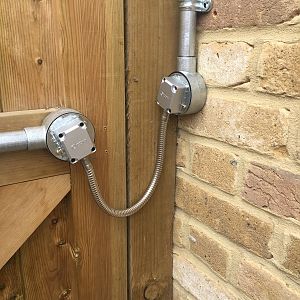
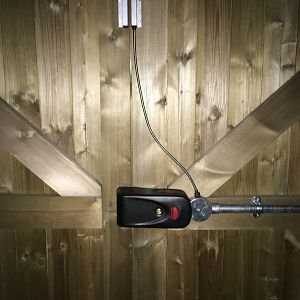
All done... Thanks all for the good advice. Door contact moved to below the lock with cable entering at bottom of the junction box and cable clipped to gate. The door loop fixed to the 2 junction boxes with Sticks like **** and a hole in the box cover to allow the cable through. Hopefully...- Siclark
- Post #13
- Forum: Alarms, CCTV & Telephones
-
S
Ricochet not learning new device
Hi I got 2 new micro contacts recently. One learnt with no problems at all. Learn Ricochet mode on keypad, held button on contact, flashed purple, then green. All good. The system refuses to recognise the other one though. I do the same steps, the contact flashes purple then solid green...- Siclark
- Thread
- Replies: 7
- Forum: Alarms, CCTV & Telephones
-
S
smart home security alarm recommendation
I have the texecom elite, which itself is stable and robust, and is plugged into my Vera so that can use all the Texecom sensors and alarm state. For an alarm system, with primary use being security, I am not convinced any home automation hub is reliable enough, so wanted to use a dedicated...- Siclark
- Post #5
- Forum: Alarms, CCTV & Telephones
-
S
External alarm cabling
HaHa. Thanks yes will be doing that as soon as I get cable clips the right size. Especially without easy pull handle it will be just the thing to grab hold of!- Siclark
- Post #12
- Forum: Alarms, CCTV & Telephones
-
S
External alarm cabling
Haha. Nice photoshopping. I had thought about putting the door contact cable coming out the bottom to reduce water getting in , although the rubber is tight, but couldn't work out how to run the cable to the contact. Didn't think about putting it below the lock!! It's too late for that...- Siclark
- Post #10
- Forum: Alarms, CCTV & Telephones
-
S
External alarm cabling
Thanks... I dont think I was clear, it was the end of the conduit into the lock that was my problem, not running most of it. However I think I have got it done as per the picture. One small 2mm hole drilled for the cables for the electric lock, hidden behind the lock, and a larger hold for...- Siclark
- Post #8
- Forum: Alarms, CCTV & Telephones
-
S
External alarm cabling
My next challenge is how to terminate the galvanised conduit into a junction box and get the cable out and into the door lock. I was going to use a single conduit box but can I then drill through the box? Or do I get a 2 way one and get some sort of waterproof grommet to pass the cable through...- Siclark
- Post #6
- Forum: Alarms, CCTV & Telephones
-
S
Texecom elite upgrade and new products
True. I was thinking timber though.- Siclark
- Post #16
- Forum: Alarms, CCTV & Telephones
-
S
Texecom elite upgrade and new products
I wonder how long before they can put a wireless contact inside a door. There are already zwave battery door contacts that can be.- Siclark
- Post #14
- Forum: Alarms, CCTV & Telephones
-
S
Texecom elite power supply
Haha... thanks. Guess that says it all. Actually I think it was running at the higher current when it was recharging the battery after having mains off for a while whilst I was doing the upgrade and a few other changes. It seems to be stable now at 0.54A which I think should be ok, even with...- Siclark
- Post #3
- Forum: Alarms, CCTV & Telephones
-
S
Texecom elite power supply
Hi, I have now got my panel upgraded to 3.02 and was checking through the rest of the setup, and realised that the panel info on the ios app is showing between 650 and 850mamps and flashing yellow. Downloading the ENCalculator it does appear that I am at the limit of the power on the panel...- Siclark
- Thread
- Replies: 6
- Forum: Alarms, CCTV & Telephones
-
S
Texecom elite upgrade and new products
Wow, the micro contacts are small.. somehow the measurements don't do them justice..- Siclark
- Post #12
- Forum: Alarms, CCTV & Telephones
-
S
Texecom Connect and Future
Cheers. Will do. It's actually a custom built integration with Vera automation, so cheaper than crestron, but built with their knowledge. I'll ask the developer, who has the signed NDA with them to check.- Siclark
- Post #11
- Forum: Alarms, CCTV & Telephones
-
S
Texecom Connect and Future
I don't suppose anyone has any insight into whether v4 would remove the premier protocol from the elite Panels? It's what my current home automation connectivity uses. Without that I would struggle to be able to upgrade the panel.- Siclark
- Post #9
- Forum: Alarms, CCTV & Telephones
-
S
Use Texecom Elite outputs to control electric locks
Thanks... Just need to test that it locks when Part B is armed, which I think above should do, and I'm all good. Then just to install it. Its a beast of a lock at 3kg!- Siclark
- Post #10
- Forum: Alarms, CCTV & Telephones
-
S
Use Texecom Elite outputs to control electric locks
Ok, so after a few hours of playing I finally got my head around the logic on the custom outputs and how to control from the phone app I set the Panel Outputs:1 to Custom 1 Stage A or B Then Custom Output 1 1.1 = PC Control 1 Pulse 1 (10 second) 1.2 = PC Control 2 Pulse 2 (1 hour) 1.3 =...- Siclark
- Post #8
- Forum: Alarms, CCTV & Telephones