
Search results
-
R
Extra wire
WHOOOOO!!! It works. Thanking you everso for all your help, you've been FANTASTIC. No more grumpy neighbours x :D- RedQueenie
- Post #57
- Forum: Electrics UK
-
R
Extra wire
Right I've put the brown back in the com and the black in the L1. I've got a connection block and will put the brown coming out of the light into one end. Does anything else need to go into the other end? I'll also put the black into the L on the light.- RedQueenie
- Post #55
- Forum: Electrics UK
-
R
Extra wire
Hiya I've got a multimeter how do I check the live line conductor?- RedQueenie
- Post #48
- Forum: Electrics UK
-
R
Extra wire
Yep everything else is connected as on the instructions- RedQueenie
- Post #47
- Forum: Electrics UK
-
R
Extra wire
Right now I tried the other way around. Disconnecting the black/brown and putting the brown into L and into Way1 at the bottom of the switch (where the black/brown used to be) now what happens is when I try to turn the indoor lights and porch light on nothing, but if I turn the security light on...- RedQueenie
- Post #45
- Forum: Electrics UK
-
R
Extra wire
I also took the brown wire out of L and made safe.- RedQueenie
- Post #44
- Forum: Electrics UK
-
R
Extra wire
Okay, just got out side and I connected the black wire with brown sleeve to the L and left the switch as in the picture. Only no lights at all, not any of them??? Any ideas?- RedQueenie
- Post #43
- Forum: Electrics UK
-
R
Extra wire
Hiya, in the instructions it says there is an automatic operation so when the switch is on the sensor detects motion and thus comes on and a manual override function which will make the light stay permanently on. What I am trying to do is wire it so that the light will not work at all when the...- RedQueenie
- Post #40
- Forum: Electrics UK
-
R
Extra wire
All I want to do is when the switch is in the off position the light and sensor is off and when the switch is in the on position the light sensor is on thus working if it detects movement. Is this possible? If so what do I do?- RedQueenie
- Post #33
- Forum: Electrics UK
-
R
Extra wire
I'm getting really confused now. All I want is to be able to turn the light on and off at the switch. I'm unable to get outside to try either way at the mo.- RedQueenie
- Post #28
- Forum: Electrics UK
-
R
Extra wire
Sorry for being stupid, but If I go with connecting the black with brown sleeve to the switch and light will this mean I can turn the light on and off via the switch in stead of it being permanently on?- RedQueenie
- Post #20
- Forum: Electrics UK
-
R
Extra wire
I'm guessing that the reason we can't get the darn thing to switch off! So let me get this straight. I don't need to put anything in the LS terminal and should just cap the brown wire and then put the black wire with brown sleeve in the L terminal. Is that right?- RedQueenie
- Post #18
- Forum: Electrics UK
-
R
Extra wire
Aaah that could be it. There's nothing in the instructions about putting anything in the LS bit. Just to confirm should I put the black with brown sleeve here?- RedQueenie
- Post #16
- Forum: Electrics UK
-
R
Extra wire
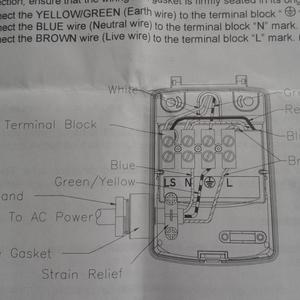
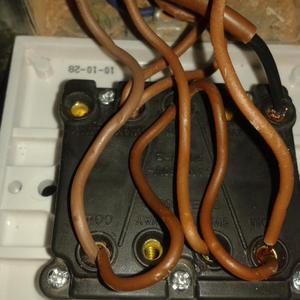
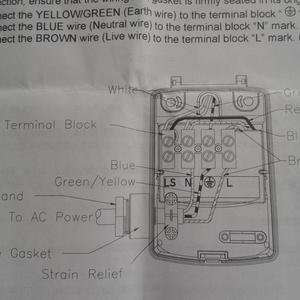
Hiya the light I'm trying to fit is a Polaris security light with sensor. It is replacing an old security light that also had a sensor. Unfortunetely it was taken down before I could see where the wires went. I've attached 2 pictures. One is a diagram of the instructions as it's peling it down...- RedQueenie
- Post #14
- Forum: Electrics UK
-
Untitled
- RedQueenie
- Media item
- Comments: 1
- Album: Wiring
-
Untitled
- RedQueenie
- Media item
- Comments: 1
- Album: Wiring
-
Wiring
- RedQueenie
- Album
- Comments: 0
-
R
Extra wire
I'm wiring up a new security light. So far I've wired in the brown, yellow/green and blue as per instructions, but I have a black wire with brown sleeve left over. There's nothing in the instructions about it and I'm confused. Should I be putting that one with the other brown wire or in place of...- RedQueenie
- Thread
- Replies: 57
- Forum: Electrics UK
-
R
Help I'm trying to replace a Honeywell ST7100 timer
I've only got wires going into 8, 6 and 3 (HW on HW COM and CH COM)?? :?- RedQueenie
- Post #8
- Forum: Plumbing and Central Heating