

I have a Worcester Greenstar 27RI compact boiler downstairs which is connected to a Greenstar Wiring Centre upstairs next to the hot water cylinder. The wiring centre talks to the boiler on an eBus connection. About a month ago I connected a Tado stat to the wiring centre on IZ3 in the wiring centre as instructed by Worcester tech support. It's a simple relay setup, stat bridges IZ3 which calls boiler for heat. Everything has been working perfectly up to yesterday.
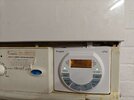
I noticed that the stat was calling for heat but the boiler wasn't firing up. At first I thought the boiler had packed up, but calling for hot water fires up the boiler fine. The slightly confusing thing (to me) is the wiring centre only has a connection to control heating with a stat. There is no way to call for hot water (confirmed by Worcester) so you need to keep a controller connected to boiler (DT 20, photo attached) for the water and I had to set CH to constant ON. This controller is not the problem as I had a replacement turn up today and I still have the same problem.
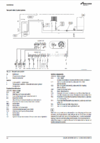
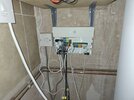
The wiring centre is setup as S Plan exactly as in diagram attached and we have a standard 2 port system for heating/water. I have removed the Tado link on IZ3 for now just to eliminate that being the issue. I had an electrician here yesterday who tested everything and said everything is wired correctly and each individual element (pump, valves, etc) are working fine. He thinks the wiring centre needs replacing. When heat is called for either from the DT 20 stat or by bridging IZ3 no power is sent to open the valve on PZ1 or the pump on PZ3. Nothing happens, no errors, just nothing kicks in. The wiring centre flashes different error codes when it detects things like BUS not connected or cylinder stat not working. Everything is green and solid, I'm just not able to get it to kick in to open valve and in turn call boiler for heat.
I know the wiring centre can talk to the boiler as hot water is working and if I turn the boiler off the wiring centre flashes to say BUS is lost. The only slightly odd thing I've found which might be nothing is IZ1 is at 25v to neutral or earth even when the HW valve is closed. I would expect it to be zero, but not sure if a bit of leakage is normal on those valves?
Before I buy a new wiring centre which I have a hunch isn't going to work, any ideas what might be wrong or anything else I should look at?
Thanks,
Simon
I noticed that the stat was calling for heat but the boiler wasn't firing up. At first I thought the boiler had packed up, but calling for hot water fires up the boiler fine. The slightly confusing thing (to me) is the wiring centre only has a connection to control heating with a stat. There is no way to call for hot water (confirmed by Worcester) so you need to keep a controller connected to boiler (DT 20, photo attached) for the water and I had to set CH to constant ON. This controller is not the problem as I had a replacement turn up today and I still have the same problem.
The wiring centre is setup as S Plan exactly as in diagram attached and we have a standard 2 port system for heating/water. I have removed the Tado link on IZ3 for now just to eliminate that being the issue. I had an electrician here yesterday who tested everything and said everything is wired correctly and each individual element (pump, valves, etc) are working fine. He thinks the wiring centre needs replacing. When heat is called for either from the DT 20 stat or by bridging IZ3 no power is sent to open the valve on PZ1 or the pump on PZ3. Nothing happens, no errors, just nothing kicks in. The wiring centre flashes different error codes when it detects things like BUS not connected or cylinder stat not working. Everything is green and solid, I'm just not able to get it to kick in to open valve and in turn call boiler for heat.
I know the wiring centre can talk to the boiler as hot water is working and if I turn the boiler off the wiring centre flashes to say BUS is lost. The only slightly odd thing I've found which might be nothing is IZ1 is at 25v to neutral or earth even when the HW valve is closed. I would expect it to be zero, but not sure if a bit of leakage is normal on those valves?
Before I buy a new wiring centre which I have a hunch isn't going to work, any ideas what might be wrong or anything else I should look at?
Thanks,
Simon
Attachments
-
 Screenshot 2024-11-16 at 19.22.55.png538.4 KB · Views: 95
 -
 03ac9a8c-7bcf-4508-ab4c-4e4acc6aefa9.JPEG157.7 KB · Views: 72
 -
 a6417116-205f-4abb-a20f-2559c122dad1.JPEG190.1 KB · Views: 93
 -
 ba525188-b151-4c6f-a50a-6c58752c3819.JPEG250.8 KB · Views: 69
 -
 cdc80be2-8062-4cb4-a456-54bc62ca9e95.JPEG261.6 KB · Views: 80

