• Looking for a smarter way to manage your heating this winter? We’ve been testing the new Aqara Radiator Thermostat W600 to see how quiet, accurate and easy it is to use around the home. Click here read our review.

Honeywell dial thermostat

Joined
4 Sep 2007
Messages
231
Reaction score
2
Location
Leeds
Country
United Kingdom
Evening all.

My father is in rented property and has a Honeywell thermostat that does not have any markings on the dial so he has no idea what the temperature is set to. I've had a look at the dial and there's absolutely no details on it whatsoever. Can anyone tell from the photo what the the model is and can just a replacement dial with markings on be bought separately?

Thanks in advance
IMG_20241202_144346.jpg
 
Looks like a T6360, not sure if the dial is available as a spare. If the cover was removed, there’s usually a sticker on the rear to confirm the model.
 
Looks like a T6360, not sure if the dial is available as a spare. If the cover was removed, there’s usually a sticker on the rear to confirm the model.
Ah brilliant. I'll remove the cover at the weekend and have a look see if there's anything there. Thanks
 
Looks like a T6360 to me (y)


111.jpg


You can buy a brand new T6360 for £35, but as it's in a rental property, surely the landlord should replace it? I've just replaced a thermostat for a tenant because the dial was stiff to turn.

Alternatively, you could put a thermometer above it and set the thermostat to around the middle position between its extents of rotation, that should be somewhere close to 20oC. Then when the thermostat clicks off, look at the thermometer, note what it's showing and mark that temperature on the thermostat dial where the vertical indication line at the top is. From there with a little trial and error, you should be able to calibrate the thermostat dial.
 
Evening all.

My father is in rented property and has a Honeywell thermostat that does not have any markings on the dial so he has no idea what the temperature is set to. I've had a look at the dial and there's absolutely no details on it whatsoever. Can anyone tell from the photo what the the model is and can just a replacement dial with markings on be bought separately?

Thanks in advance
View attachment 364915
Does it matter? Just set it to where he feels comfortable. You could put a line on it with a marker pen to give a reference point, if it helps.
 
Looks like a T6360 to me (y)


View attachment 364946

You can buy a brand new T6360 for £35, but as it's in a rental property, surely the landlord should replace it? I've just replaced a thermostat for a tenant because the dial was stiff to turn.

Alternatively, you could put a thermometer above it and set the thermostat to around the middle position between its extents of rotation, that should be somewhere close to 20oC. Then when the thermostat clicks off, look at the thermometer, note what it's showing and mark that temperature on the thermostat dial where the vertical indication line at the top is. From there with a little trial and error, you should be able to calibrate the thermostat dial.
Yeah the landlord should sort it but trying to arrange that is a nightmare so it's probably just as easy for me to swap it.
 
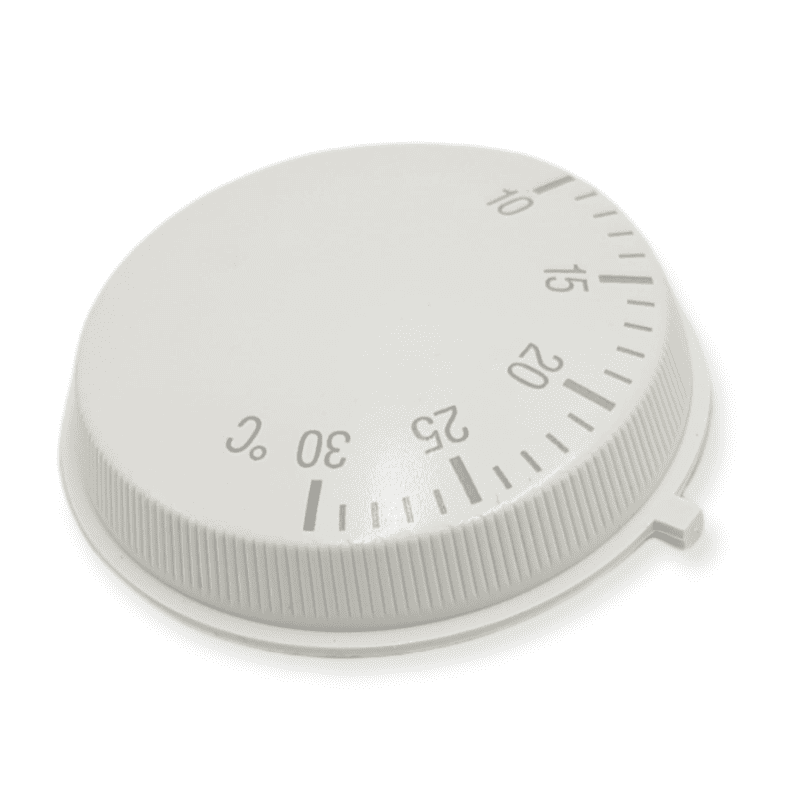
We have the same thermostat but with the numbers as shown. To be honest, we just use ours to switch the heating on or of and set it to around midway. Ours is in our hallway which tends to be colder than the other rooms, so by the time the hallway gets up to around 15 degrees, the other rooms are fine. The direction of operation does seem odd though, turning clockwise to decrease the temperature. It doesn't seem intuitive but there is probably a good reason.
 
The direction of operation does seem odd though, turning clockwise to decrease the temperature.
That's the convention, like ACW to increase the flow from a tap, and to raise the temperature of a shower. Having said that, my roomstat, Eberle, 25 years old, is CW to raise temperature.
 

If you need to find a tradesperson to get your job done, please try our local search below, or if you are doing it yourself you can find suppliers local to you.

Select the supplier or trade you require, enter your location to begin your search.


Are you a trade or supplier? You can create your listing free at DIYnot Local

 
Back
Top