HELP Light-switch doesn't switch off...

Joined
25 Aug 2008
Messages
9
Reaction score
0
Location
Surrey
Country
United Kingdom
Hi there everyone!

Just joined the community... more by need than by pleasure of dim! :roll:

I've recently moved and because the money is short I've ended up deciding to do all the fittings/refurbishments myself. The problem is that I wasn't expecting the electrics to be so different from the ones I was used to (Portugal).

I need help for my latest problem and it'd be great if anyone could help in time to sort it out tomorrow before the work re-starts on Monday... :wink:

I've fitted a chandelier today... I tried a first time and it went burst (bulb exploded) because, I believe there was a short-circuit somewhere due to using one of the non-covered derivation boxes. I did it again... and now the light is always on irrespectively of how many times I press the light switch.

What have I done wrong? There were to separate sets of cable coming from the ceiling (1 red, 1 black, 1 earth + 1 red, 1 black, 1 earth). I isolated one of the sets and connected the other set to the fitting (1 brown, 1 blue, 1 earth)... is this the problem? Are the 2nd set the wires for the switch or is build is some type of ring? Or is there a chance that something is wrong with the switch due to the short-circuit before?

Also, one of the (6) bulb holders (I don't know their name in English!) does not have current... I believe this is connected with the earlier short circuit. Is it possible it has burnt the wire? How could I fix it? Do I need to re-wire the chandelier?

Many thanks for the patient to read it all... any help is welcome and very much appreciated! :)

Rodrigo
 
There were to separate sets of cable coming from the ceiling (1 red, 1 black, 1 earth + 1 red, 1 black, 1 earth).
One of the cables is the supply, the other is the switched wire

I isolated one of the sets and connected the other set to the fitting (1 brown, 1 blue, 1 earth)...
That's the supply which is why it wont turn off.

Are the 2nd set the wires for the switch
Yes

Leave the black cable where it is.

Join the two reds together in connector block.

Put the other black where the red cable was and mark it with red insulating tape, it's a switched live.

Also, one of the (6) bulb holders (I don't know their name in English!) does not have current... I believe this is connected with the earlier short circuit. Is it possible it has burnt the wire? How could I fix it? Do I need to re-wire the chandelier?
It's hard to say but try a new lamp first
 
Leave the black cable where it is.

Join the two reds together in connector block.

Put the other black where the red cable was and mark it with red insulating tape, it's a switched live.

Thanks a lot for your quick response, Pensdown... but I'm not sure I really got what to do with the wires... :roll:

So, for the cables from the 2nd set:
1- I'll join the red (together with the one that's already there) to the connector block
2- leave the black where it is now (not connected) and isolate it with tape
3- what about the earth one? Should I leave it out also or should I connect it to the connector box leaving only the black out?

If it's like this the connector box will look:
2R 1E 1B
x¦xx¦xx¦
1Br 1E 1Blue

with 1black and 1 earth isolated staying outside, right?

Once again thanks a lot for your help! 5stars
 
Put the two reds into a brand new empty terminal block.

Leave the black which is currently in your lights neutral where it is.

Place the black which is not currently connected into the lights live terminal, placing some red sleeve or tape onto this black to identify it as a live.

Make sure you connect both earth to the light.
 
Put the two reds into a brand new empty terminal block.

Leave the black which is currently in your lights neutral where it is.

Place the black which is not currently connected into the lights live terminal, placing some red sleeve or tape onto this black to identify it as a live.

Make sure you connect both earth to the light.

Thanks Lectrician... I think I got it now, but my terminal box (came with the fitting) only has 3 slots. I need to get another box then.

I apologise for being so dumb, but it's the first time I see such an electric system and I had just assumed they had 2 set for two separate fittings so I just isolated one of them... I'll try it and let you guys know. Thanks a lot!
 
Aye, thats correct, you need an extra terminal connector for the 'loop' (two reds), remember to get some red sleeve/tape while you are buying the strip connector

I normally use 15A strip connector for lighting, anything smaller is just too small and fiddly IMHO
 
I normally use 15A strip connector for lighting, anything smaller is just too small and fiddly IMHO

Although with just two reds to loop, a 5amp one will eat it!

You say "box" that came withthe light.

Are you trying to place a "chock box" behind the light?

All you need is some termial blocks, assuming your lights base covers the terminals.

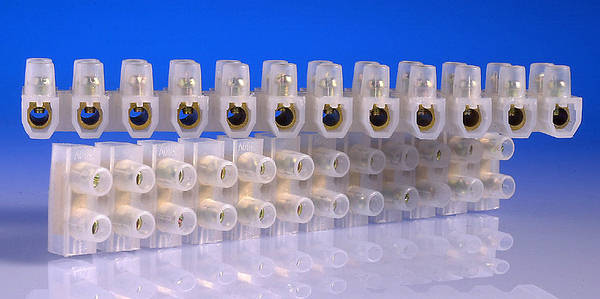
Terminal Blocks:
TLCON15.JPG


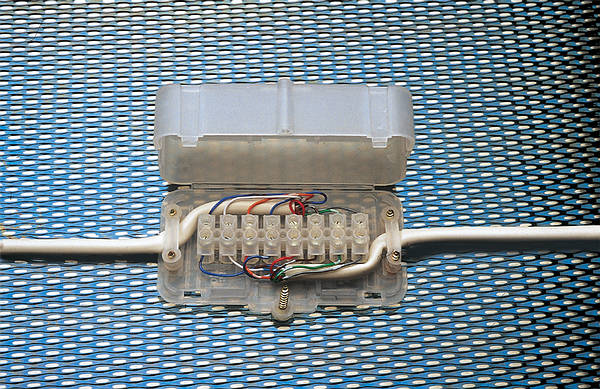
Chock Box:
CHOCBOXA.JPG


CHOC_BOX.jpg
 
I normally use 15A strip connector for lighting, anything smaller is just too small and fiddly IMHO

Although with just two reds to loop, a 5amp one will eat it!

You say "box" that came withthe light.

Are you trying to place a "chock box" behind the light?

All you need is some termial blocks, assuming your lights base covers the terminals.
Yes, yes... I've used the terminal blocks but I want to have to kind protection around it (the base of the chandelier is metal) and therefore I'm adapting the case that came with the fitting.

I've managed to fit a 5amp one (the 15amp were just too chunky and wouldn't fit under the base of the fitting) although strugling with putting 2 earth wires in one slot.

So that's done thanks to you guys. My problem now is how to find out why one of the bulb holders is not working... I had a short-circuit before when I had one bulb on, do you find it may have burnt down the wiring and will I need to re-wire that arm of the chandelier? How can I check what's the problem? I've looked at the metal components to see if any were burn't but they seem ok...
 

If you need to find a tradesperson to get your job done, please try our local search below, or if you are doing it yourself you can find suppliers local to you.

Select the supplier or trade you require, enter your location to begin your search.


Are you a trade or supplier? You can create your listing free at DIYnot Local

 
Back
Top