Texecom SmartCom - Modem Is Online Fault

Joined
8 Feb 2026
Messages
5
Reaction score
0
Country
United Kingdom
Texeom Elite 24 V6
Smartcom V3 WiFi Module

Set up system and hanging on Modem is online when generating app code

Wifi is connected

Followed texecom guide for set up including comport 1&2, UDL Password, Digi Set up for Comport

Tried to reset Digi and reboot panel and smartcom still same issue

Any help appreciated

Thanks
 
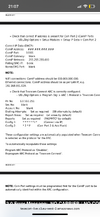
so in comport set up do you have com1 set up as smart com and com2 as com ip, its a bit of a stretch on the 24 if I recall correctly the positions of com 1 and com2.
 
yes to both and yeah com 1 middle of panel and com 2 right hand side of panel

set up as per below image
 

Attachments

  • IMG_6291.png
    IMG_6291.png
    474.7 KB · Views: 11
Apologies but this may sound rude, you think you have it setup that way.

It’s clear the smart com is connected from what you have said.

So if the comports are correct and the program did go correct you can go and turn it all back off.

Unplug smart com wait 20 seconds, plug it back in and program back up and then attempt to generate the app code
 
yeah iv done that i wiped the programming including defaulting the smartcom

set up again as per texecom guide

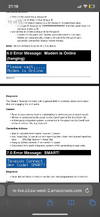
if you get this issue texecom says to do the attached but still get the same issue, not had chance to call them cause its weekend
 

Attachments

  • IMG_6292.png
    IMG_6292.png
    642.5 KB · Views: 8
Have you tried to generate app code via monitor mode?

This overrides all the settings.
If that generates the app code go and look at the programming back on.

I have reset many smart coms for new customers and it literally is a very quick process.

You can try turning off routers firewall and power it back up and turn the firewall back on.
 
I did not know about monitor mode i will try that tomorrow then the router changes if required. I will update if this resolves the issue
 
Monitor mode can be enabled and that overrides all the comport settings.

You can then go back and reset things up without monitor mode.

As the smart coms is connected to the WiFi, you should be able to see the Texecom device on the hub, used to show as texe_hub, but doesn’t anymore. So you can use MAC address etc, think it shows up as a microchip technology inc device from memory.
 

If you need to find a tradesperson to get your job done, please try our local search below, or if you are doing it yourself you can find suppliers local to you.

Select the supplier or trade you require, enter your location to begin your search.


Are you a trade or supplier? You can create your listing free at DIYnot Local

 
Back
Top