

i bought a photoshop cd. and every time i want to use the clip art section,i have to keep putting the cd back in the drive, i don't mind doing this but i don't want to wear it out...How do i make a copy of this ?.. my laptop is all geared up for that kind of thing with all the bells and whistles. any help please.

-
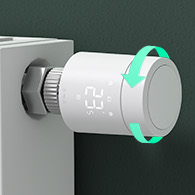 Looking for a smarter way to manage your heating this winter? We’ve been testing the new Aqara Radiator Thermostat W600 to see how quiet, accurate and easy it is to use around the home. Click here read our review.
backups
- Thread starter vokera80e
- Start date


