Electrical Issue With Central Heating

Joined
16 Oct 2013
Messages
67
Reaction score
5
Country
United Kingdom
Central heating is not turning on. Was operating intermittently. No error codes on the boiler. If I remove the cover to the CH motorized valve (Honeywell) and press the microswitch then boiler turns on. So valve is not opening.

I replaced the motorized head and no change.

With the motorized head removed the valve was a bit stiff and felt "spongy" to turn but by exercising it with pliers it now turns freely. I believe it was sticking. Motorized head was getting warm so perhaps motor was trying to move it but couldn't.

With the motorized head in my hand and the cover off, turning on the CH heating the motor does not move.

I have a Drayton wireless thermostat - it shows a wireless connection to the Digistat SCR. Has new batteries. Is calling for heat.

The Digistat SCR has a solid green light and the red light is off. Occasionally the red light flashes, I presume when receiving data from the thermostat.

I have a Centaurplus C27. Pressing the CH and HW buttons through the options I hear the relays clicking on and off.

The motor to the HW motorized valve has power on blue and pink (supposedly brown?) wires.

The motor to the CH motorized valve has power on blue but no power on pink.

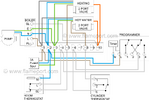
The CH motorized value pink wire goes to the Digistat SCR.

What can I check next? Thanks!!
IMG_6574.jpg
 
Last edited:
If you're happy testing 240V then if there is no power on the pink to the valve (that will be the live brown) then either the programmer isn't sending out a 240v Live call for heat or the stats receiver isn't passing that on to the valve. When the programmer is calling for CH then check for 240V at the receivers terminal 1. No power there then check the programmer.
 
Thanks @Madrab . Here is an update that might change your answer?

I turned the system back on. Valve head is off the valve and cover is off so I can see the motor mechanism.

Turning the thermostat up and the receiver green light goes on, I hear a click and the motor turns slowly - takes about five seconds to reach the microswitch. Normal speed? Boiler turns on.

Turning the thermostat down and the receiver green light goes off, I hear a click and the motor turns the opposite direction.

The valve is easy to turn by hand - no resistance.

Reinstall the valve head back on the valve, turn the thermostat up - click and green light - but the valve motor does not turn!

Took the valve head back off and test it again and the motor turns.

Valve motor arm set to auto.
 
So I can heat my house while I am working on this, which direction should the valve pin be pointing in relation to the valve inlet pipe for it to be open? It looks like closed is 100 degrees clockwise?

Thanks.
 
Turning the thermostat up and the receiver green light goes on, I hear a click and the motor turns slowly - takes about five seconds to reach the microswitch. Normal speed? Boiler turns on.

Quite normal.

Turning the thermostat down and the receiver green light goes off, I hear a click and the motor turns the opposite direction.

Again normal, but will be a bit quicker, because it uses a spring to return, rather than its slow motor.

Reinstall the valve head back on the valve, turn the thermostat up - click and green light - but the valve motor does not turn!

Mmm - you say the valve spindle is free. Can you turn it, or almost turn it with just your finger tips?

If so, then the actuator is getting a bit worn, and needs replacing. or it's motor.

Can you fix the actuator back on the spindle, without bolting it down. With heating set for on, stat calling for heat, the actuator will rotate on the valve spindle. Then just turn the actuator into it's usual alignment on the valve. Now you can have some heat, but you need to order a replacement for the actuator.
 
Are all wires/connections tight? If it doesn’t move with the head fitted, then I’d say it’s likely the valve giving too much resistance.
 
Update: When I said there was no voltage on the pink wire to the CH valve I was expecting there to be voltage when the valve is opened. I now see that it is the other way around - I guess if there is a power cut the failsafe state is to open the valve.

So to confirm, I have 242V when value is closed and 0.17V when valve is opened, on the pink wire.

@CountryFan - it is easy to move and smooth action with my fingers. No effort required at all. I retightened all of the choc block terminals when I swapped the actuator, including the ones I didn't have to loosen to do the swap.
 
Last edited:
With demand calling, From the programmer to the room stat to the brown of the motorised valve should be 230/240vac between live and earth (so you’re testing correctly). This voltage should remain the same until demand has stopped.
 
OK I understand, my setup is reversed, but here I am just swapping like for like that has worked for years? So I am confused over this. I can see when I look at the actuator that the position of the slot changes, so it should move the valve when connected.
 
I haven't gotten as far as swapping the actuators yet, however I have just noticed that regardless of whether the valves are on or off, there is 242V AC on the neutral wrt earth. Oops. If I turn off power to the boiler/digitstat SCR/Centaurplus C27 then it is zero volts, so it isn't a fault in the house but in this system.

So with the CH valve open (microswitch pressed) there is 0V on live, 242V on neutral, the motor is energized because it is warm to the touch, I presume from the voltage differential.
 
240v @ the neutral for the CH valve? Well, obviously there shouldn't be 240v on the neutral and that wouldn't usually be internal to the head, unless there's a short in there of course.

Cant really tell from the photo but I'd be checking back at the wiring centre to start with but be careful, check and confirm the wiring colours line up properly with the system powered down, as there is a real danger of critical damage if the wiring's wrong or crossed.

1770396875552.png
 

If you need to find a tradesperson to get your job done, please try our local search below, or if you are doing it yourself you can find suppliers local to you.

Select the supplier or trade you require, enter your location to begin your search.


Are you a trade or supplier? You can create your listing free at DIYnot Local

 
Back
Top