
Hive Single Receiver Wiring Help

Joined
2 Mar 2026
Messages
2
Reaction score
1
Country
United Kingdom
Can someone please help.

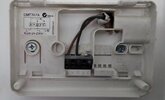
I have changed my Honeywell receiver that is located in my bedroom and attempted to install a hive single thermostat to power the central heating in the upstairs rooms. The Honeywell receiver had no issues powering the boiler on however the new receiver won't turn the boiler on. The Honeywell only had two wire L and N and I have attached these to the hive thermostat receiver but the boiler will not fire up. I have tried a link between L and 1 but nothing still. I have attached a picture of the two wires from the Honeywell receiver.
 

Attachments

  • Screenshot_20260302_180405_Gallery.jpg
    Screenshot_20260302_180405_Gallery.jpg
    103.1 KB · Views: 24
A common misconception by lots of people. That is a live and switched live, not a neutral. Unless there’s plenty of slack on that cable then I suggest you wire the Hive elsewhere. The existing Honeywell isn’t a receiver, it’s a battery operated thermostat.
 
Thanks for getting back to me. There is lots of slack with the wires available..would you mind taking me through our I would wire the hive receiver. I have already attached it to the wall.
 
Edited as my post wasn't the best or safe help, but follow @Madrab's below. I assumed was mains switching :(
 
Last edited:
Careful what you are doing with wiring and running lives etc as the boiler may use a volt free contact and if you send 240v down that then you will fry the PCB. Need to test to see what's on that brown and if it actually is 240v

Hive works differently, they have a receiver that is wired directly to the boiler and gets it's power (2 wires L&N) from there and either switches a 240v Live or 0v switching (another 1 or 2 wires system dependent), there are also 2 types of Hive, a 1 channel (combi) and a 2 channel (CH & HW) receiver.

What boiler do you have?
 
The Nest-e is as far as I am aware the only battery powered thermostat which connects to the internet. So with most thermostats that connect to the internet you need a supply for the thermostat, and the wires that need switching on/off.

The on/off wires may be 24 volts or 230 volts you can't assume either way. If you want a wireless thermostat except for Nest-e, then it comes as two units, the thermostat and the hub. And the hub is normally wired near to the boiler.

The idea is to have everything to do with the boiler either battery powered or powered from the boiler, this means one switch and boiler safe to work on. Also, easy to supply boiler from another supply in a power cut. @Madrab has given a good answer.
 
Can someone please help.

I have changed my Honeywell receiver that is located in my bedroom and attempted to install a hive single thermostat to power the central heating in the upstairs rooms. The Honeywell receiver had no issues powering the boiler on however the new receiver won't turn the boiler on. The Honeywell only had two wire L and N and I have attached these to the hive thermostat receiver but the boiler will not fire up. I have tried a link between L and 1 but nothing still. I have attached a picture of the two wires from the Honeywell receiver.

The honeywell would have used the batteries to switch a relay within the unit and connect the 2 wires together (either low voltage or high voltage) when the stat calls for heat.

This "contacting" or "joining" of the 2 wires completes the circuit back to the boiler switched live and fires it up.

Hive (and other) wireless stats work differently... The receiver is hard wired to the boiler and still has a circuit connected to the switched live in the boiler, and it is still "open" (ie not connected).

A separate roomstat (either wired or wireless) sends a signal to the receiver that again activates a relay which "makes" a connection down the boiler switch live and fires it up.

Hth.
 

If you need to find a tradesperson to get your job done, please try our local search below, or if you are doing it yourself you can find suppliers local to you.

Select the supplier or trade you require, enter your location to begin your search.


Are you a trade or supplier? You can create your listing free at DIYnot Local

 
Back
Top