• Looking for a smarter way to manage your heating this winter? We’ve been testing the new Aqara Radiator Thermostat W600 to see how quiet, accurate and easy it is to use around the home. Click here read our review.

Nest Thermostat E Wiring Heat Link

Joined
15 Sep 2008
Messages
4
Reaction score
0
Country
United Kingdom
Hi,
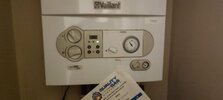
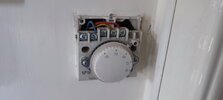
I'm trying to install a nest heat link for my girlfriend but can't seem to get the boiler to turn off and wonder if someone can check if I've wired it correctly from the images attached.

Red wire - Common
Blue wire - NO
Yellow - Terminated with a wago

I then set the boiler to the 'ON' position.
The boiler then stays on and when I try to switch it off on the nest thermostat, it doesn't switch off.

I can hear the heat link click on an off when I change it on the nest thermostat, so that's working.

I read this evening somewhere on this forum that the Vaillant combi boiler needs to be set to the Timer and the clock tabs all switched on for 24 hrs on the clock, I haven't tried this yet, but surely the 'ON' position on the boiler would do the same thing right?? I'm not at her property now to test this.

Thanks in advance!!
 

Attachments
  • IMG_20241027_151832.jpg
    IMG_20241027_151832.jpg
    99.1 KB · Views: 54
  • IMG_20241027_164938.jpg
    IMG_20241027_164938.jpg
    113.3 KB · Views: 48
  • IMG_20241027_173030.jpg
    IMG_20241027_173030.jpg
    128.5 KB · Views: 47
Last edited:
There are a few things that concern me here. In fact it's wrong on nearly every level.

1. Red is usually live, and Blue neutral. [which does correspond to terminals 1 and 2 at the old thermostat as per the nomenclature on its cover] If you have put them in COM and NO then if the Heatlink switches on then it would be connecting the live and neutral wires together. :eek:

2. The photo you posted of the old thermostat has the yellow wire in terminal 4. Yet as you can see from the diagram below terminal 4 isn't used for anything, there's no external wire connected to it. [Yellow is usually in 3] So, in theory the old thermostat is wired in reverse [On would actually be Off, and Off would be On]

3. The yellow wire is usually the switched live, the one that is responsible for controlling the boiler, yet you have "terminated it with a Wago"

123.jpg


4. Is the old thermostat still wired in, or did you take the photograph before you fitted the Heatlink?

5. You don't say what model of Heatlink you are using. There are several versions. I assume by your use of the name Heatlink that it's part of a Google Nest, but then there are different versions of Nest. The Nest-e is battery powered, but the Nest 3rd Gen is mains powered, so more wiring is involved that just COM and NO.

These are basic fundamental wiring matters, and I suspect that you are out of your depth here and to avoid damaging the Heatlink / boiler / yourself, recommend that you get it installed professionally.
 
I was beginning to write the same! :)

5. You don't say what model of Heatlink you are using. There are several versions. I assume by your use of the name Heatlink that it's part of a Google Nest, but then there are different versions of Nest. The Nest-e is battery powered, but the Nest 3rd Gen is mains powered, so more wiring is involved that just COM and NO.
The Nest Thermostat E (as in thread title) has a small, wall mounted (battery powered) Heatlink with NO and COM connections.
The Thermostat itself needs a USB connection to power it.

2. The photo you posted of the old thermostat has the yellow wire in terminal 4. Yet as you can see from the diagram below terminal 4 isn't used for anything, there's no external wire connected to it. [Yellow is usually in 3] So, in theory the old thermostat is wired in reverse [On would actually be Off, and Off would be On]
This is the second instance we've seen recently with these dial stats being wired the wrong way around.
In a way it sort of makes sense; it won't operate as a stat, but turning the dial up and the heating turns on, turn it down and it goes off - it could be argued that it's more intuitive!

As in many of these changing thermostat threads, we just have to hope that the neutral wire wasn't connected at the other end...
 
The Nest Thermostat E (as in thread title)
Ah yes, thank you I missed that, probably because it wasn't mentioned in the post itself.

As in many of these changing thermostat threads, we just have to hope that the neutral wire wasn't connected at the other end...
Indeed, I sort of thought that it hadn't gone 'bang' because it could be a 3rd Gen nest which hadn't been connected to the mains supply so the switch never operated to connected them together.....obviously that's not the case with it being a Nest-e. So, that could suggest as you say that the blue isn't connected to N at the other end, which would be fortunate for the OP.

OP if it was wired such that the red is the thermostat live, and the yellow switched live, then they would be the wires for COM and NO.
 

If you need to find a tradesperson to get your job done, please try our local search below, or if you are doing it yourself you can find suppliers local to you.

Select the supplier or trade you require, enter your location to begin your search.


Are you a trade or supplier? You can create your listing free at DIYnot Local

 
Back
Top