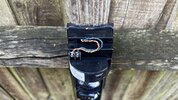
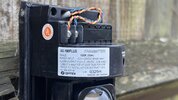
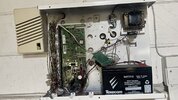
Optex driveway beam connect to Texecom panel

Joined
26 Oct 2023
Messages
35
Reaction score
1
Country
United Kingdom
I have a couple of these driveway sensors that work fine and I’ve just had to cut all the wiring out to replace the old unbranded panel

The model is this one:

AX-100PLUS

I would like to have the driveway sensors make a noise on the speaker next to the alarm panel like before I cut it all out

I was unable to trace the wiring without cutting it out unfortunately

There is a third party relay on a PCB which I have still got and I think it was wired to the driveway beams to convert the n/o to a n/c for the alarm panel to monitor

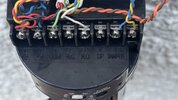
I have attached some photos for reference
 

Attachments

  • IMG_4679.jpeg
    IMG_4679.jpeg
    212.8 KB · Views: 57
  • IMG_4686.jpeg
    IMG_4686.jpeg
    246.6 KB · Views: 62
  • IMG_4685.jpeg
    IMG_4685.jpeg
    211.6 KB · Views: 50
  • IMG_4660.jpeg
    IMG_4660.jpeg
    281.8 KB · Views: 56
Just wire them as normal and add chime to the zone attributes…..can’t see why they used a relay and set them as normally open …unless they used it with a buzzer or third party sounder …
 
Just wire them as normal and add chime to the zone attributes…..can’t see why they used a relay and set them as normally open …unless they used it with a buzzer or third party sounder …
On the Premier Elite 24 I can program the zone as Normally Open as the terminals on the Optex Receiver with the main wiring that feeds the Transmitter are NO and COM. There is a deep sounding buzzer that was triggered when the beam was activated so this could be the reason for the relay. I will aim to get the Chime option working on the Panel speaker which I believe is in the kitchen on the other side of the panel which makes sense as it does not give away the location of the panel when in alarm mode. I can then look into how to trigger the loud buzzer afterwards. I am revisiting today to fit the new panel so I will know more about the set up and can update this post after
 

If you need to find a tradesperson to get your job done, please try our local search below, or if you are doing it yourself you can find suppliers local to you.

Select the supplier or trade you require, enter your location to begin your search.


Are you a trade or supplier? You can create your listing free at DIYnot Local

 
Back
Top