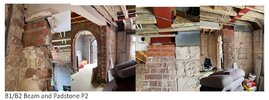
Hello. I've attached an image of a set of RSJs that were installed at our home. Building Control passed this as compliant. Can anyone comment on what they see with this? They don't appear to be dry packed and yes those are bathroom tiles under the bottom RSJ.

You are using an out of date browser. It may not display this or other websites correctly.
You should upgrade or use an alternative browser.
You should upgrade or use an alternative browser.
RSJ Advice and Building Control Compliance
- Thread starter BlackTrac
- Start date
- Joined
- 7 Sep 2022
- Messages
- 4,931
- Reaction score
- 1,437
- Country

You don't have to take a photo of a screen; you can just sign into DIYnot on the device with the screen, and try one of:
* drag drop the picture into the edit box,
* open the pic and press copy/paste into the edit box, or
* hit the "sun with mountains" button above and pick the file for upload or drop it into the area that appears
* drag drop the picture into the edit box,
* open the pic and press copy/paste into the edit box, or
* hit the "sun with mountains" button above and pick the file for upload or drop it into the area that appears
Hello. Unfortunately I cannot do that at this time. The structural report these images are attached to do not allow me to copy them out or crop them. This was the quickest way I could post with the images. I will try to find better images. Thanks.
- Joined
- 7 Sep 2022
- Messages
- 4,931
- Reaction score
- 1,437
- Country
I see. Problem is, it seems to have reduced the image quality to the point where it's not clear what the problem is
If you use windows, Click the start button, type SNIP, open snipping tool, click new, the screen goes faded, drag out a region around the picture to screenshot that region, snipping tool automatically copied it for you, come to DIYnot, press Ctrl-V to paste
If you use mac, press shift command 4, drag out a region to screenshot that encompasses the image, copy it, come to DIYnot, paste
If you want/can, you can zoom in on the images first before you screenshot. This may improve the quality if the report is being drawn at some "less than 100%" scale or if the image has a higher resolution when embedded but has been squished down to fit the page. If it goes blurry and worse when zoomed there isn't any point screenshotting the blurred version
If you use windows, Click the start button, type SNIP, open snipping tool, click new, the screen goes faded, drag out a region around the picture to screenshot that region, snipping tool automatically copied it for you, come to DIYnot, press Ctrl-V to paste
If you use mac, press shift command 4, drag out a region to screenshot that encompasses the image, copy it, come to DIYnot, paste
If you want/can, you can zoom in on the images first before you screenshot. This may improve the quality if the report is being drawn at some "less than 100%" scale or if the image has a higher resolution when embedded but has been squished down to fit the page. If it goes blurry and worse when zoomed there isn't any point screenshotting the blurred version

Then it is wrong and not to your required standard.
Building regulations are a minimum, and a very basic level of performance. Basically their concern is that it wont fall down immediately nor fall down with 30 minutes of a fire, that's it. Whether you hear creaking every night or are filling in cracks every year wont both the inspector once he signs it off.
Building regulations are a minimum, and a very basic level of performance. Basically their concern is that it wont fall down immediately nor fall down with 30 minutes of a fire, that's it. Whether you hear creaking every night or are filling in cracks every year wont both the inspector once he signs it off.
Don't get too hung up on what building control sign off. Typically, their liability is very limited and negligence is very hard to prove. There are some changes coming up for them, but that is mainly around fire safety.What about signing off breeze blocks in place of pad stones? Would Building Control sign that off?
Building control are not working for you, and you can not rely on them to look after your interests. Your contract is with your builder and your performance standards are the engineers design and the building plans and specification
The story is that we purchased this home in 2019 as a completed ''ready-to-move-in' residence. Conveyance report including Building Control Compliance, RICS Home Inspection, Electrical certificates, etc all done and checked out. Previous owner completed several extensions which the Council signed off as compliant during their ownership of the property in 2015. Fast forward to 2021, every part of the extension fell apart and crumbled. The property had no surface drains (drain pipe ran from roof into the ground and went nowhere), RSJs that were spec'd from the structural engineer were replaced with smaller, thinner ones and stacked as you see them above in various parts of the extensions. The pictured ones are the worst where broken bathroom tiles were used to level the RSJs. Pad stones were replaced with breeze blocks and the home was completed with no insulation in the roof, no DPM, no MOT Type 1 (just sand), and a roof held up with pallett timber (the type you see at warehouses). Building Control signed this off as compliant in 2015. Our builders repaired all the issues to correct spec but now Building Control refuses to pass our work because it'll suggest they did their jobs wrong. So the Design engineers and original structural engineers did their jobs, but the owner (also a backyard builder) did the work himself and Building Control passed it all off is the situation. We can't understand how a house can pass so many regulations and end up the way you see in the pictures.
Without delving into the technicalities of construction, your issues of liability will revolve around who owed you a duty (who was working for you) and whether that attracts liability.
With your purchase checks, you had the opportunity to employ a surveyor or suchlike to assess the property, and also employ legal advisors to do the paperwork checks. So the first question is whether that was done properly and without any negligence on their parts.
If all was well and certificates in place alluding to the work being done to standard, then it's difficult for you to apportion blame for work which was in fact poor, because you may not be owed a duty of care by those employed by the previous owner. So its whether you can blame the previous owner or not.
There is legal precedent to absolve local authority building control inspectors from liability, so negligence can be very hard to prove. If a private inspector was used, there may be more scope.
However if you have since employed builders to correct work, then if their work is compliant with current standards, then it must be signed off and approved. There is no disputing that. If the inspector wont sign it off then he must give reasons, and advice on what needs to be done to enable the work to be approved and certified. And if that means that all of the other work needs altering then that needs to either be negotiated (with the inspectors manager or suchlike) or be done.
You probably need some specialist legal advice to see if you have a chance of recovering your costs from someone.
With your purchase checks, you had the opportunity to employ a surveyor or suchlike to assess the property, and also employ legal advisors to do the paperwork checks. So the first question is whether that was done properly and without any negligence on their parts.
If all was well and certificates in place alluding to the work being done to standard, then it's difficult for you to apportion blame for work which was in fact poor, because you may not be owed a duty of care by those employed by the previous owner. So its whether you can blame the previous owner or not.
There is legal precedent to absolve local authority building control inspectors from liability, so negligence can be very hard to prove. If a private inspector was used, there may be more scope.
However if you have since employed builders to correct work, then if their work is compliant with current standards, then it must be signed off and approved. There is no disputing that. If the inspector wont sign it off then he must give reasons, and advice on what needs to be done to enable the work to be approved and certified. And if that means that all of the other work needs altering then that needs to either be negotiated (with the inspectors manager or suchlike) or be done.
You probably need some specialist legal advice to see if you have a chance of recovering your costs from someone.
Thank you for the comments, 'Woody'. What you've written is very helpful and certainly puts me in the right frame of mind. All the correct checks were done via conveyancing, and yes Building Control has their tails covered when it comes to negligence as you've said. The onus, if any, appears to fall on the previous owner. We are still at the stage where we are trying to gather sufficient evidence to be able to focus liability on the previous owner. The neighbors have identified him as the owner and the actual builder on site during his ownership and renovation work. Although he hired third-party labourers, he was the actual contractor. With regards to us correcting work through our own builders, this is more complicated. Building Control issued the certificate in 2015/16. When we showed the signing officer from Building Control the defects in the work he signed off, he sent us written remedial works that needed to be conducted in order to make things right. We completed the remedial works as outlined by the same signing officer of Building Control which was all done in 2021. When we asked for a new Building Certificate to reflect the remedial works had been done, they refused and said they are not legally bound to issue another certificate as one has already been issued for the areas of the property in question. As user 'CDBE' has pointed out, if the certificate was valid another would not need to be issued but in this case, the certificate 'validity' is in question since the work that was signed off was deemed 'hazardous, unsafe and presented danger to life' according to our own structural surveyors who ex post facto conducted a new report based on what was discovered. To a home owner, this certificate would be rendered 'invalid' as all, and I mean ALL, the work that Building Control signed off in 2016 was replaced one way or another as of 2021.

DIYnot Local
Staff member
If you need to find a tradesperson to get your job done, please try our local search below, or if you are doing it yourself you can find suppliers local to you.
Select the supplier or trade you require, enter your location to begin your search.
Please select a service and enter a location to continue...
Are you a trade or supplier? You can create your listing free at DIYnot Local


