• Looking for a smarter way to manage your heating this winter? We’ve been testing the new Aqara Radiator Thermostat W600 to see how quiet, accurate and easy it is to use around the home. Click here read our review.

Task scheduler deprecated

Joined
20 Apr 2007
Messages
1,600
Reaction score
138
Location
Cornwall
Country
United Kingdom
I am trying to schedule a task to put a message on the desktop several months ahead. When I click "finish" to add the task to the scheduler I get a message telling me that the task is deprecated. What is this and is there a cure?
 
I am trying to schedule a task to put a message on the desktop several months ahead. When I click "finish" to add the task to the scheduler I get a message telling me that the task is deprecated. What is this and is there a cure?

Windows 8 ?? Means it's not supported (works) anymore, there is no simple workaround.
 
AFAIK, Outlook does not work with W7 or W8

Possibly there is a newer version of MSOffice that does.
 
...display message and send email using Task Scheduler in Windows 8. Windows 8 Task Scheduler only allows you to create tasks which can launch programs, that's it. Display message and send email features are now deprecated in Windows 8...

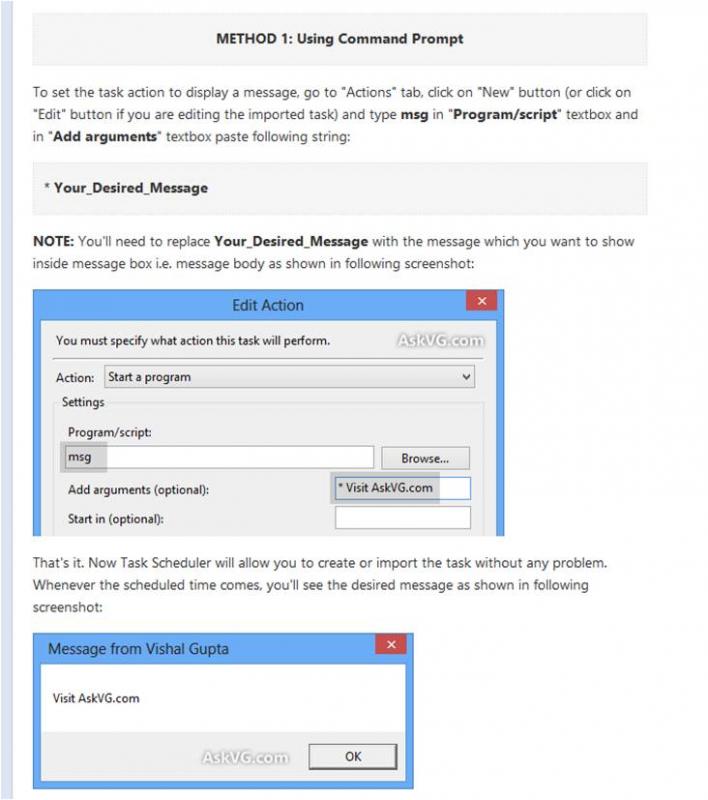
However this works (Win8.1 Pro)- I tested previously using 'msg'. To show a message on start up. - Cannot say for dates and times etc .
Read down page, note :-
'HOW-TO INSTRUCTIONS:' : 'METHOD 1: Using Command Prompt'
http://www.askvg.com/fix-cant-create-tasks-to-display-messages-in-windows-8-task-scheduler/

----------------------------
About 'Outlook'.

http://www.msoutlook.info/question/725

-0-
 
...display message and send email using Task Scheduler in Windows 8. Windows 8 Task Scheduler only allows you to create tasks which can launch programs, that's it. Display message and send email features are now deprecated in Windows 8...

However this works (Win8.1 Pro)- I tested previously using 'msg'. To show a message on start up. - Cannot say for dates and times etc .
Read down page, note :-
'HOW-TO INSTRUCTIONS:' : 'METHOD 1: Using Command Prompt'
http://www.askvg.com/fix-cant-create-tasks-to-display-messages-in-windows-8-task-scheduler/

----------------------------
About 'Outlook'.

http://www.msoutlook.info/question/725

-0-

Exactly "there is no simple workaround."
 
Sorry cannot 'tweet' a two line solution.

A swift glance down the page reveals this complex method :D

Having opened 'Task Scheduler' and clicked on 'Create Task'

-0-
 
Back
Top