• Looking for a smarter way to manage your heating this winter? We’ve been testing the new Aqara Radiator Thermostat W600 to see how quiet, accurate and easy it is to use around the home. Click here read our review.

Texecom Ricochet Impaq SC-W showing active when it shouldn't

Joined
25 Jun 2025
Messages
3
Reaction score
1
Country
United Kingdom
Hello

I have a Texecom Premier Elite system that has had no issues until the last few days. My Impaq SC-W shock sensor/door contact on the back door is showing as Active when it shouldn't. It triggered overnight the other night and showed on the app as being in Tamper mode. It had been sat in its place on the door, no one touched it. I replaced the battery as a starting point and it cleared, and I was able to re-arm the system. The next day during the day the door opening chime went off by itself (door closed and locked) and since then it shows that zone as active whenever I try arm the system. I've tried omitting it via the panel but that doesn't seem to work. I'd be grateful for any thoughts or advice as to how I can fix this, or if I need to replace the sensor, how I do that... I have my own codes and the engineer code.

Thank you
 

Attachments

  • IMG_9412.jpeg
    IMG_9412.jpeg
    216.5 KB · Views: 60
  • IMG_9410.jpeg
    IMG_9410.jpeg
    330.5 KB · Views: 50
  • IMG_9409.jpeg
    IMG_9409.jpeg
    318 KB · Views: 37
  • IMG_9406.jpeg
    IMG_9406.jpeg
    294.4 KB · Views: 44
Go into engineering and give it the omit option …or make it not used on a temporary basis until you can replace it …can’t remember where the Reed switch is on these , check magnet location
 
This been in a while, when was the battery last replaced?

the magnet/reed alignment can be seen on the unit pcb on the older units from memory.

Ricochet diagnostics in Engineer Utilities should show what is Active (note the shock part doesn't show apparently and never has). You may find Ricochet monitor easier to see what's going on with the active part of the unit.

Dip switches affect what parts are working on the unit, but these shouldn't of changed,
 
Thanks for the replies guys, I do appreciate it!!

I changed the battery the other day when the fault first appeared and it seemed to fix it, but then it came back pretty quickly. There was no System Alert on the panel to change it, I was in bed (early hours) and I heard the chime go. Obviously I was a little concerned but nothing had happened and that sensor (Zone 11 Back Door) was showing as chimed on the panel.

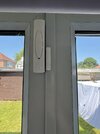
The magnet alignment should be fine, it's not moved (pic attached) and when I try arm the system at all (even for Night Mode) it says Zone 11 Active and won't arm - I'm assuming it thinks the door is open?

I've bought a new sensor and want to replace the old one with the new one, but as I'm not an alarm engineer (and don't have the engineer manual) I'd love some advice as to how to do it? I assume it's a case of deleting the old sensor and learning the new one but if anyone could guide me a little that would be great. I've tried to find a local (south Manchester) alarm company that does Texecom systems but seemingly no one does...

I've watched some YouTube videos about how to go about it and I think I have the basics, I just don't want to mess it up as having been broken into a few years ago I take my security quick seriously. The new sensor is an updated version (pic attached) and I've already put the dip switches where I think they need to be for the shock and door modes.

Any help very gratefully received!!
IMG_9485.jpeg
IMG_9486.jpeg
 
It’s straight forward, delete the old one off.

Set the dip switches

Learn new one on

Set the sensitivity if using the shock.

You can test the device to see if and when it goes active.

Note on ricochet diagnostics the shock sensor activity does not show, but it does in ricochet monitor.

The contact going active or secure shows on both.
 
Note the back boxes are different, due to the new plastic to protect the pcb from engineers, the back plastic shoulder has been removed from the the back plate
 
Have you tried taking off the magnet and holding it in the correct postion as it’s slightly too high , look at picture arrow versus indent in magnet case
 
I had to put a deep base on the magnet on the one I did last week. But they don’t come with the sc-w
 
Thanks very much everyone for your assistance, I've managed to resolve the issue by repositioning the magnet as suggested...

I'm now getting System Tamper alerts on the Inside Bell which are pretty annoying.. I do have another side issue that I've been managing that I'd like resolving. Secureiam as you're local to me is it ok if I give you a call to get you booked in to come over and see if you can sort the issues?

Cheers
 

If you need to find a tradesperson to get your job done, please try our local search below, or if you are doing it yourself you can find suppliers local to you.

Select the supplier or trade you require, enter your location to begin your search.


Are you a trade or supplier? You can create your listing free at DIYnot Local

 
Back
Top