I am installing a dimming switch in my living room, but the existing switch (installed in 2005 when the house was built) and wiring isn't as I expected, seems a bit of freestyling has gone on, but I'm sure that's just my inexperience.
The room has two ceiling lights controlled by a single switch. The switch controls nothing else.
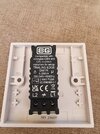
I have a two-way dimmer switch, and was expecting to simply move two wires from L1 and central terminal on the exiting switch to the corresponding terminals on the new switch.
The existing switch is BS3676 with three terminals labelled L1, L2 and L3. No terminal labelled "central".
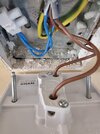
There are brown wires going into L1 and L3. Nothing in L2, which is actually totally empty, so couldn't attach anything anyway.
Two blue wires don't touch the switch, they go into a plastic "joiner" presumably to form a circuit. The earth wire is fixed to the metal back plate.
All shown in photo.
Any advice on how to proceed will be very gratefully received.
The room has two ceiling lights controlled by a single switch. The switch controls nothing else.
I have a two-way dimmer switch, and was expecting to simply move two wires from L1 and central terminal on the exiting switch to the corresponding terminals on the new switch.
The existing switch is BS3676 with three terminals labelled L1, L2 and L3. No terminal labelled "central".
There are brown wires going into L1 and L3. Nothing in L2, which is actually totally empty, so couldn't attach anything anyway.
Two blue wires don't touch the switch, they go into a plastic "joiner" presumably to form a circuit. The earth wire is fixed to the metal back plate.
All shown in photo.
Any advice on how to proceed will be very gratefully received.