• Looking for a smarter way to manage your heating this winter? We’ve been testing the new Aqara Radiator Thermostat W600 to see how quiet, accurate and easy it is to use around the home. Click here read our review.

Fitting 2x BDR91s - Wiring Advice

Joined
25 Nov 2015
Messages
23
Reaction score
3
Country
United Kingdom
Can anyone confirm the correct wiring needed to fit 2x BDR91 receivers?

I have a Y plan system with a Gloworm 12HXI boiler, a Grasslin Towerchron QE2 programmer in the kitchen and a thermostat in the hall.

From what I can gather, 1 is HW off, 3 is HW on and 4 is CH On on the current programmer.


291chef.jpg
 
First of all, your understanding of the existing wiring connections is correct.

I assume that there are two Honeywell receivers, because you will be using one for hot water and one for central heating. Make sure they will be set to operate on different frequencies so that they don't interfere with each other.

Because new wireless thermostats are being used, the system will need major rewiring as the existing room thermostat and cylinder thermostat will need decommissioning and removing. It is not possible to give advice on this as their connections are not shown [this will often be at a wiring centre located near the hot water cylinder]

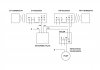
First the easy part. Both BDR91 receivers will need a mains supply to their respective L & N terminals, then the second 'L' terminal provided, should be linked to the 'A' terminal to provide a live supply that can be switched.

Second, at the receiver to be used for the central heating, the 'B' (or on) terminal of the receiver should be used to switch the heating on. [If you have a three port motorised valve it is usually connected to the white wire]

Third, at the receiver to be used for the hot water, the 'B' (or on) terminal of the receiver should be used to switch the hot water on [usually connected to the boilers switched live terminal] and the 'C' (or off) terminal of the receiver used to switch it off [If you have a three port motorised valve it is usually the grey wire]

 
I've made a sketch for you, it should look something like this, but please check that it corresponds to what you actually have. Live / Neutral / Earth wires are omitted for clarity.

You don't describe the wireless thermostats, but they will need to have time control functions as well as temperature control.

I don't know the reason why you are going for this major change to your programmer / thermostats, and going for wireless, especially on the hot water side. Wireless is normally used for convenience to prevent having to run cables, but in your case, the cables are already there. It is quite likely that there alternative upgrade routes that will give you what you want and be easier to install.

Drawing1 Model (1).jpg
 
Last edited:
Hi stem, thanks for all of your help (I was half expecting to be shot down).

I'm switching to an Evohome controller with the hot water kit.
 
Hi stem, thanks for all of your help (I was half expecting to be shot down).

I'm switching to an Evohome controller with the hot water kit.
I wasn't shooting you down, just asking. Now you have explained, everything makes sense.
 
Hi stem, thanks for all of your help (I was half expecting to be shot down).

I'm switching to an Evohome controller with the hot water kit.
I wasn't shooting you down, just asking. Now you have explained, everything makes sense.


No no, I meant, prior to posting, I was expecting to be shot down.

Your posts have been incredibly helpful. :)
 
Ah yes I see. Of course! Perhaps I need to lie down in a darkened room for a while, I seem to be a bit slow today. :whistle: Good luck with your project.
 
Ah yes I see. Of course! Perhaps I need to lie down in a darkened room for a while, I seem to be a bit slow today. :whistle: Good luck with your project.

All up and running and working perfectly. Thanks again for the quick info!
 

If you need to find a tradesperson to get your job done, please try our local search below, or if you are doing it yourself you can find suppliers local to you.

Select the supplier or trade you require, enter your location to begin your search.


Are you a trade or supplier? You can create your listing free at DIYnot Local

 
Back
Top