
Is this wiring suitable for smart thermostat?

Joined
26 Jul 2018
Messages
171
Reaction score
6
Country
United Kingdom
Hi there,
I have recently bought a new build.
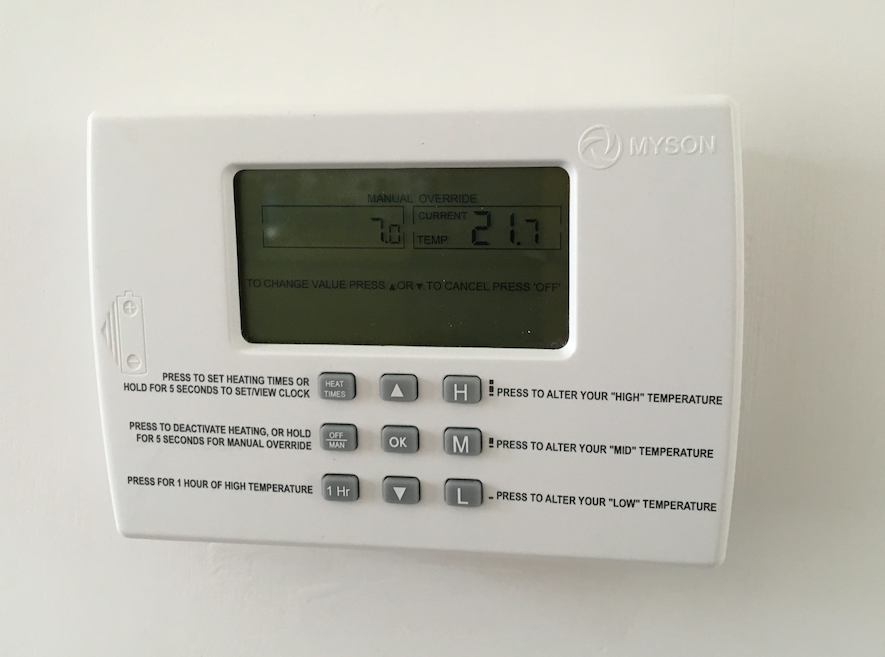
It comes with two of these Myson Thermostats built into the wall:
Screen_Shot_2018-08-24_at_15.08.30.png

They go back to my combi boiler and control heating only. There is one in the hall way and one in the upstairs bedroom.

I am trying to work out if the wiring in place has the capability to run a Nest or Hive Thermostat, but the comparability checkers on their websites are asking me to enter in which cables my current thermostat has. To be honest, it looks like the most basic set up I have ever seen.
The thermostats seem to draw no power, but work off of batteries, and simply complete the circuit when the a condition/set temp is met.

Screen_Shot_2018-08-24_at_15.08.15.png


Screen_Shot_2018-08-24_at_15.08.24.png


I have taken the cover off and this is what is in the back box...
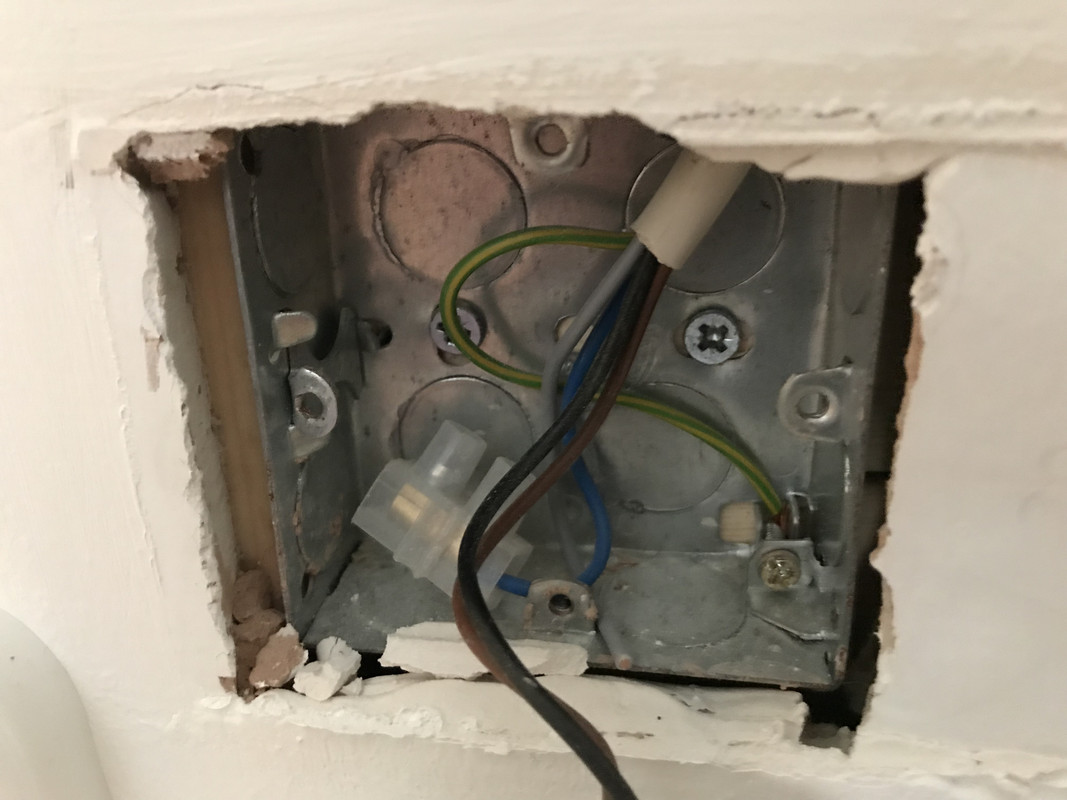
Photo-27-10-2018-11-45-50-Copy.jpg


Has anyone ever worked with anything like this before or know if it is possible to switch these to Nest/Hive?
 
Last edited:
Is there any real reason to fit a smart stat! !!!!
Yeah, these thermostats are a pain in the arse. Tried to set it up the other day, all I wanted was to switch the heating on manually. I had to go through each hour of every 24 hour day and chose between four options, off, low, med, high for every seven days. It took so long and after this, I was still unable to manually switch it on. All I could do was put it on high for one hour.

I am used to Honeywell ones which are a little better laid out and allow you to copy settings from one day to the next when setting it up. They also allow for constant (manual), something this one doesn't seem to do. Still can't believe you have to sit and programme each individual day. Such a headache.

Also, work away quite a bit, so would be handy to manually switch on as and when I need, regardless of if I am there or not.
 
complete the circuit when the a condition/set temp is met.
That's what the vast majority of thermostats do - an on/off switch.

The wiring is not suitable for Nest or Hive, as those require mains power in addition to the switch contacts.
However such things would not be installed there anyway - they consist of a wired receiver unit which is typically installed next to the boiler or wiring centre, and a wireless thermostat which is located wherever you want it.

If you just want to switch the heating on and off manually, there is no point in having any smart or programmable thermostat.
 
It is likely the thermostat controls a motorised valve, and the valve controls the boiler, with complex systems like Nest it often works other way around, the valve in this case a thermostatic radiator valve (TRV) controls the thermostat will a follow command and with the likes of EvoHome the so called thermostat is really a hub, collecting information and using it to tell the boiler output required.

So the question is what do you want a smart thermostat to do. Some people simply want to turn heating on/off with phone, others want to control every room indepently and reduce the loses through the flue, so need to connect to boiler bus, not simply switch on/off.

In the main we want some connection between at least some TRV's and thermostat Hive will not connect to any other device in the system, Nest can connect to TRV's but limited at the moment, EvoHome has full integration.

Also Hive has not got Opentherm both Nest and EvoHome has.

Myson fan assisted radiators don't have TRV they alter fan speeds instead, there is a building management system that works with them, but the price is some what off putting.

So I for one have a half hearted system, it does not really allow full control, but more than a basic system.

The basic problem is with water only control a TRV can control the boiler between around 7kW and 24kW in my case, but below 7kW it needs to switch on/off, and the TRV can tell boiler when to turn off, but not when to turn on again. You need some other unit to tell the boiler when to turn on again, and in the main that is a wall thermostat.

However if you only need the thermostat when output is below 7kW then first place to start is often the TRV as they work all year around.

So controlling a TRV with phone may be all you need, or you may want a lot more, so step one write down what you want, often writing it down helps you work it out yourself.

With TRV heads which can turn on/off at set time of day, the motorised valves become redundant, so I have gradually renewed TRV heads, in hind sight, should have used EvoHome, but That's hind sight.
 
It looks like they put in 5 core cable but have only used the two. From memory I think this should be OK as you can use 2 cores for the supply and 2 for the switching.
But I too would be thinking "why one of those crap devices" ! Hive/nest are basically a gateway into your lives - Google didn't pay the amount of money they did to buy Nest because they thought the (so called) smart stat was a neat idea, it's because they saw an opportunity to further own you. You are also, to some extent or other (varies by device and mode), dependent on the supplier not killing off the survice the device needs to function - ask what Revolv users thought about that when Google bought the company and promptly killed the product, turning the Revolv products into paperweights.

If you want something that's fairly easy to set then I'm quite impressed with the Salus products - I've got an RT500 (now superceded by the RT510). Does 5+2 or 7 day, and you set 5 setpoints/day. Each setpoint is simply a time and new temperature, so you can have the heating at different levels for different parts of the day.
Manual override is a complete doddle - just press the up or down arrow to change the setpoint, and that remains in effect until you either change it again or the next scheduled setpoint change comes round.
 

If you need to find a tradesperson to get your job done, please try our local search below, or if you are doing it yourself you can find suppliers local to you.

Select the supplier or trade you require, enter your location to begin your search.


Are you a trade or supplier? You can create your listing free at DIYnot Local

 
Back
Top