There are two steps.
1. Replace the EP3002 with the Nest Heatlink.
There will be a wiring diagram on the back of the EP3002 that looks something like this.
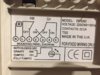
This will allow you to identify what each of the wires does. 'N' and 'L' are straightforward and go to 'N' and 'L' at the Heatlink, the other three red wires can be identified as:
3, Hot water 'on'..... This goes to the Nest Heatlink 6 'Hot water call for heat'
4, Central Heating 'on'..... This goes to the Nest Heatlink 3 'Heating call for heat'
5, Central heating live supply linked to 'L'..... This link is removed and discarded.
Insert a link between the Heatlink 'L' terminal and the common terminals '2' and '5' As there won't be enough room in the Heatlink 'L' for all of the existing and new live wires, normally I add a separate new 'L' terminal and tuck it in the metal backbox and run just a single 'L' wire to connect it to the Heatlinks 'L' terminal.
The earth wires will need to remain connected together. Again, as there won't be enough room in the Heatlink for them all, normally I add a separate new earth terminal and tuck it in the metal backbox with just a single wire to connect that to the Heatlink earth terminal. Make sure that there is also an earth wire to the metal backbox.
2. Decomission the existing room thermostat
You will need to decommission any existing room thermostat [ignore this bit if you don't presently have a room thermostat] The old room thermostat can't simply be disconnected as this would leave the heating wiring 'open circuit' and it would not operate, therefore, the integrity of the circuit needs to be maintained.
1. Look at the wiring diagram for your make/mode of thermostat that you are removing. If you don't have the instructions for it or find them online, a diagram is usually printed inside the lid. This will show which are the two switching wires, and which is the neutral wire, if there is a neutral present. (Not all thermostats need, or have one)
2. Trace the thermostat cable from the thermostat back to its origin.
3. Take take a photo, or make a note of where the two switching wires are connected at their origin.
4. Disconnect all of the wires going to the old thermostat and remove the cable and thermostat. All other wires to remain in place.
5. Insert a wire link between the terminals where the two switching wires have just been removed from, so that they are now electrically joined together.
If you need any more help with this bit, post details of the existing room thermostat and its wiring connections.



