
You are using an out of date browser. It may not display this or other websites correctly.
You should upgrade or use an alternative browser.
You should upgrade or use an alternative browser.
Pyronix Castle Euro46 v10 - Clean start, lan card, cloud link
- Thread starter GoodDIYjob
- Start date

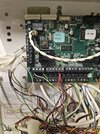

Does it back onto another pir ? You would have to take out one of the + reds at the panel to see which one it is on ….or read what’s on the labels
Yes. Ok. I will do one of those!! And revert. Tks

Thanks. Yes I remember those. I'll check them out. But the pir must be getting power!! I'll take the pir off wall as well!!Looks like theres a stripped blue and yellow pair in your pic which isnt twisted up with the rest of the spares....
Is there a spare cable in the panel with only the power connected leaving the other wires unconnecte
Looks like theres a stripped blue and yellow pair in your pic which isnt twisted up with the rest of the spares....
OK investiaged. They are labelled as the cable that does the study. I twisted yellow and blue together in the panel (not connected to anything). At the PIR in question (Bosch Tritech - photo attached). Blue and yellow is used but a multimeter on ohms showed nothing between them so it can't be that blue and yellow.
Thanks. Yes I remember those. I'll check them out. But the pir must be getting power!! I'll take the pir off wall as well!!
Yes, it is close to the position of the kitchen sensor that backs onto the same wall. Looking in the control panel wiring, the wire that goes to zone 1 is labelled Kitchen + Hall so to me that suggests it is highly likely looped through from the adjacent PIR in kitchen. Does that explain how the kitchen one would be working but this is not? The yellow wire looks a little loose in the photo but I have tugged it and it is still in the terminal to some extent......Does it back onto another pir ? You would have to take out one of the + reds at the panel to see which one it is on ….or read what’s on the labels
Attachments
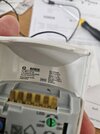
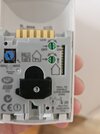
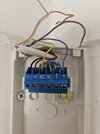
Ok if it’s linked via the kitchen there should be TWO cables in the kitchen detector , make sure ( if there is ) that the blue and yellow are connected through….post picture of kitchen wiring as you have on the hallway ..
Ok. a few more photos for you of kitchen sensor, (other one was hallway in previous post) and I've found out a bit more info but I can only draw one conclusion. Which, is based on what I've tested and what I've proven. I'll leave it to the end to not sway any alternatives....Ok if it’s linked via the kitchen there should be TWO cables in the kitchen detector , make sure ( if there is ) that the blue and yellow are connected through….post picture of kitchen wiring as you have on the hallway ..
Attached is a page of hand written notes, stored under the battery with service records. One page relates to discussion of the two downstairs pirs in question. The hall and the kitchen. So it appears that the cable ran down to the ground floor, to a 8 way jcn box. Then cables runs over to the hall and kitchen at ground level (but is not visible currently). They are nearby to one another (kitchen and hall pir) but following the cable run from the position in the loft, the hall would be first, then the kitchen, so if there was a cable join anywhere at the sensor it would likely be hall. But there is no joins visible on either sensor..... Just a single 8c alarm cable coming out of the wall to both....
Also added photos of kitchen sensor and cable. Still 8 core. 4 used. Green and white for zone and tamper and red black 12v. Green and white is what is connected to zone 1 in alarm panel called kitchen in set up parameters.
This kitchen sensor works.
The hall only shows the blue activation light, does not alarm. Corresponding to this, is that the alarm panel is missing any connections to input 2 and input 2 is turned to "0" off in paramters.
Twisting the loose stripped blue and yellow in the alarm panel - did not prove any continuity to either sensor wire. Repeated from before.
Twisting the remaining brown/orange and yellow/blue together in the panel, on the 8 core alarm wire that feeds the kitchen sensor, also proves no continuity to either sensor wiring.....
Disconnecting the 12v for the kitchen sensor also disconnects power to the hall PIR. So the power is linked somewhere.
So, my working assumption is this 8 way connections box has no continuity for blue, yellow or brown and orange at all. And presumably it has been relocated or buried in a wall and plastered over. And it probably has the shared 12v cable double up in it as well. You can see where the 8core runs in the loft, but it disappears into the loft conversion floor and you can't trace it further without lifting flooring.
Open to help but where I got to is I have two options.
i) link the hall zone and tamper wiring to the kitchen sensor. It is close but would result in a small run of visible wiring on one side of the wall. Also not entirely sure how I am supposed to do this with these resistors. and wiring. Clearly it would be better to have stand alone inputs?
ii) run a new complete alarm cable to the hall sensor. Again this is affected by the loft conversion, but I could get nearby and hopefully pull it through the ceiling coving...
It's peculiar in that this was all professionally installed and they have paid for alterations when building work has been done, yet this hall way sensor is not even active and the alarm had a mtce contract on it until we moved in!!! Serviced annually! Sort of like something was done to temporarily solve something but it was supposed to be fixed but has been left in situ......
Attachments
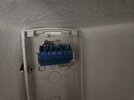

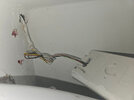
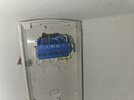
Time is money if you can get a cable to the alarm box or the keypad ( this has 2 zones) then that’s ok , second. option look for a cheap we32 wireless expander on eBay and detector …this also give the option to add further devices ( 32 )
Yes. Agree, thanks for the advice. I'm diy so my rate is not that high but there is always something else next on the list to get done. Thanks ATime is money if you can get a cable to the alarm box or the keypad ( this has 2 zones) then that’s ok , second. option look for a cheap we32 wireless expander on eBay and detector …this also give the option to add further devices ( 32 )
I don't think i checked for that. I'll give it a go today. Failing that, im goimg to run a new cable i think. Thanks.Have u tried joining the blue to the yellow on the kitchen wire, then check for continuity at the hall.... had a similar situation this afternoon with a hidden joint
Ok. You get a prize. So there is continuity on blue and yellow between 2 sensor locations!! so I could patch between them and treat them as one input? Still, running a new input wire from alarm panel, maybe better. Currently investigating that!Have u tried joining the blue to the yellow on the kitchen wire, then check for continuity at the hall.... had a similar situation this afternoon with a hidden joint
Would the resistors wiring need changing if using 2 sensors on one input. I dont think I have a wire diagram for that. And not mentioned in bosch detector instructions that I could see!! Thank you

DIYnot Local
Staff member
If you need to find a tradesperson to get your job done, please try our local search below, or if you are doing it yourself you can find suppliers local to you.
Select the supplier or trade you require, enter your location to begin your search.
Please select a service and enter a location to continue...
Are you a trade or supplier? You can create your listing free at DIYnot Local
