• Looking for a smarter way to manage your heating this winter? We’ve been testing the new Aqara Radiator Thermostat W600 to see how quiet, accurate and easy it is to use around the home. Click here read our review.

Television displaying strange shapes

Joined
23 Mar 2021
Messages
76
Reaction score
1
Country
United Kingdom
Unnecessary bold text removed
This is a very strange and specific issue , I have been watching shows on Netflix ( on Bush TV); and every now and then the scene look as if it has been filmed through a filter with small triangles on it , like a veil , however the next scene is fine , and then if the scene then goes back to the original camera / camera angle it does the same , if I rewind the scene it does it at exactly the same point , so you would think that there was possibly an issue with the camera , however I have called people watching the same show and they aren't having the same issues . What could explain my TV playing back certain camera angles with this issue to the point that when I rewind it it does if again at the exact same place ?


Thanks in advance
 
Our netflix does weird stuff every now and then.
Resetting the tv to factory settings sometimes helps although its a pita having to sign back into all the services
The other tv has a firestick that needs a reboot once in a while.
Might not work for everyone but it costs nothing to try.
 
I've noticed my Netflix has horrific picture quality if eg episode 2 auto plays after episode 1 is finished. If I stop and restart episode 2 it's fine

Can you get a screenshot of what you're talking about ?
 
Have a look at your TVs settings for sharpness, contrast enhancement, colour enhancement, dynamic contrast, and whether you have the main picture mode set to Dynamic.

It reads like your TV is picking up on the high MPEG compression used on Netflix streaming and on certain shots the TVs algorithms are getting tripped up in the way the (over)processing works.

In most cases, all this additional processing is just adding noise to the picture. Switching off this stuff actually improves the image.
 
Aspect circuitry not complying, is the most probable culprit. Try manually switching around the various aspects and see if that settles it down.
 
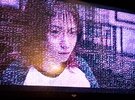
So here is an example , always happens at specific scenes , my phone res isn't so good , the first image is the good one
 

Attachments

  • IMG_20250630_005645.jpg
    IMG_20250630_005645.jpg
    200.6 KB · Views: 56
  • IMG_20250630_005706.jpg
    IMG_20250630_005706.jpg
    426.3 KB · Views: 55
On a PC this would be artifacts showing that your graphoics card is having problems and it usually time for a warranty call or new card if it continues.

On a TV it could just be the temperature, or a badly seated cable, or the TV being on it's way out.
Perhaps just keep an eye on it for happening again.

If it's in a recording though, that suggests that it's actually the received signal as that signal does not get recorded via the display chips.
So again, just bear it in mind if you see it happening again, as it's happenineg can you change channel, see if something else is also making the display look the same? If it does it's your TV, if not then it's the received signal.
 
From the image I'd say the TV isn't properly uncompressing the received data on particular scenes. The way the image is divided up into small blocks that all exhibit the same problem indicates to me that it's compression related (because that's how image compression is often done)

Have you tried updating the TV software/the Netflix app on it (if you have the option?)

Maybe you'll need to raise a complaint with the manufacturer/ Netflix..
 
So here is an example , always happens at specific scenes , my phone res isn't so good , the first image is the good one
Thanks for the pictures. Is it the camera making the faces look so magenta (purple), or is your TV picture really like that? If so, the green LEDs have gone in the backlight.

Given that the TV is by Bush, the overlay issue, nd potentially a backlight problem as well, I'd say it's time to get a new TV.
 

If you need to find a tradesperson to get your job done, please try our local search below, or if you are doing it yourself you can find suppliers local to you.

Select the supplier or trade you require, enter your location to begin your search.


Are you a trade or supplier? You can create your listing free at DIYnot Local

 
Back
Top