• Looking for a smarter way to manage your heating this winter? We’ve been testing the new Aqara Radiator Thermostat W600 to see how quiet, accurate and easy it is to use around the home. Click here read our review.

TV flicker at start up

Joined
17 Apr 2007
Messages
2,665
Reaction score
141
Country
United Kingdom
Technika LCD 32-270

The TV is usually left on standby. When switched to ON, the screen flickers for about a minute then settles to a good picture.

Loose connection effected by circuit warm up perhaps?

Comments on a fix very welcome.
 
Have you tried tapping the set, to see if you can reproduce the issue. Most sets, take a while to fully boot up, might it be still booting up?
 
I've got an Hitachi brand and that has a steady picture at startup.

What I know about the Technika is the flickering started in recent months. I tried switching on from the wall with all accessory cables unplugged but still got the initial flicker.

Noted about the tapping test. Will investigate further.
 
Hunting around, I found this article about capacitors in the very same TV.

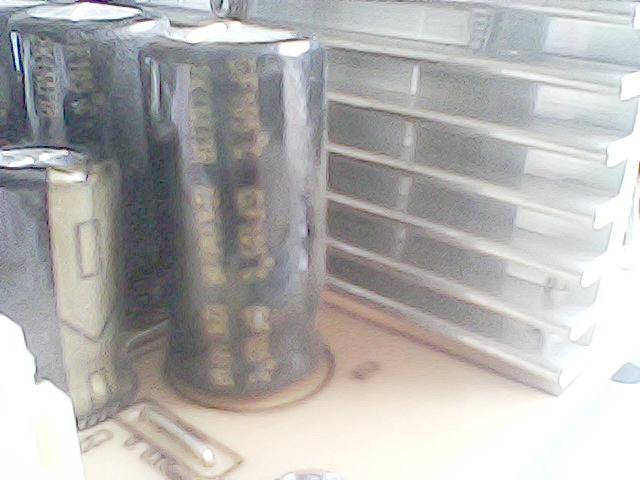
I took the back off and found three capacitors with a slight bulge so perhaps the culprits?


full
 
If a capacitor had failed, then IMO the flicker would not have stopped after a few minutes. Although the flicker must be in some way heat dependent which indicated to me there is a dry joint somewhere that closed up as the set's temperature increases.
 
If a capacitor had failed, then IMO the flicker would not have stopped after a few minutes. Although the flicker must be in some way heat dependent which indicated to me there is a dry joint somewhere that closed up as the set's temperature increases.

Perhaps the capacitor circuit only works when the TV is booting?

I'll get the capacitors replaced. Perhaps one of them have a dry joint.
 
These caps are the same spec stated in the article I quoted above.

Are they suitable replacements?

They are the same type, electrolytic, so that part is fine, as is the style. The other two things to watch for are the voltage, which must be the same or higher, and the capacitance value, which must be exactly the same as the originals.

Note they are polarity sensitive, so must be inserted the correct way round.
 
I've checked and the caps in my TV are the same spec as those in the article. 35v 470uf

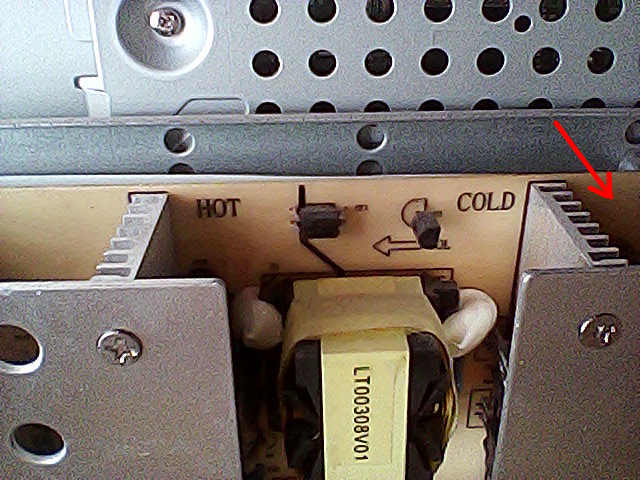
I've also noticed that the PCB the caps are mounted on is marked HOT and COLD, the faulty caps being on the side marked COLD.

full
 
I've checked and the caps in my TV are the same spec as those in the article. 35v 470uf

I've also noticed that the PCB the caps are mounted on is marked HOT and COLD, the faulty caps being on the side marked COLD.

I can't say I have ever seen that before, my best guess is it refers to the mains input side, live - hot, and the low voltage side - cold
 
Searching ebay, I found this listing sold by seller who's worked in the electronics industry. Having sent them a photo of the caps in the PCB, they claim the ebay listing are a premium brand and more reliable compared to the brand already installed.

I asked them about the HOT and COLD marking on the PCB.
I quote their reply,
"
HOT represents all of the high voltage side of the board, and COLD, the 'safe' low tension voltage side of the board. You see in your photo, the small 4 legged Optoisolator bridging between the high voltage and low voltage side of the board, this allows the low voltage side of the board to give control signals back to the high voltage side, without electrical connection, its done by light inside the optoisolator.
"
 
Once (if) you fix it something else will probably go wrong, could buy another TV for £20 or even get one for free off Marketplace, bonkers.
 
HOT represents all of the high voltage side of the board, and COLD, the 'safe' low tension voltage side of the board. You see in your photo, the small 4 legged Optoisolator bridging between the high voltage and low voltage side of the board, this allows the low voltage side of the board to give control signals back to the high voltage side, without electrical connection, its done by light inside the optoisolator.

Exactly as I suggested then.
 

If you need to find a tradesperson to get your job done, please try our local search below, or if you are doing it yourself you can find suppliers local to you.

Select the supplier or trade you require, enter your location to begin your search.


Are you a trade or supplier? You can create your listing free at DIYnot Local

 
Back
Top