Replace analog timer?

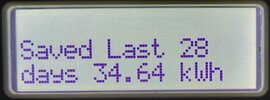
My immersion heater has a thermostat, so when water to temperature it turns off, OK my immersion heater also controlled by an iboost+ which means it only runs when we have excess solar power, and it can use just a 100 watt so run time means nothing, however the iboost+ also tells me how much it has used per day, last 7 days and last 28 days so Last 28 days1.jpg easy for me to work out what it uses. So at your electric price, 31p per day if you use the same as me.
My oil boiler does not modulate, so did not need to measure oil used, it is 20 kW output and by experiment found it needed to run once a day, for ½ hour, well it did not run for ½ hour, after 20 minutes it started to cycle, and would not turn on again before ½ hour had elapsed. So total 6.6 kWh per day, likely more as not taking into account boilers losses. So 25/6.666*1.237 = 4.64p so gas would need to be less than 4.64p to work out cheaper than electric.

I assume your gas meter is actually calibrated in kWh, so this time of year no central heating, so turn to gas only, and run for 24 hour, and see how it compares. I would be interested to see results.

With my house, that wasted energy from oil will heat the house, in winter not a problem want the house heating, in summer, I have to consider how long the AC needs to run to remove that heat.

I would be interested in your results, in how much gas used in 24 hours when only heating DHW.
 
No, the gas meter is just units. I have to apply the factor to get the KWh.
I would expect even I have a thermostat buried in the hotwater tank, so that reading was whilst it was heating the water to whatever temperature it does.
I will try and get readings for the gas when I put it back on for DHW. Experimenting at the moment.
 
Thank you, please give us the results. There has been a debate for some time gas - electric, problem is with gas there is always waste, and no clear answer, using logic there must be as water use increases, a neutral point where both cost the same, low use electric wins, high use gas wins.

But it had been drummed into me for so many years that gas was cheaper, I just accepted it without question.

But when I realised my Nest Gen 3 thermostat was rubbish where installed, and I wanted a system which would continue to work with a power cut, to power Nest from a USB outlet was out, as it would not work with a power cut.

So I moved to Drayton Wiser, but by that time realised cheaper to heat DHW with electric so just got a central heating only hub for the Wiser, it has transformed my heating, main house now three points where if too cold, it can fire the boiler.
 
But it had been drummed into me for so many years that gas was cheaper, I just accepted it without question.
Me too. That is why I have used the gas for years.
I will monitor my immersion heater for, let's say 1 hour per day. That should be enough for my hot water.
I will then put the boiler back on and see what it uses for 24 hours. Of course it uses a little anyway when off, due to the pilot light. I will also monitor that usage.
 
Going on the assumption that I am on the C plan, would you be able to give me the wiring instructions please?
I believe L2 would also need to go to 3?, but electrics has never been my strong point.
 
With that diagram not surprised, step one is work out what you have.
1782829062286.png

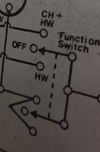
L, N, and Earth OK. I can't find an instruction set for the Unit, so trying to work out what the 'Function Switch' and 'Period Switch'

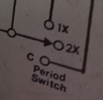
So this switch 1782829738417.png is the once, twice, or constant, and this one 1782829831604.png the water only, off, water and heating.

So L3 must be the boiler as both options work the boiler, and L1 would be the pump, as only powered with CH mode. As to L2 can't see what it is used for.
Thermostat back plate.jpg

None of the above will work unless there are internal switches. I know Hive has a software fix, but Wiser which uses the same backplate does not.

I know Nest will work as I am using Nest Gen 3, but as to simple time clocks, old ones has a switch when used with C Plan.

This is why I talked about if you really need domestic hot water on its own. If not, then that makes life easy.
 
I think L2 - L3 is HW only? L1 - L3 is CH & HW.

I do need DHW on it's own for summer.
The programmer failed again today, did not move. Now it is moving again. :unsure:

I have those figures you asked for.
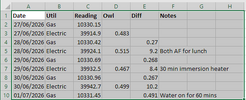
On the 29th I put the immersion on for 30 mins. Sufficient for a bath. Electric units were 8.4
Today I put the boiler on for 1 hour. Again sufficient for a bath. Gas units were not even 1 unit, but under half a unit. Not adjusted for KWh

So from that, it would appear my boiler is cheapest?, as my gas is £0.0559 per KWh, but going up to £0.07066 tomorrow. .
Electric per KWh is £0.23715 and £.25076 tomorrow.:unsure:

Thank you for your assistance with this.
 

Attachments

  • Water Values.png
    Water Values.png
    19.4 KB · Views: 7
I don't have gas, only oil, I noted a drop in cost when I moved house, and no longer used gas, but as to due to control or price of fuel can't really say.

I am sure if heating water for a bath, oil is cheaper to electric, last 6 years, I have had one bath. Not sure today if I had a bath, I could get out again.
 
OK, I decided to ask ChatGPT, and it was very helpful.
However I would like a human to confirm if it is correct as it has been wrong before with me, on something I do know.:)

Attached is our dialogue, well it's response, as my intercation is not kept, but it was pretty succinct anyway.

TIA

Edit: I should say ATM, that I have placed a smart switch on the mains supply. The programmer is set to HW only and constant, and I use the smart switch to control when the boiler fires and for how long.
After going through all of this, I suppose I could just be happy with that? :) as it will do what the current programmer does, as it is only it's timer function which has failed. ChatGPT stated that my programmer only has one live feed and just decides it output via the mechanics?
 

Attachments

Last edited:
That will take a lot of reading. When I came to do my own central heating, I realised there were errors, so it was down to make a plan of what I had.

The timer already shown, had a 230 volt supply, and a triple and earth cable red, yellow, blue, which went down into the flat where the boiler was, but at the boiler end, it was brown, black, grey, so ringing out the cores, only two were intact.

I had already had a problem with battery powered thermostats, and a cold weekend due to flat batteries, so if possible wanted a hard-wired control. So only way to control DHW and CH and power a device with two wires I could think of, was to use Nest Gen 3 to control the central heating.

This required a complete re-wire, so four locations, the boiler, the thermostat (flat) and hub (main house) and a cupboard with the pumps in.
C_Plan_My_HouseB.jpg

So I did a plan of where the wires went, this plan has errors, but gives you an idea of how I worked out how to wire.

I have looked at your picture, but I would confirm what goes where, by testing, and being remote from site, I can't test anything.

1783347361618.png
This I question, I can't see from diagram what L2 is for. So the question is L2 used? If not then seems to be no problem.

1783347547985.png
But as, yet we don't know if using Y plan or S plan, it could be C plan. In #22 I had tried to work out what you have.
Going on the assumption that I am on the C plan, would you be able to give me the wiring instructions please?
I believe L2 would also need to go to 3?, but electrics has never been my strong point.
So lets start with what is connected to that L2, until we know if C, Y, S, or W plan, it is all guess work.
 
Here is the end of the programmer where all the wires are fixed into it.
From the little I know, L2 and L3 when connected give me HW only?
ChatGPT does have a good point, re testing with a muli meter for HW only and then HW&CH and see what each terminal puts out in those positions.
 

Attachments

  • 20260706_164859.jpg
    20260706_164859.jpg
    377.4 KB · Views: 2
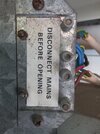
I went looking to see how that sideplate comes off. Not sure about those on the right?
Google AI has advised me that the programmer is actually a Myson integrated boiler programmer and has given me as below for wiring instructions.
The Correct Wiring Conversion Map
To bypass the old internal linking mechanism safely, follow this precise terminal mapping:

Old Myson TerminalFunctionNew Siemens RWB29si Terminal
LPermanent Live InputTerminal L
NMains NeutralTerminal N
E (Earth symbol)Ground / EarthEarth Terminal Earth Block
L1Hot Water SystemTerminal 3 (HW ON)
L3Central Heating SystemTerminal 4 (CH ON)
L2CRITICAL: LEAVE EMPTYDO NOT WIRE (Insulate safely)
Two Golden Rules for This Specific Conversion:
  1. Isolate and Cap the L2 Wire: The wire that currently goes to L2 must be entirely disconnected. Wrap the bare copper tip securely in a standalone electrical connector block (like a Wago connector or a strip connector) and tape it off. It will not be connected to the Siemens backplate. Leaving it loose will cause a dangerous short circuit against the casing.
  2. No Loop Wires: Ensure there are no physical jumper wires added between L and any other terminal on your new Siemens plate. The Siemens unit distributes switching voltages internally. [1]
Crucial Rear DIP Switch Configuration
Because your boiler relies on older internal hydraulics, you must tell the Siemens digital brain how to handle the signals.
Flip the Siemens module over before clipping it onto the wall plate. Locate the small plastic System Type DIP switch on the back: [1]
  • You MUST set this switch to Gravity Mode.
  • Why? In these old configurations, the boiler cannot physically run central heating without running hot water at the same time. Setting the Siemens unit to "Gravity" forces the software to automatically turn on the Hot Water channel whenever you request Central Heating, preventing your boiler from overheating. [1]
 

If you need to find a tradesperson to get your job done, please try our local search below, or if you are doing it yourself you can find suppliers local to you.

Select the supplier or trade you require, enter your location to begin your search.


Are you a trade or supplier? You can create your listing free at DIYnot Local

 
Back
Top