• Looking for a smarter way to manage your heating this winter? We’ve been testing the new Aqara Radiator Thermostat W600 to see how quiet, accurate and easy it is to use around the home. Click here read our review.

Can I Hot swap

I can't find any specifics on the motherboard identifying any options like hotswap but I suspect its very unlikely to allow hotswapping (although I have used modified bios on some HP machines to enable it).

It might be worthwhile looking at a PCIe card to give you usb 3.0 ports if you have a free slot available? given the age I would suspect its PCIe 2.0,
there's even PCIe cards that allow SATA hot swap and built in docks that might be something to consider

EDIT: using a PCIe card with multiple sata ports and then replacing any optical drive with a HDD bay/dock could give you plenty of additional hot swappable storage.
I have finally go round to cleaning out the computer full of dust and the fans sound quieter now and so far so good.
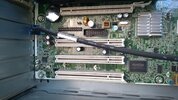
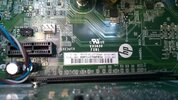
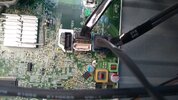
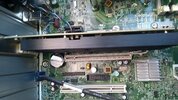
I took some pictures of the sockets.
 

Attachments

  • IMG_20250416_161208771.jpg
    IMG_20250416_161208771.jpg
    362.7 KB · Views: 54
  • IMG_20250416_161217160.jpg
    IMG_20250416_161217160.jpg
    391.6 KB · Views: 53
  • IMG_20250416_161250601.jpg
    IMG_20250416_161250601.jpg
    313.5 KB · Views: 59
  • IMG_20250416_161223612.jpg
    IMG_20250416_161223612.jpg
    334.7 KB · Views: 54
So your board looks to have (Top to bottom):

• 1x PCIe x1 - small black one
• 1x PCIe x16 - Long black one with GPU installed
• 1x PCIe x4 - Long white one
• 3x PCI - white ones (old / slow)

So you should be fine to get a card with pcie x1 slot or upto x4 (its a full length slot but only capable of x4 speed)
 
So your board looks to have (Top to bottom):

• 1x PCIe x1 - small black one
• 1x PCIe x16 - Long black one with GPU installed
• 1x PCIe x4 - Long white one
• 3x PCI - white ones (old / slow)

So you should be fine to get a card with pcie x1 slot or upto x4 (its a full length slot but only capable of x4 speed)
Amazing thank you for your help, I have read it a few times and googled.
So I could put one of these in either the x1 black slot or the x4 slot next to the GPU - over the battery. Is there an advantage one over the other.
 
Yeah those cards should be fine, amazon usually preffered due to easier returns etc... either slot will be fine, no preference on which slot to use except which allows a better fit / air flow etc...
 
Yeah those cards should be fine, amazon usually preffered due to easier returns etc... either slot will be fine, no preference on which slot to use except which allows a better fit / air flow etc...
Fantastic thank you.
 
Just about to buy and found this one that is cheaper and visually it looks the same compared to this one but wondering if it is actually the same or not.
Also My system is windows 7 and reviews say they have problems finding and installing drivers should i keep looking for a card that has no win7 issues or am i going to face the same issue with any card.
thanks for your help
usbure.JPG

usbture.JPG
 
You should probably update your system. I know, I know - I liked windows 7 too, but you're a security breach waiting to happen..
 
You should probably update your system. I know, I know - I liked windows 7 too, but you're a security breach waiting to happen..
Probably the same for millions of PCs
I have norton installed for what its worth
 
Yeah those cards should be fine, amazon usually preffered due to easier returns etc... either slot will be fine, no preference on which slot to use except which allows a better fit / air flow etc...
Thanks for your help. I have now installed the USB 3.0 card with did not auto install (win 7 ) so I had a guess on which driver to use on the supplied disk and it worked although I dont know what happened but at first my screen would no show so I wiggled the connector plug and it came on but with all my shortcuts on the desktop reverted to default lined up on the left. Not sure if my wiggling fixed it or it was coincidence.
To install, everything was unplugged as well as the power. The monitor plug has 2 thumb turns to screw it in place so I can not see if that would of sorted it by wiggling.
Tested with a 4BG file on the old USB 2 and was 3.27mins transfer to a SSD
Then with the new USB 3.0 the same file was 1.14 mins so it looks like its working (y)
 
with all my shortcuts on the desktop reverted to default
At a guess I'd say your installation of the usb card disturbed the graphics card, possibly stopping it working temporarily - there may have been another graphics card built into the motherboard that took over, windows installed a default driver for it at some lower resolution and rearranged all your desktop because your icons wouldn't fit. Getting the old one reconnected restored the visuals but not the arrangement. A newer version of windows (not that I'm pushing you to install one, but you should) would likely have better survived this, putting things back, as it's one of the noticeable improvements in things like multi monitor/occasional display handling
 
At a guess I'd say your installation of the usb card disturbed the graphics card, possibly stopping it working temporarily - there may have been another graphics card built into the motherboard that took over, windows installed a default driver for it at some lower resolution and rearranged all your desktop because your icons wouldn't fit. Getting the old one reconnected restored the visuals but not the arrangement. A newer version of windows (not that I'm pushing you to install one, but you should) would likely have better survived this, putting things back, as it's one of the noticeable improvements in things like multi monitor/occasional display handling
Thanks for that. Yes the PC had onboard graphics and I added a dedicated GPU card when I brought it.
It was a refurbished PC that I specked up with 16GB ram and a samsung 860 SSD for the OS and couple of often used programs and second WD 1TB drive for files. The graphic is a NVIDIA Quadro NVS 290 which I beleive at the time was the best you could get without needing a fan of its own.
Windows starts up in about 30-36 seconds to the ready desktop.
 
Back
Top