• Looking for a smarter way to manage your heating this winter? We’ve been testing the new Aqara Radiator Thermostat W600 to see how quiet, accurate and easy it is to use around the home. Click here read our review.

Excel help?

Joined
8 Jun 2013
Messages
820
Reaction score
134
Location
Gloucestershire
Country
United Kingdom
Anyone here an expert in Excel? I've tried the Excel Help Forum but had no responses. I'm using 2003.

I use Excel to log expenses and do my accounts with Totals data 'linking' from one sheet to another. This is repeated year on year. The trouble is that at each year I have to re 'copy-paste link' each of the totals. I want to simplify this.

Is it possible to have a cell read the file path/name as inputted once into cell A1 for example and then, use this text information to link across to the desired workbook and the specific cell with the total in?

Thanks
 
not quite understanding what you are asking - but if you want an anchor link from anywhere in a workbook to a specific cell then

=Sheet2!$A$1

this formula in any cell anywhere in the book will retrieve the contents of whatever is in cell A1 on Sheet2

if you are wishing to link different workbooks that are password protected then you need to create a VBA script
 
You can, but you mention sheets and workbooks, so we need to know if you are working across 1 workbook or more than 1.
 
Thanks both. Workbooks are not protected, so at least that reduces the problem a bit :)

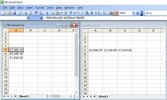
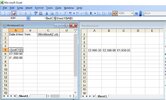
See attached screenshots as examples:
Lets two workbooks; and one sheet in each ie Workbook1.xls sheet1 and Workbook2.xls sheet1
Workbook1 contains 3 cells in column A that are linked across from Workbook2, cells A5, B5 & C5 respectively. The simple link formulae is shown.
What I am trying to do is to input the filename and path of the source document in cell C1 of the workbook1 and for the formulae to automatically use the text of this path/filename within the links. I have typed in the word 'text' but clearly this is not correct.

In these examples I have used just two docs and 3 cells in each. In reality, I have a number of documents with multiple links across.
 

Attachments

  • Current situation with link.JPG
    Current situation with link.JPG
    89.8 KB · Views: 48
  • Proposed situation.JPG
    Proposed situation.JPG
    92.9 KB · Views: 41
Use the Excel INDIRECT formula.

In cell A5 of your Workbook1 example above put:
=INDIRECT("["&$C$1&"]Sheet1$A$5")
Didn't work. Returned a #REF! error.
I've tried running through with the inbuilt Help for functions but still can't make it work.
At least having the 'INDIRECT' function that you offered, I have a start though. Thanks for that. I'll keep persevering ;)
 
Last edited:
I think it might be either lookup function or index, been over 20 years since I used Excel formulas properly.
 
Didn't work. Returned a #REF! error.
I've tried running through with the inbuilt Help for functions but still can't make it work.
At least having the 'INDIRECT' function that you offered, I have a start though. Thanks for that. I'll keep persevering ;)
Use the Excel INDIRECT formula.

In cell A5 of your Workbook1 example above put:
=INDIRECT("["&$C$1&"]Sheet1$A$5")
Got it working. There was an exclamation mark missing.
=INDIRECT("["&$C$1&"]Sheet1!$A$5")

I'm now trying to get it to work with the sheet name as a user-inputted variable as well as the workbook name, but without success.
I can get them to work separately:
=INDIRECT("["&$B$2&"]Source!$A$5") - links to the second workbook and picks up the value of A5 within sheet 'Source' all ok
=INDIRECT("'"&C2&"'"&"!"&"A5") - links to a sheet within the same workbook, picking up the name 'Source' within cell C2 all ok

But when I try and put both into the one formula, it returns #REF!
=INDIRECT("["&$B$2&"]" & "'" &$C$2& "'" & "!" & "$A$5")

I got this from ChatGPT but it seems to be picking up the cell data from the current workbook and sheet rather than from the dynamically specified one in the other workbook:
=INDIRECT("'[" & B2 & "]" & C2 & "'!" & A5)

Any ideas?
Many thanks.
 
Last edited:
Back
Top