
You are using an out of date browser. It may not display this or other websites correctly.
You should upgrade or use an alternative browser.
You should upgrade or use an alternative browser.
Pyronix Alarm - Trigger Alarm Remotely
- Thread starter Nims
- Start date


Set up an output for user defined….then link it to one of the onboard zones set as panic ( you will probably need a small relay )
I have a similar query to this, but am using the Pyronix Wireless Encorcer V11, including a wireless sounder mounted on the wall outside.
I see a wired PGM output, as well as mechanisms for custom user outputs. I have a keyfob configured with a hold-up keypress combo, but I can't figure out a way to get an option in my HomeControl+ app, that would allow me to remotely trigger the sounder.
For now, I have added a custom user output (and an endstation pgm output), just to see if I see either of them show up in the HomeControl+ app, after the next sync, but so far, no joy. I'm unsure how to get anything in that 'automation' part of the app - it just seems to be disabled for me.
I have some wires running between the V11 and the wireless sounder (used only for 12v+ charging), in case anyone has some ideas - but unless I can get it showing in the HomeControl+ app, I'd need to figure out another way to activate it.
Edit: Ah, I just noticed in the instruction manual, that 'User Defined 1-30' (i.e. outputs 0170-0199), are designed for KeyFob activation only, so that looks like a dead end.
Edit2: Looks like my only option might be to use some of that spare wire to my external sounder, to hook up a 12v feed directly to the piezo, and just control it via a remote smart plug. Just not sure I trust the smart plugs enough... imagine it went on without my explicit say so. No auto-off. No notification. No timeouts.... Just lots of annoyed neighbours. That sounds like a bad plan, so would have to build some redudancy into it somehow with a timed burst or something, which means its all getting more complicated. Probably easier at this point, to just hook the smart plug up to a light, TV, music system etc... and make the house noisy that way (home alone style).
I see a wired PGM output, as well as mechanisms for custom user outputs. I have a keyfob configured with a hold-up keypress combo, but I can't figure out a way to get an option in my HomeControl+ app, that would allow me to remotely trigger the sounder.
For now, I have added a custom user output (and an endstation pgm output), just to see if I see either of them show up in the HomeControl+ app, after the next sync, but so far, no joy. I'm unsure how to get anything in that 'automation' part of the app - it just seems to be disabled for me.
I have some wires running between the V11 and the wireless sounder (used only for 12v+ charging), in case anyone has some ideas - but unless I can get it showing in the HomeControl+ app, I'd need to figure out another way to activate it.
Edit: Ah, I just noticed in the instruction manual, that 'User Defined 1-30' (i.e. outputs 0170-0199), are designed for KeyFob activation only, so that looks like a dead end.
Edit2: Looks like my only option might be to use some of that spare wire to my external sounder, to hook up a 12v feed directly to the piezo, and just control it via a remote smart plug. Just not sure I trust the smart plugs enough... imagine it went on without my explicit say so. No auto-off. No notification. No timeouts.... Just lots of annoyed neighbours. That sounds like a bad plan, so would have to build some redudancy into it somehow with a timed burst or something, which means its all getting more complicated. Probably easier at this point, to just hook the smart plug up to a light, TV, music system etc... and make the house noisy that way (home alone style).
Last edited:
It will work on V11 enforcer …..you will need a small relay and have a spare input on the 2 zone input card inside the enforcer ….
Ah, I see what you mean. I think.
There are 2 inputs on my enforcer (Z33/Z34) and one of them is available.
I'm only using a Wired Keybad Input (D1-4), a 12v/Com out to the wireless sounder, and a single wired input for my front-door contact.
All the other PIR and detectors in use are wireless.
I *think* you are suggesting something like the following:

And of course, it would mean configuring Z34 as a panic type input which immediately sounds the alarm.
Of course, this wont get it inside the HomeControl+ app, but then I'm not sure that is possible.
However, it does mean that it benefits from all the other 'controls' around an alarm sound, such as maximum time, notifications, allowing someone to disarm it etc.
That makes sense to me, but obviously means using some outside tech.
Still, if I am understanding your suggestion correctly, I think its entirely doable. I'll just need to buy a 240v relay and wire in as above to a nearby socket.
Can you confirm this is what you mean?
Initially, I had been trying to solve it by seeing the alarm as a potential 'manual output' - which is doable with the key-fob, but I can't see any way to do it remotely via the HomeControl App, unlesss I create a new input trigger (with some other type of smart device).
Please confirm I'm not misunderstanding, and if not, I'll solve it this way. Thanks.
To be clear. When I set up a 'User Defined' output on my Enforcer, I NEVER saw it come into the App. I believe the user defined outputs are for KeyFobs only. I'd love to understand more about how to get items into the Pyronix App 'Automation' tab. Are these just entirely unrelated products I'd need to purchase?
p.s. Ok, I think I have also realised that the 'auotomation' stuff really applies to things you have set up elsewhere in the app ( + -> automation -> 'scenes and automations'), and let you setup devices like the smart plug etc... so have nothing to do with the Enforcer.
There are 2 inputs on my enforcer (Z33/Z34) and one of them is available.
I'm only using a Wired Keybad Input (D1-4), a 12v/Com out to the wireless sounder, and a single wired input for my front-door contact.
All the other PIR and detectors in use are wireless.
I *think* you are suggesting something like the following:
And of course, it would mean configuring Z34 as a panic type input which immediately sounds the alarm.
Of course, this wont get it inside the HomeControl+ app, but then I'm not sure that is possible.
However, it does mean that it benefits from all the other 'controls' around an alarm sound, such as maximum time, notifications, allowing someone to disarm it etc.
That makes sense to me, but obviously means using some outside tech.
Still, if I am understanding your suggestion correctly, I think its entirely doable. I'll just need to buy a 240v relay and wire in as above to a nearby socket.
Can you confirm this is what you mean?
Initially, I had been trying to solve it by seeing the alarm as a potential 'manual output' - which is doable with the key-fob, but I can't see any way to do it remotely via the HomeControl App, unlesss I create a new input trigger (with some other type of smart device).
Please confirm I'm not misunderstanding, and if not, I'll solve it this way. Thanks.
To be clear. When I set up a 'User Defined' output on my Enforcer, I NEVER saw it come into the App. I believe the user defined outputs are for KeyFobs only. I'd love to understand more about how to get items into the Pyronix App 'Automation' tab. Are these just entirely unrelated products I'd need to purchase?
p.s. Ok, I think I have also realised that the 'auotomation' stuff really applies to things you have set up elsewhere in the app ( + -> automation -> 'scenes and automations'), and let you setup devices like the smart plug etc... so have nothing to do with the Enforcer.
Last edited:
No PGM to one side of coil and 12/ 0v to the other can’t remember which one off top of my head …the contact wired to zone and program it to panic , set this up to user defined and momentary, this should bring up a slider in the app you can then slide it to activate a panic alarm …setting off your alarm
Will look at one I did before for someone off here and let you know the options needed
Will look at one I did before for someone off here and let you know the options needed
OK, I'm with you. PGM supplies a voltage, so it would be PGM & 0v to relay, and then I'm good on the other side of the relay (as per my drawing).

My issue with this, is that I shouldn't have to do *ANY* of it, other than some Master Manager setup, to get that slider in the app you refer to.
So let me try and work on that side of things again, and see if I have any luck. Appreciate your nudges in the right direction.
p.s. Update: From the docs: "Hint: Polarity of the PGMs. The polarity of the outputs are normally switched negative, i.e. normal status OFF = 12VDC and in active status ON = 0VDC.". Not ideal, but can work around it.
My issue with this, is that I shouldn't have to do *ANY* of it, other than some Master Manager setup, to get that slider in the app you refer to.
So let me try and work on that side of things again, and see if I have any luck. Appreciate your nudges in the right direction.
p.s. Update: From the docs: "Hint: Polarity of the PGMs. The polarity of the outputs are normally switched negative, i.e. normal status OFF = 12VDC and in active status ON = 0VDC.". Not ideal, but can work around it.
Last edited:
No luck I'm afraid. Tried lots of things:
- PGM set to User Defined (0170).
- Set up some 'User Outputs' entries also, just to play around.
The app is syncing OK. I renamed one of my normal inputs just to verify, but no matter what I try, I can't seem to get that slider.
- PGM set to User Defined (0170).
- Set up some 'User Outputs' entries also, just to play around.
The app is syncing OK. I renamed one of my normal inputs just to verify, but no matter what I try, I can't seem to get that slider.
Will have a look later
Ok it works will update the info later
Go to output ..endstation ouput …PGM op set this to 170 user defined 1….then go to user output 01 ..output type 1 for timed….user output time …set at 02 ….name it panic ….put relay on ( PGM 0v ) 12v + ….in app in automate you should now have slider….as per picture
Attachments
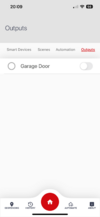
Holy mackrel... It worked.Go to output ..endstation ouput …PGM op set this to 170 user defined 1….then go to user output 01 ..output type 1 for timed….user output time …set at 02 ….name it panic ….put relay on ( PGM 0v ) 12v + ….in app in automate you should now have slider….as per picture
Somhow, changing the output type from 'Latched' to 'Timed', pushed everything through. I now see it in the App, and can work on hooking up a relay once I order one.
 With any luck, I can find a micro one that fits neatly inside the enforcer case.
I'm not sure *why* that part made the difference. I had already set PGM to 170 already, and had a user output called 'test' setup on 01. I just had it set to 'Latched' and it didn't seem to come through.
I have since set it back to 'Latched', and it is now 'sticking'... so I'm unsure what happened there. Toggling it seemed to push it through to the app - unless it happened with some overnight sync and I just hadn't noticed.
Timed is obviously the more appropriate operation anyway for a relay based alarm signal, so, I'll leave it as timed.
Thank you very much, this is super duper.
I'm a total DIYer, so I take my hat off to you for setting these systems up day in, day out. I've thoroughly enjoyed learning the intricacies of it, and feel empowered to support, maintain, and upgrade my own system thanks to your contributions.
Oh - this is my updated drawing then based on your earlier reply:

I'm showing +12V to relay (and then back to PGM)... I hope that is right, but can test it now fairly easily.
I also figured that the Z34 input, via the relay, might also need a resistor on it?
It doesn't need tamper protection, obviously... so maybe not - but thought I'd check if you had a view. I'm not sure you can configure it per input, and I know my Z33 door contact, is set up with an eol resistor as part of the contact.
Either way, I'll figure out the rest now I'm sure. Tyvm.
I'm showing +12V to relay (and then back to PGM)... I hope that is right, but can test it now fairly easily.
I also figured that the Z34 input, via the relay, might also need a resistor on it?
It doesn't need tamper protection, obviously... so maybe not - but thought I'd check if you had a view. I'm not sure you can configure it per input, and I know my Z33 door contact, is set up with an eol resistor as part of the contact.
Either way, I'll figure out the rest now I'm sure. Tyvm.
4.7k across the closed relay and 2.2k from one side of the relay to a wire back to the common and one wire from the other side of the relay to zone 34

DIYnot Local
Staff member
If you need to find a tradesperson to get your job done, please try our local search below, or if you are doing it yourself you can find suppliers local to you.
Select the supplier or trade you require, enter your location to begin your search.
Please select a service and enter a location to continue...
Are you a trade or supplier? You can create your listing free at DIYnot Local
Similar threads
- Replies
- 2
- Views
- 4K
- Replies
- 2
- Views
- 1K
- Replies
- 3
- Views
- 2K
- Replies
- 17
- Views
- 5K
- Replies
- 9
- Views
- 5K
