Hello everyone,
Please be patient, it’ll be long
I moved into an old cottage and decided to change all light fittings.
I had no problem with « easy ones » upstairs which had just L and N. But I got stuck in the kitchen downstairs. It was a flush light fitting with 4 bulbs and when I took it off it looked like all the L, N and E were squeezed together into one connector per L, N, E if I make sense. I forgot to take a picture, big mistake.
Problem 1)
I when I removed all of it and turned electricity back on I saw that both hallway and front room ceiling lights stopped working.
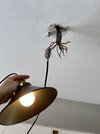
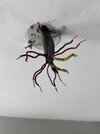
Problem 2) I want to connect this basic single pendant which has L and N (see pic). But what I have on the ceiling is 4 sets of L, N, E (4 sleeves) all tangled together with the E wire being « shared » between sleeves. Do I choose just one set? How do I know which one?
Problem 3) I have this yellow wire with black tape (marked with yellow on the picture) and I have no idea what it could be?
Problem 4) I’ve been connecting my new pendant light randomly to each of the « sets » of wires. It does work with one of the « sets » (I marked it with blue on the picture) but only the pendant turns on, the hallway and the front rooms still don’t work. My pendant has E cable supplied separately so maybe it’s got something to do with it?
Could someone help before I give up please. I really want to do it myself Thanks.
Please be patient, it’ll be long
I moved into an old cottage and decided to change all light fittings.
I had no problem with « easy ones » upstairs which had just L and N. But I got stuck in the kitchen downstairs. It was a flush light fitting with 4 bulbs and when I took it off it looked like all the L, N and E were squeezed together into one connector per L, N, E if I make sense. I forgot to take a picture, big mistake.
Problem 1)
I when I removed all of it and turned electricity back on I saw that both hallway and front room ceiling lights stopped working.
Problem 2) I want to connect this basic single pendant which has L and N (see pic). But what I have on the ceiling is 4 sets of L, N, E (4 sleeves) all tangled together with the E wire being « shared » between sleeves. Do I choose just one set? How do I know which one?
Problem 3) I have this yellow wire with black tape (marked with yellow on the picture) and I have no idea what it could be?
Problem 4) I’ve been connecting my new pendant light randomly to each of the « sets » of wires. It does work with one of the « sets » (I marked it with blue on the picture) but only the pendant turns on, the hallway and the front rooms still don’t work. My pendant has E cable supplied separately so maybe it’s got something to do with it?
Could someone help before I give up please. I really want to do it myself Thanks.