
Texecom premier Elite 64w - Richochet network not found

Joined
29 Jul 2026
Messages
5
Reaction score
0
Country
United Kingdom
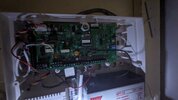
Hi fully working system up until now. I moved my wireless keypad to opposite end of the property and the keypad was still working. I was making some settings adding another device and learning, then the screen froze. So thought it would be a good idea to remove the batteries now I get richochet network not found . I have disconnected the battery so it doesnt run down.

Do i need this cable, here or should I try to see if it works with the keypad near the panel ?
Cheers in advance, and nice to meet you all by the way
 

Attachments

  • PXL_20260729_180041181.jpg
    PXL_20260729_180041181.jpg
    315.3 KB · Views: 3
Not sure what you have done and why you think you need a cable, I see you have a smart com attached?


you have the engineers code and a smart com so you can use wintex and ricochet monitor to look at the keypad, the keypad will be blue if its not powered up and still on the system
 
Thanks , as you may of guessed I am not an installer so got all the gear and no idea !
I have engineer code yes for the keypad.
How do I use wintex and richochet monitor please ?
 
The whole system was setup by an installer a couple of years ago. I did nothing other than pay them to do it. I have the engineer code so I decided to add an entry to another part of the property and add another device, did this and all working fine. Alarm setting, etc.
I logged back in at the keypad using engineer code, the screen froze, hence batteries removed. Now with batteries back in it says learn keypad, either yes or no it tries searching for richochet network, none found
 
Alas, putting batteries back in it is always No to learn keypad as its already learned on.

If you know the engineers code, the chances are you don't know the UDL Passcode.

If your panel is on the original installers account and upgraded to 6.04 or higher then you wont be able to use the smartcom to connect to the panel, you would need a usbcom cable or connect via ip address using the local ip address of the panel.

The problem with that is the comip unit could be sending messages out and that could make a connection potentially difficult until you disable the reporting side.
 

If you need to find a tradesperson to get your job done, please try our local search below, or if you are doing it yourself you can find suppliers local to you.

Select the supplier or trade you require, enter your location to begin your search.


Are you a trade or supplier? You can create your listing free at DIYnot Local

 
Back
Top