WiFi messed up by Openreach, I reckon

Joined
28 Mar 2011
Messages
1,190
Reaction score
75
Location
Conwy
Country
United Kingdom
WiFi coverage question, folks.

We’re with TalkTalk, for our sins, and we had full fibre 900 installed in May 2024. The coverage in and around our semi detached bungalow is excellent, or rather WAS excellent till Openreach turned up the other day and did something to our external box. I didn’t ask the engineer what he was doing but really wish that I had done, because from having excellent coverage both inside and outside the property our external coverage is now almost non existent, and it’s definitely happened since Openreach were here. I went through the laborious process of contacting TT ( because service provider is first port of call with WiFi problems) but all they could do was run diagnostics and tell me it’s a router fault and send a replacement, which has made no difference.

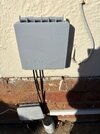
The only clue I have as to what Openreach have done is that there are now two cables entering the exterior box when prior their recent visit there was just one ( see attached pic). You can’t contact Openreach direct so I’ll have to go back to TT and ask them to escalate.

But meantime, does anyone have any clue what Openreach might have done to mess up our coverage?
 

Attachments

  • IMG_3589.jpeg
    IMG_3589.jpeg
    651.7 KB · Views: 8
The problem is that talktalk will have no interest in your garden reach problems because they will usually say its only meant for your house.
For wifi the router will use a 2.4GHz signal which is very good at going through walls - and reaching your garden but it is a slow signal and the router will also use a 5GHz signal which is much faster than the 2.4 but it is rubbish at going through walls.
Your device will have the ability to use either 5GHz or the 2.4GHz depending on what it thinks is the best to use. It could be that during an outage whilst something was done that your device or router has defaulted and sort of got stuck on using the faster but rubbish at going through walls 5GHz.
Turning on and off the router for 30 mins and or turning off and removing the router from your device and re connecting from scratch with the password may get every thing back
 
The problem is that talktalk will have no interest in your garden reach problems because they will usually say its only meant for your house.
For wifi the router will use a 2.4GHz signal which is very good at going through walls - and reaching your garden but it is a slow signal and the router will also use a 5GHz signal which is much faster than the 2.4 but it is rubbish at going through walls.
Your device will have the ability to use either 5GHz or the 2.4GHz depending on what it thinks is the best to use. It could be that during an outage whilst something was done that your device or router has defaulted and sort of got stuck on using the faster but rubbish at going through walls 5GHz.
Turning on and off the router for 30 mins and or turning off and removing the router from your device and re connecting from scratch with the password may get every thing back
Thanks for that. The problem with the loss of outdoor coverage is that its affecting the two cameras that we have on our outside walls. I'll do the "turn off for 30 minutes" thing that you suggest and see whether that works.
 
The only thing I can think of is that your neighbour now has wifi and is possibly on the same channel number. Download a wifi scanner and it will show which channels your neighbours use. Then change your channel accordingly.
 
Have they maybe piggybacked out of your box to a neighnour? Worth asking your other half.
That occurred to me too, but there's no new wiring which visibly enters our adjoining neighbour's property. However, its certainly possible that they've taken that second cable underground to another customer, although I did read somewhere the type of cable used should be able to supply multiple properties without anyone losing coverage.
 
The only thing I can think of is that your neighbour now has wifi and is possibly on the same channel number. Download a wifi scanner and it will show which channels your neighbours use. Then change your channel accordingly.

The only thing I can think of is that your neighbour now has wifi and is possibly on the same channel number. Download a wifi scanner and it will show which channels your neighbours use. Then change your channel accordingly.
As far as I can tell from a visual inspection, they've made no changes to our neighbour's phone/ internet line. If you look at the photo that I posted, the small grey box underneath the larger one belongs to our neighbour and the cable beneath that smaller box goes underground via a different route. I suppose they could have joined them underground. But I'll investigate that "channel changing" option, thanks.
 
The only thing I can think of is that your neighbour now has wifi and is possibly on the same channel number. Download a wifi scanner and it will show which channels your neighbours use. Then change your channel accordingly.
I have a similar problem... Expletive deleted neighbour has a mesh network with a mesh box inside on every external wall. My Wi-Fi is o my useable either close to the Router or in a very few parts of rooms in my home.
luckily I did a lot of cabling to the various 'box's that I wish to be connected to the web. But it still makes laptop and tablet use difficult!
 
I have a similar problem... Expletive deleted neighbour has a mesh network with a mesh box inside on every external wall. My Wi-Fi is o my useable either close to the Router or in a very few parts of rooms in my home.
luckily I did a lot of cabling to the various 'box's that I wish to be connected to the web. But it still makes laptop and tablet use difficult!

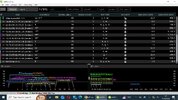
Check what channels he is using. In the UK, on the 2.4ghz you can select channels 1-13. 1, 6 and 9 are considered non-overlapping.

My favourite Windows scanner is Inssider (the free version is available from MetaGeek)


wifi.jpg

Edit- and if none of your products use the old B standard- disable that in the router settings.
 
Last edited:
Thanks for that. The problem with the loss of outdoor coverage is that its affecting the two cameras that we have on our outside walls. I'll do the "turn off for 30 minutes" thing that you suggest and see whether that works.
If no other remedy works then after they have sent a new router you could get them to send a booster which may work for you. But dont say outside because then may put their foot down and say your contract is only for inside.
 
I have a extra hub for better coverage in rooms the other side of a wall. I suppose you could wire in a second one near your outdoor devices. It can choose a different frequency. Powered over the cable.

Uni, I think it is. Very cheap used one on Ebay probably from an office refurb. I heard about it here. I was never interested in infrastructure.
 
If no other remedy works then after they have sent a new router you could get them to send a booster which may work for you. But dont say outside because then may put their foot down and say your contract is only for inside.
Fair comment, though how the Hell anyone would be able to install working exterior security cameras supplied solely by internal coverage, Lord knows.
 
I have a extra hub for better coverage in rooms the other side of a wall. I suppose you could wire in a second one near your outdoor devices. It can choose a different frequency. Powered over the cable.

Uni, I think it is. Very cheap used one on Ebay probably from an office refurb. I heard about it here. I was never interested in infrastructure.
Thanks for that. TT supplied an additional hub when we had our system updated to fibre, and it did boost the signal enough to get the security camera on our rear wall ( which is about 30ft from the main router) working. However, since Openreach’s recent “intervention” it hasn’t managed to boost the signal adequately for the other camera outside our side door, which is two brick walls and 20ft away from the router.
 
Back
Top