• Looking for a smarter way to manage your heating this winter? We’ve been testing the new Aqara Radiator Thermostat W600 to see how quiet, accurate and easy it is to use around the home. Click here read our review.

Ideal Classic FF250 help needed

Joined
8 Oct 2006
Messages
25
Reaction score
0
Location
Nottingham
Country
United Kingdom
Hi,

It's stopped working! I'm new to the workings of central heating but I'll do my best to describe what I've managed to work out. It's about 6 years old.

The burners fail to burst into life when they should. It started happening intermittently 6 months ago, but it always rectified itself (not sure whether it was related to me switching off the mains power, twiddling knobs and shouting at it). Anyway, over summer I've not noticed a problem (however we hardly use any hot water so if it worked for a short while once every week I bet we'd not notice a problem), but now I need the heating on so that has highlighted the problem again now.

When I switch the heating on at the programmer, it clicks reassuringly, the pump by the hot water cylinder starts up, but the boiler doesn't burst into life. The mains is definately on at the boiler (orange light on) but there's no other sign of life. The spark doesn't spark and there's no sounds. I've turned the room, hot water cylinder and boiler thermostats to full.

I don't have an instruction book but I found this one for what looks like a newer model (mine doesn't mention SE anywhere.)
http://www.idealboilers.com/docs/html/classic_se_ff_manual.html

I get to the 'is the fan turning' question. How do I check this? There's certainly no fan noise at the boiler. Is that my answer? If so what do I do next? If not, what other checks can I do to identify what's gone wrong.

(I'm a fairly sensible have-a-go-handy-person who can do standard electrical or plumbing jobs)

Cheers for any help,
Steve
 
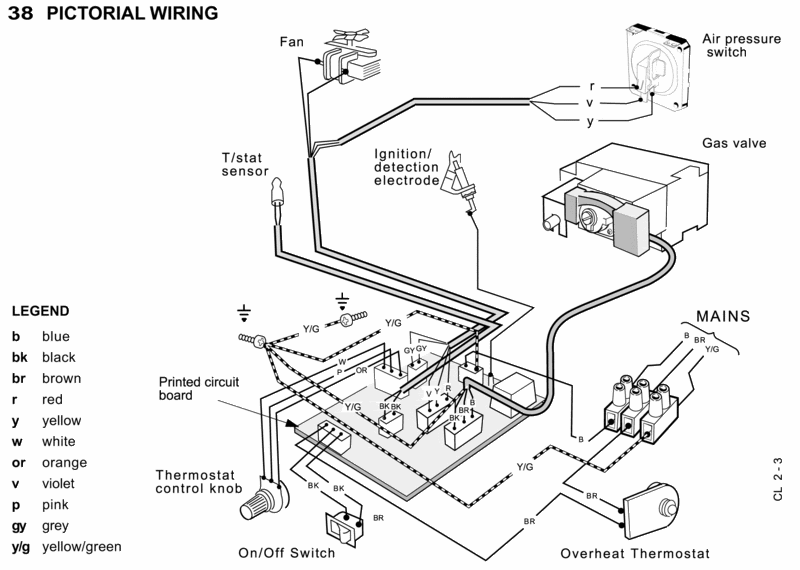
Is there a supply on the fan connector at PCB ('Molex' marked 'FAN')?.
There should be live at both terminals of the high limit thermostat and at the purple wire to the air pressure switch.
There's a fuse on the board too.
Be careful, use a meter and not a mains test screwdriver.
 
Hang on, progress!

I switched it off the mains electricity supply, pulled out the PCB, noticed that some of the molex's were not pushed fully home (did I disturb them when tugging out the PCB?), switched the power back on and bingo, fan bursts into life (...ah so that's what makes *that* noise which makes me up every morning!), burners fire into life... hurrah! Aren't forums ace! I wouldn't have had the confidence to start dismantling without your backup!

Anyway, so what fixed it (for now?)
1) there was a dodgy molex connection? Hope so - now fixed for good.
or
2) leaving it switched off for 10 mins rather than 1 minute made the difference? (is this possible?)
or
3) random chance? - as I said before it used to be an intermittent fault. Hope not. I'll be back soon if that's the case! :(

BTW, I never found the molex marked "fan", but we'll solve that problem if we have to!

cheers,
Mr Happy and warm.

...sh1t it's too warm...need to go turn those thermostats back down! :D
 
Hmpphhh! Me again... :(

Looks like it was option 3.

30 minutes later, it wasn't working again. I switched it off and on again at the mains - no joy. I switched it of and on again on the front, no joy. I flicked the switch again on the front, and this time it fired up...

Any ideas?

The flow diagram still requires me to check supply at the fan connector. Where is that? and then (assuming 'no') i need to "Remove the sensor(NTC) from the PCB". What's that all about?

The only thing that I noticed was that when it did switch on OK, the component on the PCB that is arrowed flashes. I assume this is normal?
http://www.hpjw.co.uk/temp/pcb.htm

The fuse looks OK.

Ta muchly!
Lukewarm Steve


See, the grey wires go to the fan.
The flashy thing is supposed to flash when it sparks.

It could be the front panel switch, or anything else really.
 
There was 240v at the fan connector of the PCB and one of the connectors in the molex was loose. When I fixed that and plugged it back in, it worked. So either:

1) that molex was the problem :D
or
2) it's just randomly decided to start working again for a while! :(

No doubt I'll be back soon when it turns out to be option 2 again!

Many thanks
Steve
 
Guess what. Another false hope...!

It stopped working again.

It started working again when I tapped the black box in the top right of the PCB. Pic here: http://www.hpjw.co.uk/temp/pcb2.htm. Coincidence? I'm not sure. What is this black box? Does it have any moving parts? If not, it may be another red herring

When it wasn't working there was no power to the fan. So that takes me to this in the diagnosis tree: "Remove the sensor(NTC) from the PCB".

Are they talking about the thermostat sensor?
http://i30.photobucket.com/albums/c321/ChrisPlumber/Ideal-Classic-FF-pcb.gif

Ta,
Steve
 
Stevie100 said:
When it wasn't working there was no power to the fan. So that takes me to this in the diagnosis tree: "Remove the sensor(NTC) from the PCB".

Ta,
Steve

Fan relay on the PCB - I can see it from the photo

and as someone who repairs them, I can tell you it's the single most common fault with the 25B PCB

The thing which sparks is the spark gap ... that's what it does

the black thing is the HT transformer, the soldering might have cracked on the underside of the board

get thesel' a recon pcb
 
Thanks guys,

It looks like it is that little black box. The next time it stopped, it started again on tapping it again.

I'll check the solder connections and if there's nothing to re-solder, I'll get another PCB. I can get a second hand one for £28. Is that an OK price?

Thanks for all your help.
Steve
 
I wouldn't bother. New ones aren't expensive. #079716
 
I found a supplier but they quoted £80 + VAT! So I bought the 2nd hand one for £28...

As much as it's been fun on this forum, I hope I don't have to come back in a few days - that would mean it's still not working!

Thanks for all your help Chris. Very philanthropic. :D

Steve
 

If you need to find a tradesperson to get your job done, please try our local search below, or if you are doing it yourself you can find suppliers local to you.

Select the supplier or trade you require, enter your location to begin your search.


Are you a trade or supplier? You can create your listing free at DIYnot Local

 
Back
Top