Texecom Ricochet PIR's False Low Battery Error

Joined
18 Jan 2018
Messages
25
Reaction score
0
Location
South East
Country
United Kingdom
I've got a Texecom Premier Elite 12 which had been powered down for about a year until recently when I got it back up and running.
I've got 2 x door contacts and 1 x PIR that are wireless Ricochet devices and after powering up the system, the wireless PIR was reporting low battery which I replaced with brand new out of packet battery. PIR still reporting low battery. Tried the other new battery (2 in packet) but the same. Checked the batteries with a tester to confirm ok, and even the one originally in the PIR was showing as still pretty decent. As the PIR quite old and looking online which said sometimes problems with the tamper switches can report as low battery figured PIR must've gone faulty so removed it from the panel and ordered a new one.

My panel was on firmware version 2.10 so in the meantime I flashed the firmware to the latest v6 version which went as it should. The new PIR turned up yesterday so learned it with the panel which went as expected... but that too is showing a low battery fault! The new PIR came with a new battery too.

New PIR, another new battery, reporting a low battery fault - something other than the PIR must be generating the low battery fault...

Anyone any suggestions / ideas?
 
Hmm, low battery faults report as tampers sometimes never seen a tamper report as low battery.

Not sure how you tested the battery and the result so can’t comment on that.

Low battery without a zone number isn’t a device battery fault.

When flashing from 2 to 6, better to delete the wireless devices off first, default, flash panel, reprogram and re,earn the devices.

When replacing batteries best to tamper the devices several times after replacing battery before replacing it.
 
I suspect given the panels age and been sat for a year and no zone info it’s likely to be referring to the panels back up battery, but guessing as don’t know the exact phrase you are seeing.
 
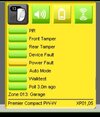
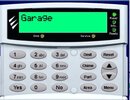
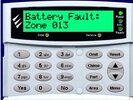
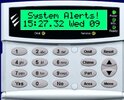
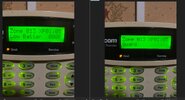
Some screenshots attached which will hopefully give you a better idea.
I have earlier today reset the ricochet expander removing all the wireless devices and re learned them again which made no difference.
The thing that seems odd to me is that when the PIR is first learned, the keypad and Ricochet monitor shows a tamper error because of course the front of the PIR is off, but only registers the low battery fault when the front cover is put back on - this was another reason why with the old PIR I thought maybe a tamper switch fault or something.
Yep, have been pressing the tampers after removing a battery to clear any residual energy and leaving a good couple of minutes before replacing it.
Batteries tested with a hand held battery tester - put the battery between the contacts and it provides a read out.
 

Attachments

  • Ricochet.jpg
    Ricochet.jpg
    20.9 KB · Views: 8
  • Keypad 3.jpg
    Keypad 3.jpg
    43.4 KB · Views: 8
  • Keypad 2.jpg
    Keypad 2.jpg
    46.3 KB · Views: 4
  • Keypad 1.jpg
    Keypad 1.jpg
    47.7 KB · Views: 5
  • Wintex Log.jpg
    Wintex Log.jpg
    9.4 KB · Views: 8
Zone 13 is a compact pet wise. They haven’t made these for several years now so certainly any replacements at best would be new old stock with batteries in them being old.

Cant speak for your tester as it may or may not be one for lithium batteries, tester I use gives a condition and voltage, from memory at 2.82V is the critical voltage for it to function may have to double check it’s been a while as we replace them every two years and don’t usually see power faults.There maybe a guide on the Texecom forum as what to expect based on voltages but can’t place my hands on it at the minute.

After removing all your pirs from the expander, default the panel.
Then add the sensors and reprogram I would not send old profile data back from a v2 into a v6 after updating the wintex profile, I don’t trust wintex enough when jumping so many panel versions to send a profile back.

If your sure the batteries are good and you have defaulted the panel etc as suggested then you need to speak with Texecom or an installer that can do the tests for you, not sure an installer would get anything different mind as you appear to have done things correctly.

I was never a fan of the compact pw-w, but not a fan of petwise detectors full stop!
 
Zone 13 is a compact pet wise. They haven’t made these for several years now so certainly any replacements at best would be new old stock with batteries in them being old.

Cant speak for your tester as it may or may not be one for lithium batteries, tester I use gives a condition and voltage, from memory at 2.82V is the critical voltage for it to function may have to double check it’s been a while as we replace them every two years and don’t usually see power faults.There maybe a guide on the Texecom forum as what to expect based on voltages but can’t place my hands on it at the minute.

After removing all your pirs from the expander, default the panel.
Then add the sensors and reprogram I would not send old profile data back from a v2 into a v6 after updating the wintex profile, I don’t trust wintex enough when jumping so many panel versions to send a profile back.

If your sure the batteries are good and you have defaulted the panel etc as suggested then you need to speak with Texecom or an installer that can do the tests for you, not sure an installer would get anything different mind as you appear to have done things correctly.

I was never a fan of the compact pw-w, but not a fan of petwise detectors full stop!
Thanks very much for taking the time to reply.
I did look up the PW-W and knew it was an older model but as it's for the garage I figured as long as it works it'll be fine. With the batteries, even if you forget about the tester I bought a brand new 2 pack of Duracell - be unlikely one of them would be a dud let alone 2.

I have just sent an email to Texecom support actually, so lets see what they come up with. As I'm sure you know more than me being a professional installer that they are usually pretty helpful, but to me it seems like some kind of panel / ricochet firmware glitch as the issue is exactly the same over 2 different PIR's which are different models too (QD-W & PW-W) and the fact that with both of them when first paired to the panel the ricochet monitor shows no battery issue at all just an open front tamper but literally as soon as I put the front cover of the PIR back and the front tamper spring is depressed the low battery fault registers straight away.
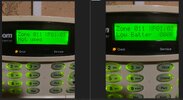
I also just noticed - the old PIR was attached to zone 11 which I completely removed ages ago before I even got the replacement PIR as it was the only way to stop the keypad fault tones (and since then I have completely reset the Ricochet expander and manually added the 2 door contacts and added the new PIR to zone 13 (thought using a completely fresh zone would give the best chance of no errors) - but when I check zone status from a keypad, zone 11 is still showing a low battery fault even though there is no sensor attached.
 

Attachments

  • Zone 13.jpg
    Zone 13.jpg
    196.5 KB · Views: 3
  • Zone 11.jpg
    Zone 11.jpg
    187.3 KB · Views: 3
Well I don’t recall there being issues back in the day on this but it’s a long time ago, certainly know tamper showing up instead of a battery fault somewhere between v2 and v5 but slept since then.

Did you default the panel and manually reprogram it up?
 
Well I don’t recall there being issues back in the day on this but it’s a long time ago, certainly know tamper showing up instead of a battery fault somewhere between v2 and v5 but slept since then.

Did you default the panel and manually reprogram it up?
Yep, I defaulted the panel, but didn't manually reprogram as the instructions I had said I can convert a backup to the new firmware so followed the guide for doing that.
 
Can’t say that’s the reason, but it has been known for udl software, to create issues. One manufacturer advises not to send a certain page across as it’s been causing problems, believe that’s been fixed.

on larger systems we would try it first and do things as controlled as possible.

upgraded a lot of panels, bad enough going v1 to v2, but v2 to v6 I just would do it manually. But when you have had your fingers burned on a Friday evening and the pub is calling, you do things long way round as it’s less likely to be a problem and can be a lot quicker
 
Thanks Gents, we live and learn as they say.
I'll wait and see if Texecom come back with anything, but if not I'll create a new panel profile in Wintex - I presume I would default the panel again before sending the new config?

Trying various things with the PIR earlier I discovered that when the front case is off it throws up the expected tamper fault, but no battery fault. I can see in the Ricochet monitor the panel still regularly polls the PIR but still only throws up the tamper. But as soon as the case goes back on - or you manually depress the tamper spring the tamper dissapears as expected and the battery fault happens. Then as soon as the PIR goes to tamper again the battery fault goes again. Is this normal behaviour for the PIR's?

IMG_6331.mov
 
No. Neither is the reverse either.

Reality is I am aware of tamper showing for a battery fault, but in your case you have the reverse battery fault for a tamper. related very probably the first one is well documented online.

I have never seen your scenario, but been a long time since I have seen a compact pw-w on a V2 panel, most have been upgraded, certainly gut panels that started life as a v2 but none of them had pw-w we used to sell them on eBay and use QD-W & DT-W. If you bought kit 5 you got elite 48 metal, now it’s kit-1005 and has capture QD and DT.
 
No. Neither is the reverse either.

Reality is I am aware of tamper showing for a battery fault, but in your case you have the reverse battery fault for a tamper. related very probably the first one is well documented online.

I have never seen your scenario, but been a long time since I have seen a compact pw-w on a V2 panel, most have been upgraded, certainly gut panels that started life as a v2 but none of them had pw-w we used to sell them on eBay and use QD-W & DT-W. If you bought kit 5 you got elite 48 metal, now it’s kit-1005 and has capture QD and DT.
My original PIR is a QD-W, which shows exactly the same fault and exactly the same behaviour. This is why I got the replacement as the QD-W was an original sensor from install which must be around 10 years ago so with the strange tamper / battery fault behaviour and the fact I'd just turned the system on after being off for a year assumed the PIR had developed a fault
 

If you need to find a tradesperson to get your job done, please try our local search below, or if you are doing it yourself you can find suppliers local to you.

Select the supplier or trade you require, enter your location to begin your search.


Are you a trade or supplier? You can create your listing free at DIYnot Local

 
Back
Top