CB Keeps Popping

Joined
3 Aug 2012
Messages
194
Reaction score
0
Location
London
Country
United Kingdom
I don't know much about electrics, but I just replaced a security light outside my front door.

The old one was activated by a normal thrower switch on the inside of my door.

Recently, my wife flipped the switch on the inside (while the security light was not connected on the outside) and the CB popped. So I removed the inside flip switch.

Now I have attached a security light on the outside and it works without there being a switch on the inside. It works with PIR.

But, when I connect the wires inside with a new flip switch, it blows the CB again.

Any idea what I should do?

JH
 
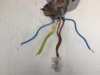
It has a Double Brown, a Double Blue and Earth wire on the outside.

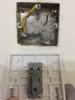
On the inside, it has a Brown, Blue and Earth wire.

I connected the Brown Wire to the Common port and the Blue Wire to the L1 Port and I just wrapped the Earth wire to the Back Box. Then I flipped the CB on and that's When it Blew.

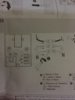
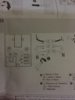
See images.

JH
 

Attachments

  • Inside.JPG
    Inside.JPG
    214.2 KB · Views: 366
  • Outside.JPG
    Outside.JPG
    254.8 KB · Views: 363
I connected the Brown Wire to the Common port and the Blue Wire to the L1 Port
That's correct.

and I just wrapped the Earth wire to the Back Box.
Not sure what that means.
Connect them both to the back box - screw top right in picture.

Then I flipped the CB on and that's When it Blew.
If you mean the CB trips with the outside wires loose as in the picture then you must have a fault in (one of) the cables.


The light L and N should each be connected to a blue wire. Is that what you did?
You will have to determine which blue is which, can't tell from here.
 
The light L and N should each be connected to a blue wire. Is that what you did?
Indeed, but if, by any chance, the OP joined the two blues (perhaps then connecting the light between the 'joined browns' and 'joined blues') and then 'flipped the switch .... !
You will have to determine which blue is which, can't tell from here.
Are you thinking that it might be a 'screw in' (e.g. ES) bulb/lamp (in which case correct polarity is necessary from a 'safety' point of view)?

Kind Regards, John
 
Last edited:
Indeed, but if, by any chance, the OP joined the two blues (perhaps then connecting the light between the 'joined browns' and 'joined blues') and then 'flipped the switch .... !
Indeed, My question was somewhat rhetorical (is that the right word here?); I didn't think he had done that.

Are you thinking that it might be a 'screw in' (e.g. ES) bulb/lamp (in which case correct polarity is necessary from a 'safety' point of view)?
I was just CMA against being asked the opposite. :)
 
In the Inside image, you can see I just put the earth wire through the hole in the back box and left it. I hope that makes sense and it's the right thing to do (since there is no connection for the earth wire on the plastic face plate of the switch).

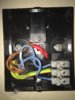
Look at the "Before" image. This is how I connected it. I suspect that it's wrong since you are saying that I need to connect the 2 blue wires without connecting the brown wires.

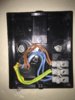
So then I changed it (After image). I taped up the brown wires and connected the 2 blue wires instead, but then the light didn't work after putting the CB back on.

According to the attached Diagram, I seem to have connected it correctly first time.

What am I doing wrong?


JH
 

Attachments

  • After.JPG
    After.JPG
    314 KB · Views: 344
  • Before.JPG
    Before.JPG
    311.3 KB · Views: 353
  • Diagram.JPG
    Diagram.JPG
    270.3 KB · Views: 303
Last edited:
In the Inside image, you can see I just put the earth wire through the hole in the back box and left it. I hope that makes sense and it's the right thing to do (since there is no connection for the earth wire on the plastic face plate of the switch).
There is a srew terminal in the back box for the earth wires.

Look at the "Before" image. This is how I connected it. I suspect that it's wrong since you are saying that I need to connect the 2 blue wires without connecting the brown wires.
It was wrong and why the CB tripped - see if you can work out why.


So then I changed it (After image). I taped up the brown wires and connected the 2 blue wires instead, but then the light didn't work after putting the CB back on.
Put them back as they were in the outside picture -
upload_2018-3-7_21-7-59.png


According to the attached Diagram, I seem to have connected it correctly first time.
I see no diagram - but no
 
Are you saying that I need to connect the 2 brown wires into that plastic casing rather than taping them up with red electrical tape?
And leave the 2 blue wires connected with the L & N terminals?

Diagram attached.

JH
 

Attachments

  • Diagram.JPG
    Diagram.JPG
    270.3 KB · Views: 282
Are you saying that I need to connect the 2 brown wires into that plastic casing rather than taping them up with red electrical tape?
Yes, they must be connected together.

And leave the 2 blue wires connected with the L & N terminals?
Yes.

Diagram attached.
The diagram does not have a separate cable going to the switch.
 
Thanks, I'll fix it in the morning and see if it works.
Really appreciate the help,

JH
 
I don't know much about electrics, but I just replaced a security light outside my front door.
When you did that, did you end up with the same conductors connected together, and not connected together, as before, or did you decide to join different ones together?
 
When you did that, did you end up with the same conductors connected together, and not connected together, as before, or did you decide to join different ones together?

The previous light had a different set up and confusing. Had 6 holes.

The new light only needs me to connect to 3 holes.

I can't remember the previous setup coz I knew I only had to deal with 3 holes.
I decided to stuff wires of the same colour in each hole.

JH
 

If you need to find a tradesperson to get your job done, please try our local search below, or if you are doing it yourself you can find suppliers local to you.

Select the supplier or trade you require, enter your location to begin your search.


Are you a trade or supplier? You can create your listing free at DIYnot Local

 
Back
Top