• Looking for a smarter way to manage your heating this winter? We’ve been testing the new Aqara Radiator Thermostat W600 to see how quiet, accurate and easy it is to use around the home. Click here read our review.

Computer beeping and not starting

Sorry for the delayed response, I have struggled on with it until now as it was working on and off and I haven't needed my computer as much.

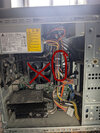
I have opened the side and this is what it looks like:
There is nowt much in the photo, which helps us identify it. It's absolutely filthy with dust, I would start, with finding some way to blow the dust out of it- try an airline, or a vacuum cleaner on blow, if you have one able to do that. A garage, will have an airline.

It could be, simply over-heating due to the dust.
 
I prefer a vac, it sucks the dirt out rather than blowing it into crevices and you don't have to breathe it.

You can get a suction adaptor giving you a smaller pipe, also used for car detailing. I'd use it with a small paintbrush with long, soft bristles.

When I clean a PC I remove the fans and heat sinks, but if you aren't familiar with dismantling and assembly, don't do that. You can pull the plugs off their sockets, but only do one at a time and plug it back after cleaning so you don't forget how it goes.

When you have it clean, you will probably be able to read the board manufacturers type or part number.

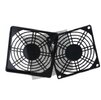
You can get dust filters to put on the suction side of your fans. Yours probably sucks air in through the back with that fan on the left of your pic. Photograph the back panel when you have time. The fan is probably about 120mm, Check that, and the spacing of the four fixing screws.


Fan filter.jpg
 
I have an 18v DeWalt blower in my van, can I use that if I do it outside? I'll remove the fan first. Will that be okay?
 
This is an example of a detailing kit, but it doesn't say how big the bits are. I'd say you want no bigger than half an inch.

I would prefer not to use a blower.

 
The RAM sticks are circled in red (looks like you have 4). Do not remove the fan with the red X. It is the processor fan and is attached to the processor with thermal paste.

ram.jpg

As the others have suggested, you need to identify the BIOS. When you first turn on the PC the BIOS will "POST" (power on self test). Hardware problems will often be flagged up during POST. The number of beeps should help you identify what the POST is flagging but those error codes beeps may be specific to the BIOS in question. To enter the BIOS, F1, F2,F10, escape, or del. You need to hit the correct key repeatedly when the the PC is first turned on.

Once POST is completed, the operating system (Windows) will load from the hard drive.

Freezing does sound like a RAM problem. Overheating often tends to result in the computer instantly shutting down.

As others have suggested, Memtest would be a good place to start. Alternatively, remove one or two RAM sticks at a time and see how you get on.
 
The RAM sticks are circled in red (looks like you have 4). Do not remove the fan with the red X. It is the processor fan and is attached to the processor with thermal paste.

View attachment 375873

As the others have suggested, you need to identify the BIOS. When you first turn on the PC the BIOS will "POST" (power on self test). Hardware problems will often be flagged up during POST. The number of beeps should help you identify what the POST is flagging but those error codes beeps may be specific to the BIOS in question. To enter the BIOS, F1, F2,F10, escape, or del. You need to hit the correct key repeatedly when the the PC is first turned on.

Once POST is completed, the operating system (Windows) will load from the hard drive.

Freezing does sound like a RAM problem. Overheating often tends to result in the computer instantly shutting down.

As others have suggested, Memtest would be a good place to start. Alternatively, remove one or two RAM sticks at a time and see how you get on.
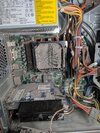
I already took the fans out, one was screwed in from the back and the other just clipped on, it looks pretty grim behind the inside fan.

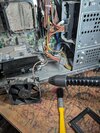
Realised I had an attachment for our shark vacuum so will get what I can off without touching the boards.

Is it okay to use a small brush to loosen the stubborn dust?
 

Attachments

  • PXL_20250311_172921727.MP.jpg
    PXL_20250311_172921727.MP.jpg
    464.4 KB · Views: 49
  • PXL_20250311_173044967.jpg
    PXL_20250311_173044967.jpg
    430.1 KB · Views: 51
AIUI vacuums can present a lot of harmful static, air blowing is better.

Yes it is OK to use a small clean brush, I use a 1" long bristle paint brush myself.

Ensure that (with the power off) all cards are fully pushed into their respective connectors.
 
Have you backed up your files, either onto an external harddrive or online, or better both?
If not, do it now whilst it is still working and before you touch anything.
 
Back
Top