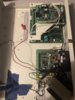
There is a jumper link on the main PCB (labeled something like "Memory BK"). It's on the right hand side of the board. You need to down power the panel completely, open the wire link above, re-apply power and close the link. It should now be returned to factory settings, just be advised that this will completely wipe ALL programming. Be warned, if you haven't programmed a Galaxy alarm panel before, then a 504 is probably not a good place to start!
If you need to find a tradesperson to get your job done, please try our local search below,
or if you are doing it yourself you can find suppliers local to you.
Select the supplier or trade you require, enter your location to begin your search.
Please select a service and enter a location to continue...
Are you a trade or supplier? You can create your listing free at DIYnot Local



 just powers up to alarm in progress then when i put the pin in it says call manager reset required.
