• Looking for a smarter way to manage your heating this winter? We’ve been testing the new Aqara Radiator Thermostat W600 to see how quiet, accurate and easy it is to use around the home. Click here read our review.

How to reset temper warnings

Joined
30 Jul 2013
Messages
146
Reaction score
0
Location
London
Country
United Kingdom
Hello

I replaced my burglar alarm 12v battery which has died.

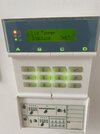
I am now getting this lid temper warning because I opened the box to replace the battery, which doesn’t allow me to set the alarm and call installer. I don’t have the engineer code, tried few defaults but nothing worked.

The company which has our engineer code wants 210£ to come and set it.

Is there a way for me to do that without having to call them on ?

Thanks
 

Attachments

  • IMG_2731.jpeg
    IMG_2731.jpeg
    197.8 KB · Views: 26
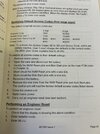
Do a stage 1 reset
This only resets the master (1) code ( 1234) and engineer code ( 7290) as it’s been programmed as lid tamper engineer reset option 38
After doing this enter1234 to stop alarm , then box up
Reset your code
Reset time and date
Do engineer reset
 

Attachments

  • image.jpg
    image.jpg
    315.2 KB · Views: 22
Thank you, I think I have that manual too :)

When you say "Do a stage 1 reset" do you mean steps 1-10 in first stage reset chapter ?

I know how to do steps 1-3, no clue how to do 4 onwards :-/ How do you short circuit those pins ?
 
Last edited:
Ah right, thanks :)

But step 7 says remove it. Am I suppose to keep two screwdriver blades on both of those pins and reconnect the battery afterwards and only then remove them. Sounds like a two person job. Also, are you sure it will only reset those passcodes and not the entire setup ? Have you tried it yourself before ?
 
And another question please: I don't suppose there's a way to supress this tempered warning and restore the alarm without the engineering code right ?
 
Yes it only resets the code
I take it you have tried entering the default engineer code ?
Post picture of control panel is there a fuse isolator at the side of it
 
I tried the default one yes, doesn't work, and the company who holds it wants 210£ to have it removed, not giving them that pleasure.
The control panel has a fuse box next to it which I believe is alarm related but then again I'm no expert.
Is that important to the procedure above ?
 
Pull fuse out , disconnect battery …short the two pins with screwdriver keep it shorted push the fuse back in , keep it shorted for 10 seconds, it should be 1234
 
Thanks for the walkthrough.

It also has dedicated mains power switch in the electricity switchboard, do I not need to bring it down as well (step 1 in the manual) ?
 
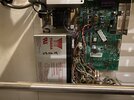
Here’s a picture of the board if it helps. The fuse box is next to it, not in the picture
 

Attachments

  • IMG_2701.jpeg
    IMG_2701.jpeg
    390.4 KB · Views: 24
I tried the procedure today, it doesn’t work.

I tried keeping two screwdrivers on both pins pairs. Any chance I need to use something else to short circuit them ?
 
Think I’ve managed now I’m in installer mode with the default code ! How do I apply the temper changes and exit tjis mode ?
 
By the way, how do I now change the engineer code from its default ?
 

If you need to find a tradesperson to get your job done, please try our local search below, or if you are doing it yourself you can find suppliers local to you.

Select the supplier or trade you require, enter your location to begin your search.


Are you a trade or supplier? You can create your listing free at DIYnot Local

 
Back
Top