• Looking for a smarter way to manage your heating this winter? We’ve been testing the new Aqara Radiator Thermostat W600 to see how quiet, accurate and easy it is to use around the home. Click here read our review.

impaq plus with contact, best to wire into 1 or 2 zones if available?

Joined
18 Oct 2014
Messages
146
Reaction score
1
Location
Cambridgeshire
Country
United Kingdom
hi:)

continuing on with my texcom permier elite 24 install i'm considering using a wired texecom imapq plus with door contact on my front door.

the rkp is quite close so i'd be using the zone/zones on that, is it best/least hassle to wire both the reed and shock sensor into 1 zone, or wire them to seperate zones on the rkp (i have spare available still)?

also when powering contacts/pir's etc from an rkp i just take the 12v/0v from the network terminals right?

many thanks:)
 
Best to do on seperate zones as it’s easier to diagnose faults in the future.

Take power from keypad as required
 
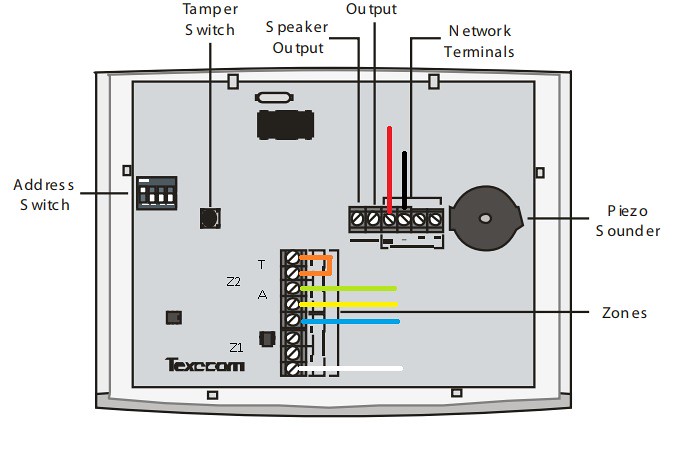
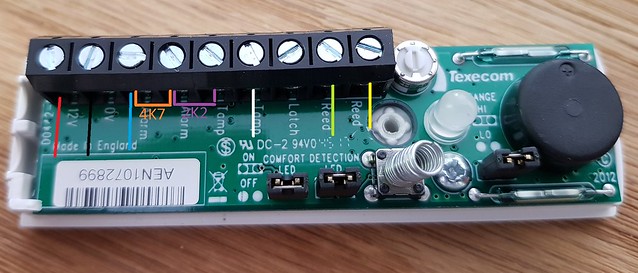
Yes, if you utilise EOL wiring with resistors for the zones. Use red and black for power, blue and yellow for the shock sensor zone and green and white for the reed switch (see page 32 of the manual for a diagram on wiring a zone with resistors)

Alternatively, you could wire the shock sensor zone EOL as above, but wire the green and white straight to the reed terminals without resistors. At the keypad, connect the green and white to the alarm terminals of the reed switch zone and put a link between the tamper terminals of that zone. That will save the hassle of trying to squeeze 4 resistors and a join into the Impaq and the tamper protection will be covered by the EOL circuit on the shock part of the sensor.
 
looking to install a few more componenets this weekend.

just to confirm i'm understanding this right from the advice above, if i wire as below this'll achieve 2 separate zones from a single 6 core wire

edit: just to confirm the orange wire on the keypad rear is just a link wire, no resistor (should of used a different colour:-/)


If you need to find a tradesperson to get your job done, please try our local search below, or if you are doing it yourself you can find suppliers local to you.

Select the supplier or trade you require, enter your location to begin your search.


Are you a trade or supplier? You can create your listing free at DIYnot Local

 
Back
Top