- Joined
- 5 Nov 2024
- Messages
- 6,159
- Reaction score
- 2,935
- Country

I like itOr a Klaxon

I like itOr a Klaxon

Read post #1Or a Klaxon


That could trigger ptsd!
Must have one hell of a motor in it..... what size plug has it got???
Henry hoover 200A
Condition
Used – like new
Henry hoover 200a Has been refurbished New motor and cable, but no tools Fully working amazing suction £55
that would work!Could you mount a simple batten holder along side the fan and wire it across the motor terminals? Not as neat as a small fitted indicator admittedly but more visible
The indicator (assuming it's one such as has been linked) will have two wires coming from it. These, as said above, need to connect across the motor in the fan. This should also have two connections and which way round does not matter. Easiest way to do this is post a photo of the fan with top removed and try to show the wiring. If your friend has a soldering iron he will probably also be able to guide you on what to do.
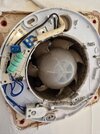
Plenty of room on that right hand side.here is the fan without the cover on. any chance of connecting an LED light into that?
Plenty of room on that right hand side.
The black wires, usually not polarity sensitive. Blue ones are for the pull cordi don't mean room, i mean where do i connect this (link below) to it. i don't know which wires are the motors. i can see the power supply cables to the fan, the white one. but i don't know about the other connections. where do i connect the LED light connections on the photo?
thank you. on making the photo larger, i can see that you are right. the blue wires connect to the pull chord and the black wires connect to the rotating blade / motor. It looks to say on the two black wires terminals "ML" and "MN", which I assume to mean Motor Live and Motor Neutral.The black wires, usually not polarity sensitive. Blue ones are for the pull cord

If you need to find a tradesperson to get your job done, please try our local search below, or if you are doing it yourself you can find suppliers local to you.
Select the supplier or trade you require, enter your location to begin your search.
Are you a trade or supplier? You can create your listing free at DIYnot Local