Texecom Connect now showing ‘App User’ instead of name.

Joined
28 Feb 2025
Messages
40
Reaction score
0
Country
United Kingdom
Hi

I have a few users for my system and have Texecom connect and the app all working fine. In the last day I have started to have the alerts for the panel showing as app user rather than the name of the person arming or disarming.

Being able to track who had arrived and disarmed the system was really valuable.

Is this change that Texecom has made or have I done something to mess up my system?

In the app and on Wintex the users are still showing with their names though I notice that when I use a user code to log on to the app it shows as ‘no name’ on the home screen. I have just finished installing a comip on com3 which likely caused this though not sure how or why.

System otherwise working great.
Months keypad it does say welcome master or whatever so that is fine, it just isn’t getting passed by the app.
 
Or any area in use come to that

Once programmed do a panel sync from the app to force the update
 
it was reported that some were having issues with correct user not showing some time ago on the Texecom forum.

But from menory addresssibv the no name issue and doing a panel sync straightened it out.
 
That worked - amazing, thank you so much.

One more question if you could help - at the same time as this issue starting - I think may have been following panel restart - it seems to take longer for the tones to start when I arm the system, and when I disarm, it hasn't got the usual tones to confirm it is unset, the normal Texecom noise, it just goes from entry beeping to nothing with the code input.


For ref Premier Elite 64-W
Firmware 4.x
New Texecom App
Smartcom and IPCom fitted.
 
service tones and volumes on keypad possibly. wireless keypad?

as for the delay hard to be certain, how is it being set and unset, what is recorded in the log.
 
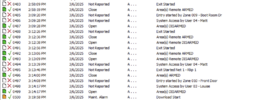
I will check the log. when unsetting from the app I still get the Texecom confirmation little tune, but not when unsetting at a keypad. Volume is fine, button presses and the entry and exit noises are clear. Keypads are wired.
 
Nothing interesting in the logs - unless I need to do something for more detailed log
 

Attachments

  • Screenshot 2025-03-06 at 15.24.06.png
    Screenshot 2025-03-06 at 15.24.06.png
    413.3 KB · Views: 47
so your remote arming the system with the app?
or re we talking about you arming via keypad 1 wrt to sound?
 
sorry didnt read all the posts

so your unsetting at the keypad before or after starting entry?
 
so for example you armed and disarmed via the app, but Louise disarmed after starting the entry zone, zone 10, after you armed from the keypad.
 
if disarming from the app or texecom2mqtt it does the normal Texecom tune (not sure what else to call it) to signal disarmed.

If entering, you get the entry tones, then when you put the code in it just stops - no Texecom tune to signal disarmed.
 
good question, I am not sure on the correct function to be fair.

when entry starts you type in your user code and as your at the keypad it disarms and no tones (??? yes), the beep you here is confirmation tone, which is the service tones.

test this several times a week, in that install or service checking the system is working correctly after complete, but never paid attention to the confirmation tone at disarm, as the entry tone has stopped and alarm hasn't gone off and the keypad stops displaying the system in entry.
 

If you need to find a tradesperson to get your job done, please try our local search below, or if you are doing it yourself you can find suppliers local to you.

Select the supplier or trade you require, enter your location to begin your search.


Are you a trade or supplier? You can create your listing free at DIYnot Local

 
Back
Top