

This actually relates to a post I created way back in 2022 (where a very kind fella called secureiam was helping me!) but I thought I'd start afresh as the actual questions differ slightly.
So I installed a Texecom Ricochet Premier Elite 64-W Control Panel in my loft back in 2022
This was alongside a pair of Texecom Premier Elite Odyssey 1 External Sounders - one at the front of the house (under the eaves) and one at the rear of the house (under the eaves)
This is how I wired them up:
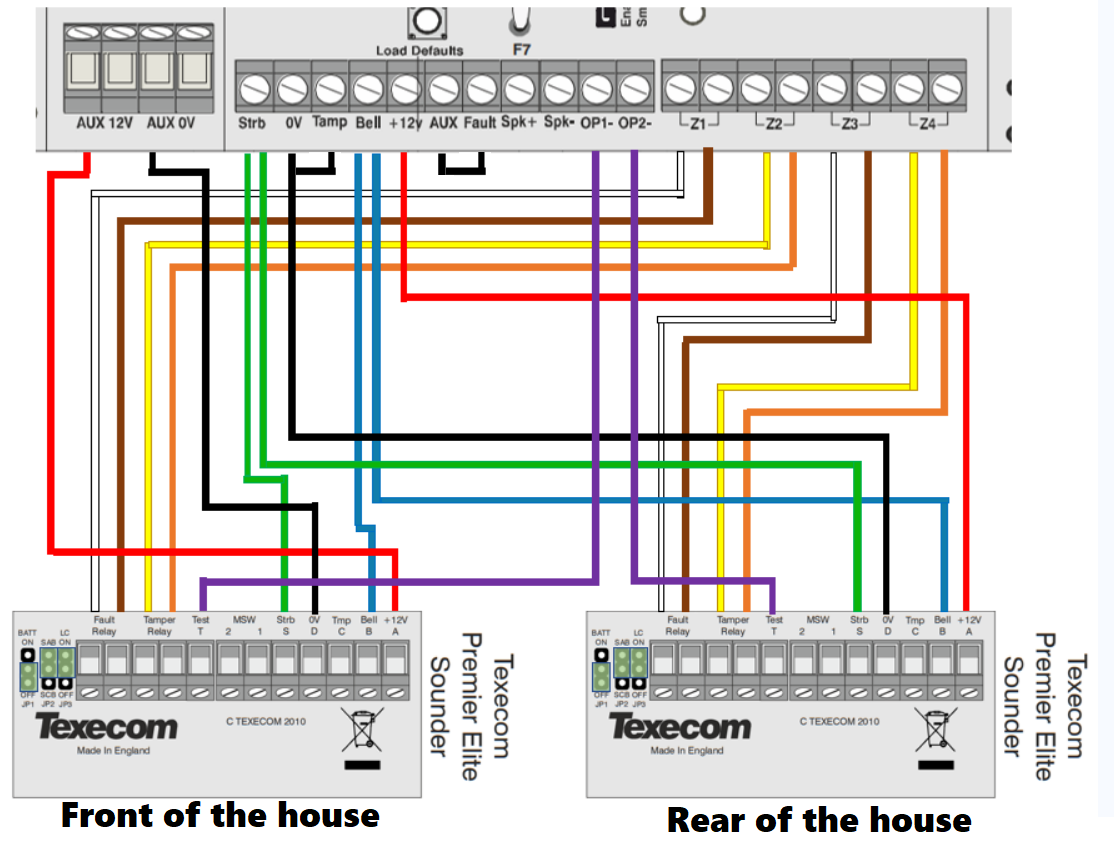
For reference I also have the following:
Ok so I wired it all up back in 2022 and got some error messages - couldn't figure out what the issue was or how to fix it.....got to the end of the weekend and was back to work the next day so told myself I'd have another look at it the following weekend....I didn't! Nor did I the weekend after that either! Fast forward FOUR YEARS later and after clearning out the loft and looking at the control panel up there, I decided I'd take another look at it, especially as nowadays we have things like ChatGPT to help out with questions!
So the issue I was experiencing at first was the following:
System Alerts:
Panel Lid Tamper (yep, the lid is off the 64-w )
)
Confirm Devices (possibly the Texecom Connect SmartCom?)
EXP 1,1 Tamper (I'm guessing because the 64-w jumper on the right between the two aerials is in commissioning mode?)
Zone 1 Tamper
Zone 2 Tamper
Zone 3 Tamper
Zone 4 Tamper
This is how I set them up in Wintex:
z1 (Fault Relay - Front of House Sounder)
Zone Type = 12 Auxiliary
Wiring Type 8 - WD Monitor
z2 (Tamper Relay - Front of House Sounder)
Zone Type = 13 Tamper
Wiring Type = Normally Closed
z3 (Fault Relay - Rear of House Sounder)
Zone Type = 12 Auxiliary
Wiring Type 8 - WD Monitor
z4 (Tamper Relay - Rear of House Sounder)
Zone Type = 13 Tamper
Wiring Type = Normally Closed
So I asked ChatGPT about this, because I wasn't sure if the errors are related to my Jumper settings on the bells....they are both set to the following:
Batt = Off
Mode = SAB
LC = On
My understanding of this was that the Batt jumper could stay off as I would be powering the bells from the main control panel, but ChatGPT said that even if you don't intend to use the bells internal battery, you still need to sett Batt to On? Is this really true?
I get why some people would want to use the backup battery in the bell...... for example if a burglar cut the bell wire the alarm is still meant to go off........ but in my case there's no visible wire between the bell and the eaves, and even if there was, a burglar would have to climb a 15ft ladder to get to it, as it runs up into the loft eaves and then across to the control panel..... so am really not concerned about that.....hence why I thought I could just leave the jumpers for Batt set to off on both bells.
To be honest, I'm not really fussed about power cuts either.....we've had two in the past 10 years....both lasting for about 10 minutes.... so I can live with the power cut risk.
So do I actually need to set the jumper to On in the bells? Will the entire alarm system simply not work unless I change this jumper setting?
Or is it just a case that the Z1/Z2/Z3/Z4 warnings in wintex can be ignored or suppressed?
I imagine the bell batteries would be completely knackered now anyways..... they've been on the wall for 4 years and never once been used!
So I installed a Texecom Ricochet Premier Elite 64-W Control Panel in my loft back in 2022
This was alongside a pair of Texecom Premier Elite Odyssey 1 External Sounders - one at the front of the house (under the eaves) and one at the rear of the house (under the eaves)
This is how I wired them up:
For reference I also have the following:
- 6x Texecom Ricochet Impaq SC-W VIBER Accelerometer Technology Wireless Shock and Contact (for doors and windows)
- 1x Texecom Premier Elite Satin Chrome SMK Keypad
- 1x Texecom Connect SmartCom Ethernet & Wifi Communicator
- 12-Core Burglar Alarm Cable
- 1x Yuasa Yucel 7-12v Back Up Battery for the Alarm Control Panel
- 1x Texecom Premier Elite Panel USB-COM programming cable
Ok so I wired it all up back in 2022 and got some error messages - couldn't figure out what the issue was or how to fix it.....got to the end of the weekend and was back to work the next day so told myself I'd have another look at it the following weekend....I didn't! Nor did I the weekend after that either! Fast forward FOUR YEARS later and after clearning out the loft and looking at the control panel up there, I decided I'd take another look at it, especially as nowadays we have things like ChatGPT to help out with questions!
So the issue I was experiencing at first was the following:
System Alerts:
Panel Lid Tamper (yep, the lid is off the 64-w
)Confirm Devices (possibly the Texecom Connect SmartCom?)
EXP 1,1 Tamper (I'm guessing because the 64-w jumper on the right between the two aerials is in commissioning mode?)
Zone 1 Tamper
Zone 2 Tamper
Zone 3 Tamper
Zone 4 Tamper
This is how I set them up in Wintex:
z1 (Fault Relay - Front of House Sounder)
Zone Type = 12 Auxiliary
Wiring Type 8 - WD Monitor
z2 (Tamper Relay - Front of House Sounder)
Zone Type = 13 Tamper
Wiring Type = Normally Closed
z3 (Fault Relay - Rear of House Sounder)
Zone Type = 12 Auxiliary
Wiring Type 8 - WD Monitor
z4 (Tamper Relay - Rear of House Sounder)
Zone Type = 13 Tamper
Wiring Type = Normally Closed
So I asked ChatGPT about this, because I wasn't sure if the errors are related to my Jumper settings on the bells....they are both set to the following:
Batt = Off
Mode = SAB
LC = On
My understanding of this was that the Batt jumper could stay off as I would be powering the bells from the main control panel, but ChatGPT said that even if you don't intend to use the bells internal battery, you still need to sett Batt to On? Is this really true?
I get why some people would want to use the backup battery in the bell...... for example if a burglar cut the bell wire the alarm is still meant to go off........ but in my case there's no visible wire between the bell and the eaves, and even if there was, a burglar would have to climb a 15ft ladder to get to it, as it runs up into the loft eaves and then across to the control panel..... so am really not concerned about that.....hence why I thought I could just leave the jumpers for Batt set to off on both bells.
To be honest, I'm not really fussed about power cuts either.....we've had two in the past 10 years....both lasting for about 10 minutes.... so I can live with the power cut risk.
So do I actually need to set the jumper to On in the bells? Will the entire alarm system simply not work unless I change this jumper setting?
Or is it just a case that the Z1/Z2/Z3/Z4 warnings in wintex can be ignored or suppressed?
I imagine the bell batteries would be completely knackered now anyways..... they've been on the wall for 4 years and never once been used!


