Hey all,
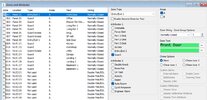
Thanks for the useful threads I've read so far here. My Electrician installed a Premier 24 and set it up with two areas (B upstairs/A downstairs), but part arms never worked correctly. He also didn't know about Wintex, so I have now registered and set that up myself via the Smartcom.
I now understand that areas are not really suitable for this setup and we're best to just use part arm omits. I've now flipped all zones to Area A and I have the night time part arm 1 working well.
How it should work:
Full Arm - Good: Set from GF Hall (w/PIR) or Utility (w/PIR) keypads, with either Front Door or Side Door as entry/exit - instantly arming. Seems to work.
Part Arm 1 - Good: Omits landings. Set from GF Hall (w/PIR) or Utility (w/PIR) keypads, with timed arming, and GF Hall (PIR) and Snug (PIR) as guard access.
Part Arm 2: Omits garage. Set from GF Hall (PIR) or Utility (PIR) keypads, with either Front Door or Side Door as entry/exit - instantly arming.
Where I am struggling:
1. I'd like the door contacts to guard under Part arm 1 but instant arm and entry/exit under part arm 2. I am guessing it is not possible to have the separate part arms configure the entry exit in different ways? Do I need to leave guard off or can I use areas?
2. Areas - I'd probably like to delete Area B now but can't see where to do this. Does that seem like a sensible idea to simplify things? Although perhaps you'll tell me I need it for the garage scenario.
3. Wiring types. Everything is set to normally closed. Is this generally a bad thing? Do I need to check to see if things have been connected with 2 wires or 4 wires?
Many thanks,
Dan
Thanks for the useful threads I've read so far here. My Electrician installed a Premier 24 and set it up with two areas (B upstairs/A downstairs), but part arms never worked correctly. He also didn't know about Wintex, so I have now registered and set that up myself via the Smartcom.
I now understand that areas are not really suitable for this setup and we're best to just use part arm omits. I've now flipped all zones to Area A and I have the night time part arm 1 working well.
How it should work:
Full Arm - Good: Set from GF Hall (w/PIR) or Utility (w/PIR) keypads, with either Front Door or Side Door as entry/exit - instantly arming. Seems to work.
Part Arm 1 - Good: Omits landings. Set from GF Hall (w/PIR) or Utility (w/PIR) keypads, with timed arming, and GF Hall (PIR) and Snug (PIR) as guard access.
Part Arm 2: Omits garage. Set from GF Hall (PIR) or Utility (PIR) keypads, with either Front Door or Side Door as entry/exit - instantly arming.
Where I am struggling:
1. I'd like the door contacts to guard under Part arm 1 but instant arm and entry/exit under part arm 2. I am guessing it is not possible to have the separate part arms configure the entry exit in different ways? Do I need to leave guard off or can I use areas?
2. Areas - I'd probably like to delete Area B now but can't see where to do this. Does that seem like a sensible idea to simplify things? Although perhaps you'll tell me I need it for the garage scenario.
3. Wiring types. Everything is set to normally closed. Is this generally a bad thing? Do I need to check to see if things have been connected with 2 wires or 4 wires?
Many thanks,
Dan