
Texecom UDL password wrong issue

Joined
10 Nov 2013
Messages
258
Reaction score
5
Location
West Midlands
Country
United Kingdom
Hi everyone, got this issue with alarm system Texecom premier elite with the hard wired comic module where I had builders in and they messed up sensor wiring.

The panel eventually got locked out and I had to use wintex to enter a code to get another code out to unlock the panel. All worked fine.

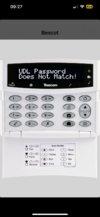
But when I tried to connect wintex back to the panel or use the app on phone I can’t connect. App comes back with the picture below and the wintex app just doesn’t connect saying wrong credentials.

Even though the zones are still named correctly, I’ve lost access to 1 key part arming and full arming and there is like a double tone when I get the arming countdown.

Does anyone know how to regain access to the panel - ie get the new UDL code out? I’m hoping it’s embedded in the panel somewhere. I have the master code and engineer codes still working.

Thanks in advance.
 

Attachments

  • IMG_3112.png
    IMG_3112.png
    813.8 KB · Views: 86
its in the panel

Engineers code/ 7 yes, then it will be 5 or 6 for udl options depending on firmware abdd nodules in use, yes to that until you get to udl passcode
 
Hi I can’t seem to get into engineer mode now
I have 2 codes, one was arming user and one other one an engineer user. When I type in engineer code it was welcome master but when I press 7 I get nothing - when I press menu, there is an option to enable engineer mode which doesn’t really give me much.
 
I’ve tried to do a factory reset by opening the lid, turning off mains and disconnecting battery, turning on power and pressing tamper switch 3 times.

Still have the same codes present. So guess it didn’t work.
 
Can’t get in via winter. Used to be able to but when using the same wintex creds it says can’t connect
 
still got the same issue with version 8 of wintex.

"Connection with control panel could not be established - Please check settings and try again!"
 
Version8.x. ? As 8 isn’t the latest version and they updated security certificates when they release new versions I believe

So old versions won’t work for smart com
 
version 8.2 im using,
trying to connect over network as i have the comip hard wired option
also trying to connect via the iphone app
 
okay so check internal ip address of com ip module in setup modules

check ip address ip wintex matches

if you are using away from home then you need a vpn or port forwarding
 
Hi
The internal ip address is correct and as expected within the control panel . I can ping successfully the ip from computer and when I enter in the ip address into web browser I get the comip layout diagram.

Don’t think I’m using away from home but got port forwarding already setup as part of initial configuration.

I did lose the ability to one button part/full arm the system but added that back in.

The other strange thing is that when armed I get a double kind of chime out the control panel - one normal chime but the new / other one is a lot louder
 

If you need to find a tradesperson to get your job done, please try our local search below, or if you are doing it yourself you can find suppliers local to you.

Select the supplier or trade you require, enter your location to begin your search.


Are you a trade or supplier? You can create your listing free at DIYnot Local

 
Back
Top