• Looking for a smarter way to manage your heating this winter? We’ve been testing the new Aqara Radiator Thermostat W600 to see how quiet, accurate and easy it is to use around the home. Click here read our review.

Thermostat poorly placed??

So would the receiver be mounted and connected next to the wiring centre?
Yes, that is usually the best place to mount the receiver.
Thermostats, would something like this be suitable?
https://wiser.draytoncontrols.co.uk/product-selector/44
The Wiser Kit 3 has two heating zones and hot water control.
If you have a combi, the hot water control would be redundant and can be ignored.

It's a system that seems well regarded on the forum.

If you're happy to show us the wiring in the wiring centre, we should be able to suggest how to connect one up.
There would be no need to modify anything at the boiler.
 
Can you give me an example of a Bluetooth thermostat and hardwired base station? I just keep finding smart thermostats and cannot find any base stations.
Have a look at the Salus RT510RF Wireless Digital Room Thermostat - readily avaialbe on line. I have this myself and, although some people on this forum have spoken crtically about Salus thermostats, I find this work well.
 
The base station doesn't need to be placed near the boiler if you already have a hardwired thermostat mounted on th wall. You can just replace that with the base station - avoiding all the hassle of moving the thermostat cabling
 
The base station doesn't need to be placed near the boiler if you already have a hardwired thermostat mounted on th wall. You can just replace that with the base station - avoiding all the hassle of moving the thermostat cabling
The existing stat is battery powered, the RT510RF requires a neutral, hence the need to ensure a neutral connection is made at the wiring centre...
Another option would be to use the hidden grey wire (in the triple and earth cable) behind the Honeywell. It could be connected to a neutral terminal in the wiring centre - enabling power to the receiver, when mounted in place of the T3
 
Yes, that is usually the best place to mount the receiver.

The Wiser Kit 3 has two heating zones and hot water control.
If you have a combi, the hot water control would be redundant and can be ignored.

It's a system that seems well regarded on the forum.

If you're happy to show us the wiring in the wiring centre, we should be able to suggest how to connect one up.
There would be no need to modify anything at the boiler.
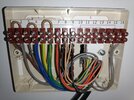
I have attached a photo of the wiring centre.

Could I use the existing wiring from the T3 thermostat to wire up the receiver instead of running extra wires from the wiring centre? I would like to try and reduce as much potential damage as possible lol!

Would replacing the upstairs thermostat affect the downstairs one or should I replace them both at the same time?

Thanks again for everyone's help
 

Attachments

  • 1739050454031.jpg
    1739050454031.jpg
    291.5 KB · Views: 40
I have attached a photo of the wiring centre
Thank you.

It's a little difficult to see, but I wondered if you could confirm that there were three brown wires in terminal 1 of the wiring centre?

Could I use the existing wiring from the T3 thermostat to wire up the receiver instead of running extra wires from the wiring centre? I would like to try and reduce as much potential damage as possible lol!
You could, but it would only control the upstairs zone and you would still need to move a grey wire in the wiring centre.
It would probably involve more work and disruption, than connecting the Wiser directly!

For the minimum possible damage, you can leave all the existing wiring in place and simply remove the batteries from the T3's; the Wiser would then completely control both zones...

Screenshot_20250208_220344_Adobe Acrobat.jpg


With a short length of 4 core and earth flex, you would...

Using the brown wire, connect terminal 1 of the wiring centre, to L on the Wiser Kit 3 backplate.
Using the blue wire, connect terminal 3 of the W/C, to N on the Wiser.
Using the green/yellow wire, connect terminal 5 of the W/C, to the earth terminal on the Wiser.
Using the black wire, connect terminal 8 of the W/C, to terminal 1 of the Wiser.
Using the grey wire, connect terminal 9 of the W/C, to terminal 3 of the Wiser.

It doesn't matter initially which wiser zone controls the upstairs or downstairs - this can always be changed within the app.

If you did eventually wish to decommission the wiring to the existing stats, you would disconnect two of the brown wires from terminal 1, and the black wires from terminals 8 and 9 - parking them all safely with the grey wires in the spare terminals at the other end of the wiring centre.
Check that all these wires come from the same two cables - a separate brown wire in terminal 1 will be a live in - you still need that one.

I hope that makes sense.

 
Thank you.

It's a little difficult to see, but I wondered if you could confirm that there were three brown wires in terminal 1 of the wiring centre?


You could, but it would only control the upstairs zone and you would still need to move a grey wire in the wiring centre.
It would probably involve more work and disruption, than connecting the Wiser directly!

For the minimum possible damage, you can leave all the existing wiring in place and simply remove the batteries from the T3's; the Wiser would then completely control both zones...

View attachment 372304

With a short length of 4 core and earth flex, you would...

Using the brown wire, connect terminal 1 of the wiring centre, to L on the Wiser Kit 3 backplate.
Using the blue wire, connect terminal 3 of the W/C, to N on the Wiser.
Using the green/yellow wire, connect terminal 5 of the W/C, to the earth terminal on the Wiser.
Using the black wire, connect terminal 8 of the W/C, to terminal 1 of the Wiser.
Using the grey wire, connect terminal 9 of the W/C, to terminal 3 of the Wiser.

It doesn't matter initially which wiser zone controls the upstairs or downstairs - this can always be changed within the app.

If you did eventually wish to decommission the wiring to the existing stats, you would disconnect two of the brown wires from terminal 1, and the black wires from terminals 8 and 9 - parking them all safely with the grey wires in the spare terminals at the other end of the wiring centre.
Check that all these wires come from the same two cables - a separate brown wire in terminal 1 will be a live in - you still need that one.

I hope that makes sense.
Wow that is fantastic information thank you.

I had a look again at the wiring centre with your diagram and came to the conclusion that I haven't got the faintest idea of what to do! I would probably wire it up wrong and end up burning down my house (unsurprisingly, my wife would not be pleased with me). I can just about wire a plug....

I will look at contacting a few local electricians and get some prices for them to fit it.

Is there an alternative to a smart thermostat as I don't need the function for it to be controlled whilst I am away from home as I work from home all week?

Would I need to remove the TVR from the radiator where I would place the new Thermostat? Also would the room also benefit from replacing the current single radiator to a double radiator?

Thank you for all your help and patience with me, all the different options confuse me!
 

If you need to find a tradesperson to get your job done, please try our local search below, or if you are doing it yourself you can find suppliers local to you.

Select the supplier or trade you require, enter your location to begin your search.


Are you a trade or supplier? You can create your listing free at DIYnot Local

 
Back
Top