Veritas 8 Tamper Problems.

the test in the event log would be able to confirm where the tamper is coming from.

in event log and it displays tamper
Press omit which zone is illuminated

Zone 1 = Global tamper or Bell tamper circuit
Zone 2 = Power
Zone 3 = lid tamper (panel or keypad)
Zone 4 = N/A
Zone 5 = RKP offline
Zone 6 = Code Pin Tamper
Zone 7 = Keypad PA
Zone 8 = N/A

If you do that check you can quickly confirm where to look.

Although expect it is the bell box.
 
I need heip
You need to do this ..
Ok I will do this
No you need to do this
Jesus
It seems clear to me that james needs to use his multimeter to check the voltage of the bell tamper return feed, and check the resistance of the global tamper circuit, and share the results. My guess is he's still sat on the landing with the system part armed waiting for it to tamper again :eek:
Thanks for the advice/comments, due to the fact l have had no tamper faults while the system is in unarmed mode or fully armed mode, with about 6 tamper faults over a 4 week period at various times of day, and the system would have only be armed partly or fully for about 7 hours a day until the first tamper fault at 3 in the morning, l am reluctant to start poking around on the PCB, l am still reading the downloaded manual on where or how to test the bell voltage, which l presume will need to be done on battery power in program mode. I did say l needed an idiots guide l can see a tamper loop on the PCB but don't want to do more damage than good, l do have the ability to replace a couple of RKB's, solider, use a multimeter, and can see there are no sights of excessive component heat on the board but my knowledge of alarm systems is limited, so l am taking it slow.

Sorry,
James.
 
the test in the event log would be able to confirm where the tamper is coming from.

in event log and it displays tamper
Press omit which zone is illuminated

Zone 1 = Global tamper or Bell tamper circuit
Zone 2 = Power
Zone 3 = lid tamper (panel or keypad)
Zone 4 = N/A
Zone 5 = RKP offline
Zone 6 = Code Pin Tamper
Zone 7 = Keypad PA
Zone 8 = N/A

If you do that check you can quickly confirm where to look.

Although expect it is the bell box.
Thanks for your advice, The last event was a delibrate alarm on full, in the event log it gave a steady red at 2 which was the door l opened to turn the alarm off, and a flashing 1 which was the zone l activated to turn the full alarm on, when l press omit those lights stay the same and l get a single beep so no extented data, no zones light up after pressing omit on any of the 7 events in the log, it could be that the panel is so old that this information is not available.

Thanks again,
James.
 
the problem is the event log will keep writing over itself.

did you do the event log from the engineers menu or user menu?

this should be a prog panel not a 00 panel to enter the menus. So on some prog panels you couldn't do the extended information from the user code, only the engineers code.
 
the problem is the event log will keep writing over itself.

did you do the event log from the engineers menu or user menu?

this should be a prog panel not a 00 panel to enter the menus. So on some prog panels you couldn't do the extended information from the user code, only the engineers code.
It is the engineers code l am using but when l press Prog it does nothing l get a beep and unset flashes and if l press 41 that should bring up the last event unset stops flashing.

I have also tried reconfiguring the RKB on the panel and the RKB and both show the correct remote number and l have also done the above on the panel itself with the same results.
 
Last edited:
engineers code prog (engineers menu.)
41 takes you to first event if tamper is displayed press OMIT
should display a number, that number refers to the tampers in the table mentioned earlier.
 
Thanks again for your replies secureiam,

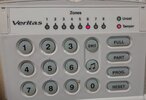
To confirm, l am using the factory set original engineers code, and have followed your instructions below using the panel not the RKB and l have even videoed it but can't upload the 1.2sec video because it is to large, the panel just beeps once with no LED's, however when l put the engineers code and press 00 all the leds light up and by pressing 4 and then the event number flashing zones numbers that were trigger along with the original alarm event light up, so 4 and 2 for me was a tamper event and results in a flashing tamper light but no zone lights but pressing prog does nothing.

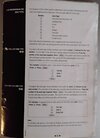
I was able to get the attached just about readable page for the alarm elsewhere and it states that 00 is needed to access options from the engineers code, but in all event cases so 7 pressing prog after l have pressed 4 then 1 then reset and then 4 and 2 gives no further event information on the panel.

Kind regards and thanks for your advice,
James


engineers code prog (engineers menu.)
41 takes you to first event if tamper is displayed press OMIT
should display a number, that number refers to the tampers in the table mentioned earlier.
 

Attachments

  • 202505241437_00.jpg
    202505241437_00.jpg
    171.2 KB · Views: 51
So the panel is pre 2000 and that option isn't available for extended information if I recall correctly.
 
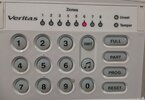
Just an update l finally got a tamper fault while in unset mode at about 11pm last night, it gave event an Zone number and flashing light which was Zone 6, this is the kitchen PIR and l was in the kitchen at the time (see attached files). It had been in unset mode since l deliberately sent off the alarm on Thursday and luckily with it being in unset mode it was only on internal sounder, but l was able to check the strobe was working having already checked the external sounder in a walking test.
 

Attachments

  • 20250525_230103_1.jpg
    20250525_230103_1.jpg
    202.1 KB · Views: 45
  • 20250525_230054.jpg
    20250525_230054.jpg
    190.4 KB · Views: 58
apologies but the 00 version of the panel doesn't have the extended log.

I am not aware of the panel having individual zone tampers either.

so if the panel was unset and zone 6 was triggered, then the programming for that zone is likely to be a 24 hour zone type.

So press rest twice,
Inter engineers code then 00
Then type 16 what number is displayed?
press reset twice
 
Last edited:
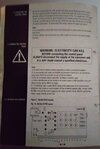
My friend that emailed me the page that l previously uploaded was able to get hold of the original installation manual for me and dropped it off this morning so l can photocopy it and return it to him to return to the owner. l have attached the relevant page and from section 2.12 and the above already loaded pictures confirming tamper is flashing and zone 6 is steady, l presumed the tamper switch on the PIR set off zone 6 on the system last night.

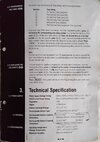
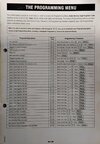
I have followed your instructions and can confirm 1 comes on, but the alarm zones in the instructions manual are different than the ones you have listed at post 16, see the attached page 20 under section 2.10 from the manual, if this helps he also had the owner's guide with him, but l had already had a copy of this, so comparing these owners manuals confirms the installation manual he has loaned me is correct for the model and year.

Kind regards and thanks for all your replies.
James.
 

Attachments

  • 20250526_133258.jpg
    20250526_133258.jpg
    302.7 KB · Views: 59
  • 20250526_141715.jpg
    20250526_141715.jpg
    211.5 KB · Views: 56
Are you sure this isn’t an early R8plus panel ….post picture of alarm panel PCB …as asked previously..
 
James ring if your free today between now and 6pm or before 8pm

I am struggling to understand what instructions you are following and what lists you are comparing.

The 16 was to know what the zone was programmed as and not for the tampers.

Think we can clear some things up with a quick phone call.
 
Last edited:
Are you sure this isn’t an early R8plus panel ….post picture of alarm panel PCB …as asked previously..
It states on the panel it is a Veritas 8 and here is the PCB from the manual l have borrowed and it looks exactly like that with the front off, l described it as a Veritas 8 in the post title because that is what is written on the front panel, l even stated it was a very old model of over 20 years old. A Veritas R8 has the tamper switch in the centre of the PCB and not top right like mine and the R8 has no built-in keyboard.
James ring if your free today between now and 6pm or between 8pm and 10pm.

I am struggling to understand what instructions you are following and what lists you are comparing.

The 16 was to know what the zone was programmed as and not for the tampers.

Think we can clear some things up with a quick phone call.
Hi Secureiam,

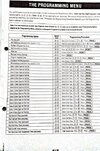
As best as l can with my limited knowledge, l am now following the Veritas 8 manual l have just uploaded page 4 that may help, you told me to key in 16 after using the engineers code and then 00, when l did key 16 in the keyboard confirmed the zone type was a 1 and if you look at 1 on page 20 under section 2.10 Zone Types then that is: 'Entry/Exit with Final Door Set' but that as never been altered or changed!

Cheers.
James.
 

Attachments

  • 20250526_171447.jpg
    20250526_171447.jpg
    220.3 KB · Views: 44
  • 20250526_174826.jpg
    20250526_174826.jpg
    365.5 KB · Views: 47

If you need to find a tradesperson to get your job done, please try our local search below, or if you are doing it yourself you can find suppliers local to you.

Select the supplier or trade you require, enter your location to begin your search.


Are you a trade or supplier? You can create your listing free at DIYnot Local

 
Back
Top