• Looking for a smarter way to manage your heating this winter? We’ve been testing the new Aqara Radiator Thermostat W600 to see how quiet, accurate and easy it is to use around the home. Click here read our review.

Help needed setting up CCTV cameras

So if I was to buy this one then
You think it will plug into my camberas BNC and then into the TVs SCART port?

If that where the case then i would need to work out which channel the SCART runs on

Where SCART cable desinged for video cassette players or something?
There is a clitch hear with the hyper link, it dose take you to one particular iteam on ebay
 
Yes, yes, and yes!
OK I got it delivered and plugged in bough ends thanks! today I got a signal on the TV screen from one of the cameras. (Seams OK!)

So my next question really is how do I record the camera footage?

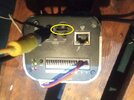
There is some kind of slot on the camera that looks like a SD card slot; But it is not. Infact all the other cameras I have have the same slot that will not! take an SD card. Photo attached of the working camera.

Any idea what it is? Can what ever it is record from it?
Thanks
 

Attachments

  • IMG_20251119_210725.jpg
    IMG_20251119_210725.jpg
    99.3 KB · Views: 20
Read the spec sheet I posted …it does support a memory card …you would have to connect that camera to the your network to access the card and set it up …that bnc video output is only probably to assist setting up the camera
 
Read the spec sheet I posted …it does support a memory card …you would have to connect that camera to the your network to access the card and set it up …that bnc video output is only probably to assist setting up the camera
Those images you posted dont actully tell you how to set the camera up

An SD card dose not fit into the slot! But are you saying I need to connect an eithernet cable from the camera to a PC to set up the SD card? Dose it have to be done though the internet?
 
An SD card dose not fit into the slot!

Many cameras do include an SD card, and it seems likely that is a slot for an SD card, but the photos of the camera are so indistinct, as to make them near useless. The usual use for an SD card, in a camera, is to record when any motion is detected, for a set period.

Configuration of a camera's settings, is usually done, via a webpage on the camera. The webpage will, after a factory reset, be at a an IP address, the address of which will be included in the camera manual, and might need a username/password to login - again in the manual.

To get more help, you need to be able to identify the make, and model of that camera.
 
Many cameras do include an SD card, and it seems likely that is a slot for an SD card, but the photos of the camera are so indistinct, as to make them near useless. The usual use for an SD card, in a camera, is to record when any motion is detected, for a set period.
Sorry I got it wrong! looks like i was trying to put the SD card in the wrong way up.
Do you think it can record all the time on a loop with the SD card? or do I need something ells say like a recording box between the cameras BNC port and the TVs scart connector?


Configuration of a camera's settings, is usually done, via a webpage on the camera. The webpage will, after a factory reset, be at a an IP address, the address of which will be included in the camera manual, and might need a username/password to login - again in the manual.

To get more help, you need to be able to identify the make, and model of that camera.
I got my computer running which dose indeed have a eithernet port. Next I will need a cable to join the two together
Did Sparky not post a manual on page 2? it might have the IP address listed there?
Other then that, there is a sticker on the back which says, IP Camera. IPC-HF5421EP. And a PIN, MAC and a S/N numbers
 
Ok from what I can see the output is standard PAL composite output , to be honest this is an ip camera it looks a good spec …but it may need resetting …whybthe video out isn’t working is ? Bad connections at your end …software issues in the camera or it’s faulty anybody’s guess , try to connect via a pc …
Nope! looks like there is no IP address listed on the manual attached
 
Do you think it can record all the time on a loop with the SD card?

Read, what I wrote in #52, which you quoted?

Did Sparky not post a manual on page 2? it might have the IP address listed there?

No, he posted a single page, listing the specifications. You need to find a full copy of the manual, which will include the default IP, username, and password.
 
This is what I would do ….download an app like Fing or network scanner ….check what’s on your network , it should give a list of all,devices ….make note ….now connect camera , hold in reset and power up ( this will probably default ip settings and it should pick up new ip address…give it 5 mins …now re scan with Fing ect …there should be an extra IP address listed , take note …type in the new address in web browser …with a bit of luck it should bring up a log in screen ….then go from there…
 

If you need to find a tradesperson to get your job done, please try our local search below, or if you are doing it yourself you can find suppliers local to you.

Select the supplier or trade you require, enter your location to begin your search.


Are you a trade or supplier? You can create your listing free at DIYnot Local

 
Back
Top