Replacing Danfoss FP715SI with Nest Third Generation

Joined
13 Dec 2023
Messages
9
Reaction score
1
Country
United Kingdom
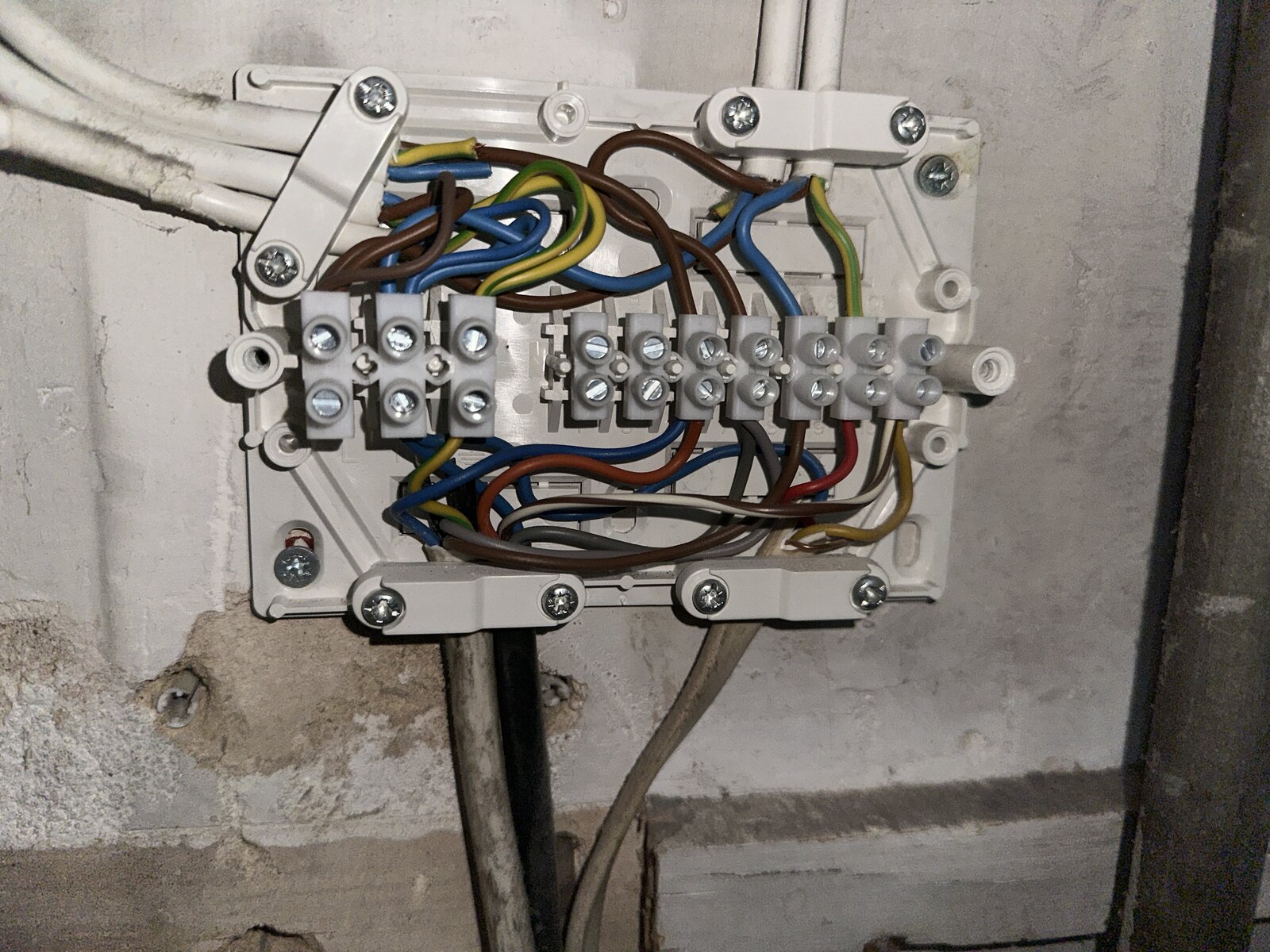
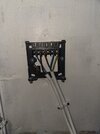
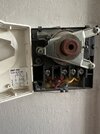
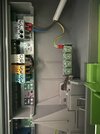
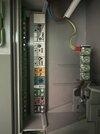
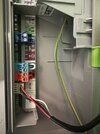
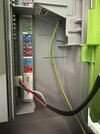
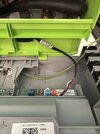
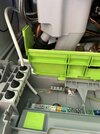
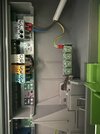
I am wanting to replace my current thermostat/ programmer with the Nest 3rd generation. I have a conventional boiler. Before I go ahead and buy it I want to make sure it will work and what wiring needs to be in place. Any help is appreciated. The large amount of wiring is located beneath the programmer. The wire coming in from the bottom right is for the thermostat downstairs, the black is for the water pump, the one next to the black is for the water tank. The top right wires go into the programmer.

The three coming in on the top left;
Top two go back to the boiler
Bottom wire is the electrical supply.
IMG_3715.jpeg
 

Attachments

  • IMG_3714.jpeg
    IMG_3714.jpeg
    321.3 KB · Views: 214
  • IMG_3709.jpeg
    IMG_3709.jpeg
    338.2 KB · Views: 187
It would be a relatively straightforward swap.

The N and L from your current programmer would go to N and L on the Nest Heatlink.

The Green/Yellow wire in terminal 4, would go to terminal 3 - Heating (call for heat) on the HL.

The Brown wire in terminal 1, would go to terminal 4 - Hot water (satisfied) on the HL.

The Blue wire in terminal 3, would go to terminal 6 - Hot water (call for heat) on the HL.

Additionally, short bridging wires would be required between L and terminals 2 and 5 on the HL.

In the wiring centre, move the Green/Yellow wire from the programmer, one space over to the last terminal on the right.
This will bridge out the existing thermostat and allow its cable to be removed completely.

Or, if you want the Nest thermostat to be mounted in the same place as the existing stat - the cable could be reused, with two of the wires connected to T1 and T2.
In this case, the earth terminal on the HL would also have to be connected to an earth.

For reference, your existing wiring doesn't meet current regulations - green/yellow wires can not be used for switched lives any more.
It would also be good practice to oversleeve the switched lives in Brown.
 
Last edited:
The heat link would likely be placed next to the wiring centre, and the programmer would be removed, green/yellow is not permitted for anything other than earth bonding, so you have not got enough wires to correct this if the heat link replaced the programmer, so job one is to label all wires at the wiring centre.
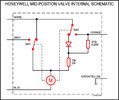
Start with cables, orange, grey, white and blue are likely the motorised valve, mid-position-valve.jpg and since N/C terminal used with programmer seems likely Y Plan Y-Plan.jpg there is no standard order of wiring in the wiring centre, so you need to do some detective work working out what wires go where. The Nest book does show Y plan, but you need to work out what wires go to the old thermostat as the new one will be 12 volt, so getting 230 and 12 volt mixed up releases expensive blue smoke.

It would not matter which thermostat you go for, the wiring needs correcting, yes likely Hive or Drayton Wiser will plug straight in without any re-wiring, but wiring is still wrong.

I don't like Nest as it will not connect to any TRV heads, but that's me, I want to control every room independently. But if you don't want that then Nest will work, not happy with the geofencing function, but again if you don't need that function then no problem. But the big question is do you have the skill to fit it?
 
Thanks so much!

Only thing I’m still confused on is the last point - we do want to keep the thermostat in the same place (downstairs hallway) please could you clarify?

I also think the nest has two ports on the thermostat whereas we currently have three cables connected up to it.

Thanks again
 
Only thing I’m still confused on is the last point - we do want to keep the thermostat in the same place (downstairs hallway) please could you clarify?
The cable running to your thermostat appears to have a red, blue, yellow and earth wire.
To reuse this to power the Nest Thermostat, all these wires must be removed from the connections in the wiring centre.
You would then pick two of the wires, i.e. red and blue, place these into T1 and T2 on the HL (and safely isolate the other two wires). This will provide the 12V to power the thermostat.

As said earlier, in this configuration, the HL must be provided with an earth connection from the wiring centre, to its earth terminal.
 
1702508666317.png

I have numbered the terminals 1 to 10, and will try and work out what they are:-
1) Line too many brown cables to be likely anything else.
2) Neutral as above.
3) Earth as above.
4) Unused.
5) Unused.
6) Likely live to boiler to make it run.
7) DHW off from programmer
8) DHW on from programmer
9) CH on from programmer, feed to thermostat.
10) From thermostat to three port valve as seems only yellow wire and black/white often call for heat.

To be sure would need to test, and clearly I am not where I can test, because you can set the programming from thermostat or app/program, there is not need for access to the heat link, so no problem being next to wiring centre. This is my best guess from the pictures you have posted.

If my guess is correct then the three and earth is disconnected from wiring centre and goes to T1 and T2 on Nest.
The two cables to the programmer can come out.
6) on wiring centre to 3 on nest.
7) on wiring centre to 4 on nest
8) on wiring centre to 6 on nest
1) on wiring centre to L, 2 and 5 on nest
2) on wiring centre to N on nest
3) on wiring centre to earth on nest

The original thermostat is replaced by nest thermostat, the original programmer is now dead and can be removed.

However as said this is my guess, up to you to verify I have guessed correct.
 
Last edited:
Hello, not sure if anyone can help. We are moving house and I have disconnected the nest, replaced it with the Danfoss and will be fitting the nest to a new combo boiler. This is the current wiring in the boiler. The thermostat will be wired in another room via an existing cable, but I am confused how to wire the heatlink to the boiler
IMG_8926.jpeg
 
We are moving house and I have disconnected the nest, replaced it with the Danfoss and will be fitting the nest to a new combo boiler.
My first reaction is why. Nest Gen 3 is rather a poor thermostat. However, it can be connected either digitally or analogue, the analogue is best method, but to latch onto someone else's thread can result in answers which don't match both, so better to start your own thread.

There is a difference between working, and working efficiently. Modern boilers gain the latent heat from the exhaust gases, and to do this they need to modulate, there are two ways to do this, one electrically and the other using the return water temperature. In both cases, it requires analogue control, and in the main it is hinged around the TRV valve, so each room is individually controlled, and Nest seem to have lost the plot, and there is no way to link TRV's to the hub, in fact you can't even connect multi thermostats to it, can with the USA version, but not European version.

And yes I have Nest Gen 3, as I thought it would connect to Energenie TRV heads, but it seems when Google took over Nest, this option was lost, and even when it did work, it worked the wrong way around, Nest told the TRV to change settings, not the TRV telling Nest.

I would just leave Nest where it is, and get a good thermostat for the new house, EvoHome, Wiser, Tado, or even Hive, but Nest have lost the plot.
 
My first reaction is why. Nest Gen 3 is rather a poor thermostat. However, it can be connected either digitally or analogue, the analogue is best method, but to latch onto someone else's thread can result in answers which don't match both, so better to start your own thread.

There is a difference between working, and working efficiently. Modern boilers gain the latent heat from the exhaust gases, and to do this they need to modulate, there are two ways to do this, one electrically and the other using the return water temperature. In both cases, it requires analogue control, and in the main it is hinged around the TRV valve, so each room is individually controlled, and Nest seem to have lost the plot, and there is no way to link TRV's to the hub, in fact you can't even connect multi thermostats to it, can with the USA version, but not European version.

And yes I have Nest Gen 3, as I thought it would connect to Energenie TRV heads, but it seems when Google took over Nest, this option was lost, and even when it did work, it worked the wrong way around, Nest told the TRV to change settings, not the TRV telling Nest.

I would just leave Nest where it is, and get a good thermostat for the new house, EvoHome, Wiser, Tado, or even Hive, but Nest have lost the plot.
Hi Eric, this was my original thread. You were acctually the one that helped me to install this originally. I agree that it has limited controls however for the rads, current set up, and price I paid we are going to use it. Would you be able to help with the wiring to the boiler in the above picture. Many thanks in advance if you can ☺
 
All I can say is given their track record with Nest 1 & Nest 2, give Nest a swerve
 
I have seen that layout before, but can't remember which boiler it is to be able to down-load the instructions. Neither do I know if it is one of the boilers where the connections are within the sealed part of the boiler, yes a stupid idea to put the terminal block within the room sealed area, but it seems they do silly things.
 
Looks like it'll be either the white plug in connection next to the yellow, the yellow one or possibly the dark blue one. Can you take better photos? Is the dark blue one OpenTherm?
 
Looks like it'll be either the white plug in connection next to the yellow, the yellow one or possibly the dark blue one. Can you take better photos? Is the dark blue one OpenTherm?
I have seen that board before, but guessing can cause a lot of damage. The Nest Gen 3 can work on 24 or 230 volt switching, or OpenTherm, but some boilers can only use their own analogue controllers, and the Bosch analogue controller I looked at was like the Nest in that it did not connect to TRV heads. Clearly designed for open plan homes where one thermostat can control the whole home.

I moved to Drayton Wiser, think it allows up to 9 devices to tell the hub with in turn tells the boiler to fire up, but my house has the radiators under the window, I know the idea, but that's when the heating is running, and we do have summer where heating is not required, but a north facing outside wall can still get cold, and end up firing the central heating when not required. So the idea of having all linked TRV heads seems good, but in practice if the radiators are not on an internal wall, then a wall mounted thermostat can work better. The Wiser will allow either.

Honeywell EvoHome was the first I saw, it came out before we all walked around with a phone glued to our ears, so had a good HMI (Human Machine interface)
EVO-home1.jpg
the latter ones often need a phone or computer to control them. Nest Gen 3 actually not too bad, you can do most things with the dial, but Energenie was rotten that way, you can only set the TRV setting with a phone or computer, hardly any option to set on the device.

But, Nest had so many what seemed good ideas, which simply do not work. Anti-legionnaires was firing it up when not required, so disabled, the learning bit went completely daft, so disabled, the geo fencing needs one to be far too close before putting heating on, and turned off the heating in a storm when the EE mast went down, so disabled, the energy used is useless as it only shows when boiler is switched on, not how much it is using, reminds me of the IHD with smart meters. What is required is to monitor more than one room, and only the USA version has that, so all in all, a bit useless. It does allow one to wire a C Plan boiler, but since @DIYron26 is using a combi boiler, the DHW part of the Nest will not be used.

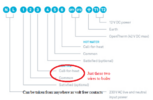
So 1753953917061.pngin real terms only two wires to boiler, same applies if using OpenTherm, but different two wires, but there is a reason why installation manuals are written, and best it to look in the manual for the boiler, most available on line, but need make and model of the boiler to know which terminals are used, @Stuckinarut likely correct for OpenTherm if an OpenTherm enabled boiler, if not one of the links will be removed and thermostat contact wires will replace it, but I can't say which, as you have not said what the boiler is, so can't look it up, can't even check if now cover has been removed it needs a gas safe guy to test it.

 
1753982674545.png
1753982752172.png

Bosch do publish installation manuals online. However, it does seem they don't know what low voltage and extra low voltage means.
1753982855607.png
1753982902837.png
When it says low voltage it means extra low voltage, I would guess this
1753983162744.png
is the connection for the thermostat, but need to look at your installation instructions for your boiler, I have just picked a Bosch set of instructions at random. I noted Bosch written on cable, and I remember with mother's Bosch it used its own special thermostat, not standard OpenTherm, so the Nest Gen 3 will not work with the EMS bus control.

Personally, I would not bother with OpenTherm, the TRV can control each room quite well. The problem is it will not turn the boiler fully off, so some means to turn the boiler fully off is required. I found the Honeywell-thermostat.jpg really basic thermostat without the neutral connected does a reasonable job, one wants a large difference between turning on and off, but using some linked TRV heads does a better job, but looking at more expensive options, I use Drayton Wiser in parallel with Nest, the Nest allows me to use boiler for DHW on the odd time when not enough solar and central heating not running.

There is no reason why one should not have 5 or 6 Nest Gen 3 thermostat in parallel, except rather expensive, may as well get a proper thermostat like Wiser to start with, and simply leave the old Nest behind in your last house.
 
I do want to attach this thermostat so any wiring advice would be appreciated. Please see clearer images and images with blocks removed for clearer picture
 

Attachments

  • IMG_9460.jpeg
    IMG_9460.jpeg
    238.2 KB · Views: 21
  • IMG_9461.jpeg
    IMG_9461.jpeg
    217.3 KB · Views: 21
  • IMG_9462.jpeg
    IMG_9462.jpeg
    234.4 KB · Views: 20
  • IMG_9463.jpeg
    IMG_9463.jpeg
    221.4 KB · Views: 19
  • IMG_9464.jpeg
    IMG_9464.jpeg
    239.9 KB · Views: 22
  • IMG_9465.jpeg
    IMG_9465.jpeg
    250.6 KB · Views: 20
  • IMG_9460.jpeg
    IMG_9460.jpeg
    238.2 KB · Views: 20

If you need to find a tradesperson to get your job done, please try our local search below, or if you are doing it yourself you can find suppliers local to you.

Select the supplier or trade you require, enter your location to begin your search.


Are you a trade or supplier? You can create your listing free at DIYnot Local

 
Back
Top