• Looking for a smarter way to manage your heating this winter? We’ve been testing the new Aqara Radiator Thermostat W600 to see how quiet, accurate and easy it is to use around the home. Click here read our review.

Replacing Honeywell with Hive!

Joined
23 Jul 2025
Messages
12
Reaction score
4
Country
United Kingdom
Hi All!

I’ve been researching the installation of hive in place of our current system which is a Honeywell ST9400c.

Our set up is boiler and water cylinder, with two thermostats controlling both upstairs and downstairs.

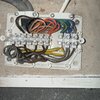
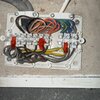
I’ve pretty much got my head around the process but quickly losing confidence one I crack the junction box and stare at the tin of spaghetti inside. I have the correct hive bits, two receievers (one water and heating, the other heating)

From my understanding I can switch out the Honeywell programmer for the Hive receiver with like for like wiring.

Then I need to address the downstairs thermostat by disconnecting it and capping.

Where I’m losing my head with this is within the junction box, what I’m reading and watching is telling me to trace the wires from stat to junction box to figure which is which, this is not possible without pulling my walls apart.

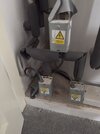
There junction box has 3 cables running into the back left coming from each of the 3 port valve boxes at the cylinder. Is the thermostat likely to be one of these cables, this doesn’t make sense to me but after that I’m at a loss!

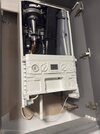
I’ve attached images of the set up at the boiler and the water cylinder (where then junction box lives)

If somebody could break it down for me that’d be great! I’m aware I’m not mentioned the upstairs circuit, I’m just trying to get my head around downstairs first before tacking the second leg of the job!

TIA!
 

Attachments

  • IMG_0070.jpeg
    IMG_0070.jpeg
    287.9 KB · Views: 42
  • IMG_0071.jpeg
    IMG_0071.jpeg
    422.1 KB · Views: 42
  • IMG_0092.jpeg
    IMG_0092.jpeg
    67.5 KB · Views: 71
  • IMG_0091.jpeg
    IMG_0091.jpeg
    66.9 KB · Views: 35
Do you have any testing equipment?
Yes I’ve got a multimeter, I’m planning on a process of elimination approach, remove cable, turn on electrics, test the stat with multimeter.

Would this be a way to tackle it?

The more I read into this, I’m now thinking that actually those 3 cables running into from the valves are likely to be the 2 of them thermostat? Is this likely?
 
Yes the stat gets a live from the programmer or depending on the control if separate. Which is the one you're replacing? Post a photo please
 
Yes the stat gets a live from the programmer or depending on the control if separate. Which is the one you're replacing? Post a photo please
Thanks!

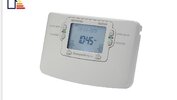
I’m not a home to get pics of the kit there but ultimately these. The programmer is a Honeywell st9400c and the stat a bog standard.

I’ve read about dark arts of connecting live and switch live at the stat, from what I’ve read it’s frowned upon but if that’s the easiest route? Otherwise I’m still looking for the way to remove the stat.
 

Attachments

  • IMG_0096.jpeg
    IMG_0096.jpeg
    63.8 KB · Views: 22
  • IMG_0095.jpeg
    IMG_0095.jpeg
    100.7 KB · Views: 20
Thanks!

I’m not a home to get pics of the kit there but ultimately these. The programmer is a Honeywell st9400c and the stat a bog standard.

I’ve read about dark arts of connecting live and switch live at the stat, from what I’ve read it’s frowned upon but if that’s the easiest route? Otherwise I’m still looking for the way to remove the stat.
Ok, so if this is accurate. Turn the heating on via the programmer, turn the downstairs stat up to maximum and turn upstairs stat turned down to minimum. You should then be able to test for mains voltage between earth and the black wires which meet the brown wires feeding the motorised valves, whichever gives you 230Vac is the downstairs stat.

Yes you can link live and switched live at the thermostat, turn up to maximum and leave on the wall, What's frowned upon/not permitted is hiding the join buried in the wall.
 
Ahh brilliant! I’ll try that mate!

One final question!

In regards to the back wires meeting the brown wires to feed the valves . Am I looking at the situation back to front.

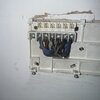
The three cables that enter the top left of the junction box are off the motorised valves. Will the stat cabling be on the opposite side of them, in the bottom row of cables? That’s be swell if they are, it’s the top row that’s been keeping me up at night!
 
Ok, so if this is accurate. Turn the heating on via the programmer, turn the downstairs stat up to maximum and turn upstairs stat turned down to minimum. You should then be able to test for mains voltage between earth and the black wires which meet the brown wires feeding the motorised valves, whichever gives you 230Vac is the downstairs stat.

Yes you can link live and switched live at the thermostat, turn up to maximum and leave on the wall, What's frowned upon/not permitted is hiding the join buried in the wall.
Ahh brilliant! I’ll try that mate!

One final question!

In regards to the back wires meeting the brown wires to feed the valves . Am I looking at the situation back to front.

The three cables that enter the top left of the junction box are off the motorised valves. Will the stat cabling be on the opposite side of them, in the bottom row of cables? That’s be swell if they are, it’s the top row that’s been keeping me up at night!
 
In regards to the back wires meeting the brown wires to feed the valves . Am I looking at the situation back to front.

The three cables that enter the top left of the junction box are off the motorised valves. Will the stat cabling be on the opposite side of them, in the bottom row of cables? That’s be swell if they are, it’s the top row that’s been keeping me up at night!
Yes the 3 black cables are your motorised valves, they have brown wires which become live when the room stat is calling, which then open up, touch a microswitch and make the grey and orange live sending the live (switched live) to your boiler to come on. So, yes, the brown wires from the valves to the black stat wires
 
Okay Jobs a good one!

Located the stat wires and removed entirely.

I’m now racking my head about the bridge here, I’ve yet to put one in, just looking for input.

my question is, at terminal one, the live wire (brown) from the stat shared a terminal with a black wire. Am I okay to bridge from the terminal the switch live was in over to terminal one? Currently have no hot water but need to contact hive to resettling my hub!
 

Attachments

  • IMG_0071.jpeg
    IMG_0071.jpeg
    415.2 KB · Views: 29
Last edited:
You could bridge that, but are you sure that’s where the stat was connected? I thought it would go to a motorised valve
 
Last edited:
Definitely not sure! The black cable I disconnected from here was the only one from this bottom row that had a change when the stat was turned on. Weirdly though it was idling around 70v and when stat was turned up it went to 240v. Tested the stat afterwards and cables were out other than 3v on a live running into it which I thought may be residual?

Possibly mucked it up? I thought you meant these wires at the bottom that were likely to be that stat, the three thick cables at the top and the wires inserting in the top row are from the valves.

In any case, finally just got access to the app and tested both heating and hot water and both are not working, so in a pickle!
 
Yes the ones at the bottom are supposed to be the stat ones. Right, do me a favour, the red marked photo that you posted recently, which one was 240vac when the stat was live/turned up?
 
Hi!

It was the black cable 2nd in from the left at the bottom marked with green arrow!

The new hive stat fires up the boiler but no action so assuming I’ve cocked something up wire wise!
 

Attachments

  • IMG_0112.jpeg
    IMG_0112.jpeg
    381.5 KB · Views: 16
Hi!

It was the black cable 2nd in from the left at the bottom marked with green arrow!

The new hive stat fires up the boiler but no action so assuming I’ve cocked something up wire wise!
 

If you need to find a tradesperson to get your job done, please try our local search below, or if you are doing it yourself you can find suppliers local to you.

Select the supplier or trade you require, enter your location to begin your search.


Are you a trade or supplier? You can create your listing free at DIYnot Local

 
Back
Top