Texecom Premier 48 bringing up to date?

Joined
15 Nov 2010
Messages
41
Reaction score
0
Country
United Kingdom
Hi,

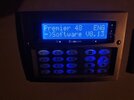
I have a Texecom Premier 48 alarm system that was fitted in 2011. The keypad shows firmware v8.13.

It has the dialler (don't think it works), 8 pir sensors, 6 surface mounted door sensors, 1 garage door contact , 2 keypads (hallway and garage). All hard wired.

Is it possible to update this system to a newer one to enable alerting over wifi or similar or will I have to replace the main unit and keypads (retaining the sensors)?

I'll look to get an expert in but wanted to know my options before I do.

Thanks in advance.
 
Just change control panel , everything else will work , fit a smartcom if you need app control and notifications
 
Echo that of the above, if your thinking of extending it then a kit 5 does have wireless devices etc if you want to go that way.

Also look at for kits including smart coms as well as buying parts separately as it can make a difference.
 
Thanks for replying, good to know I can utilise some of the kit I currently have.

Can I keep my existing keypads? They're brushed steel type so hoping I can
 
Seeing as most of the system is there, how difficult would it be for me to DIY install? I'm fairly handy, can I just copy and paste the existing installation?

My existing system is metal cased, I wonder if you can replace just the pcb for the newer model.

I'm just thinking out aloud.
 
No because it’s a 12 Dc psu not an AC psu ….just buy the panel all the screw holes are the same , as the internal stuff is screwed from the rear you would still have to take it off the wall !
 
I tend to find it’s easier to remove the metal box and replace it .

programming wise to some degree you can copy it manually or into a wintex profile manually and send across to the new panel.

But it tends to be problematic if you try and receive the old profile into wintex and update it and send across.
 
Thanks, that is a good point. When I order the new kit, I'll get the cable to connect to my computer and I'll take screenshots of the existing setup.

I'll see if I can put a list of components/ kit together today.
 
Hi, I've spent a bit of time this evening and I believe I need the following, would you be kind enough to review and feedback?

Texecom Premier Elite 48
Backup battery
Premier Elite RM8 expander - Can I use the existing expander one off my Premier 48?
SmartCom CEL0001
Flasher Interface CDH-0001 & USB Cable JAC-0001 - Will this work with my existing Premier 48 to view and copy the current Wintex profile?
Premier Elite Odyssey 5 bell (replace existing faulty unit)

Have I captured everything?

Looking to use all my existing wired sensors (15 zones - 9 PIRs, 4 door contacts, 1 garage door contact), 1 key pad in hallway and another in garage, not looking to expand any more at this time.

Thanks
 
RM8 is a plug on relay board …..8xp is the expander and yes your old one will work
Yes the usb and flasher will work on old panel
 
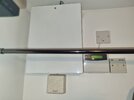
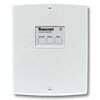
Looking up the 8xp, I can see it's an external box as per the pic. I don't have such a box so assumed it was a circuit that sits inside the case, a pic of my alarm attached.
 

Attachments

  • 20250120_220154.jpg
    20250120_220154.jpg
    143 KB · Views: 66
  • texecom-premier-elite-8xp-remote-expander-ccb-0001--888-p_2_1_-1.jpg
    texecom-premier-elite-8xp-remote-expander-ccb-0001--888-p_2_1_-1.jpg
    8.2 KB · Views: 55
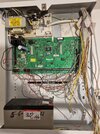
Are you sure it’s not somewhere else ? Loft ? Post picture of pcb or press menu 4 on keypad …
 
Pic attached.

I'll get to the PCB tomorrow and also take a look in the loft.
 

Attachments

  • 20250120_225939.jpg
    20250120_225939.jpg
    200.3 KB · Views: 75
Last edited:
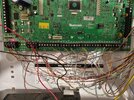
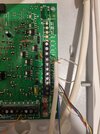
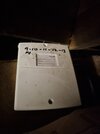
Pics of pcb. I found the expander in the loft as you suggested.
 

Attachments

  • 20250121_121949.jpg
    20250121_121949.jpg
    471.8 KB · Views: 86
  • 20250121_122004.jpg
    20250121_122004.jpg
    505.5 KB · Views: 89
  • 20250121_122045.jpg
    20250121_122045.jpg
    337.5 KB · Views: 89
  • 20250121_124426.jpg
    20250121_124426.jpg
    102.7 KB · Views: 69
Last edited:

If you need to find a tradesperson to get your job done, please try our local search below, or if you are doing it yourself you can find suppliers local to you.

Select the supplier or trade you require, enter your location to begin your search.


Are you a trade or supplier? You can create your listing free at DIYnot Local

 
Back
Top