

Hi all,
About a year ago I installed a Texecom Premier Elite 64W myself. It's currently using a mixture of Ricochet sensors & wired PIR's as the house was wired for an alarm, despite some of the cable runs no longer working.
After I configured the alarm to my liking, I paid for an accredited security firm to come and check my work. I didn't want it certified or anything like that, it was purely because this was the first time installing such a system, I wanted to make sure I hadn't made any silly mistakes. Fortunately, after going through my configuration and them running standard tests they do on all systems, it passed and they didn't need to make any changes, which was nice.
So why am I here?
The front door to our house has a shock contact sensor, which (all my configuration is done via Wintex) is set to "Entry/Exit 1" with no "Attributes 1" and just "Auto Rearm" on "Attributes 2". Once you enter the house there are 2 PIR sensors that can see the front door, the hall and the lounge. These are currently set as "Entry/Exit 1" Zone type with "Access" enabled under Attributes1 to prevent it causing a fail when exiting the property. This has worked well for us as when we part set the system "Night Arm" (Part set 1), despite having a keypad in the bedroom if we go downstairs into the hall, the hall PIR picks us up and triggers an entry countdown. We can then use the front door keypad to disable it, easy.
The issue is that given the hall & lounge PIRs are set to Entry/Exit1 if someone were to break in (in full set mode), they'd have X seconds to grab something and go before the bell goes off, rather than an instant alarm. After doing some research and reading the Texecom manuals I came to the conclusion that the best zone type would be "Guard Access" for both PIRs. That way if the front door opens, it triggers the count down and the PIR's don't cause the alarm to sound and allows us to disarm the alarm. At night (part-set), if they detect us coming down the stairs (which both PIR's might), it'll trigger the entry countdown.
Issue 1:
I've tried setting the PIRs to "Guard Access", however after putting the system into part-set and dancing around at the bottom of the stairs, I hear around 5-6 small clicks coming from the panel speaker (maybe 3 or 4 seconds? Not sure what the clicks are), then then countdown timer starts (from the panel speaker). The problem with this is that if we go downstairs and quickly into the kitchen, you'd be hit by the kitchen PIR which is on Guard and trigger the alarm. My desired config would be that as soon as we come down the stairs, the countdown tone starts (like it does when the zone type for the PIR's are Entry/Exit1).
Not a massive fan of using AI for troubleshooting as it often hallucinates, however it says the issue could be related to "pre-alarm verification logic"? However reading previous forum posts, people mention setting their PIRs in Guard Access and it triggering the countdown instantly.
Issue 2:
If I use the keypad by the front door to part-set (Night Arm), then walk away to go upstairs I get a arm failure due to causing the 2 PIR sensors to go active. Is there a way so when I part set the system I have X time to leave to go upstairs? (I do have a landing PIR but this is omitted as part of the part-set).
Everything in the house is on Area A. I have a garage which has multiple sensors within and thats in Area B.
Really keen to get your opinions on what might be the best setup for us, as although the entry/exit config for the PIR's "works", it just doesn't feel right.
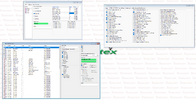
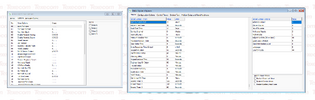
I've attached a screenshot of my Wintex config. Hopefully that helps.
Thanks for any help / suggestions.
About a year ago I installed a Texecom Premier Elite 64W myself. It's currently using a mixture of Ricochet sensors & wired PIR's as the house was wired for an alarm, despite some of the cable runs no longer working.
After I configured the alarm to my liking, I paid for an accredited security firm to come and check my work. I didn't want it certified or anything like that, it was purely because this was the first time installing such a system, I wanted to make sure I hadn't made any silly mistakes. Fortunately, after going through my configuration and them running standard tests they do on all systems, it passed and they didn't need to make any changes, which was nice.
So why am I here?
The front door to our house has a shock contact sensor, which (all my configuration is done via Wintex) is set to "Entry/Exit 1" with no "Attributes 1" and just "Auto Rearm" on "Attributes 2". Once you enter the house there are 2 PIR sensors that can see the front door, the hall and the lounge. These are currently set as "Entry/Exit 1" Zone type with "Access" enabled under Attributes1 to prevent it causing a fail when exiting the property. This has worked well for us as when we part set the system "Night Arm" (Part set 1), despite having a keypad in the bedroom if we go downstairs into the hall, the hall PIR picks us up and triggers an entry countdown. We can then use the front door keypad to disable it, easy.
The issue is that given the hall & lounge PIRs are set to Entry/Exit1 if someone were to break in (in full set mode), they'd have X seconds to grab something and go before the bell goes off, rather than an instant alarm. After doing some research and reading the Texecom manuals I came to the conclusion that the best zone type would be "Guard Access" for both PIRs. That way if the front door opens, it triggers the count down and the PIR's don't cause the alarm to sound and allows us to disarm the alarm. At night (part-set), if they detect us coming down the stairs (which both PIR's might), it'll trigger the entry countdown.
Issue 1:
I've tried setting the PIRs to "Guard Access", however after putting the system into part-set and dancing around at the bottom of the stairs, I hear around 5-6 small clicks coming from the panel speaker (maybe 3 or 4 seconds? Not sure what the clicks are), then then countdown timer starts (from the panel speaker). The problem with this is that if we go downstairs and quickly into the kitchen, you'd be hit by the kitchen PIR which is on Guard and trigger the alarm. My desired config would be that as soon as we come down the stairs, the countdown tone starts (like it does when the zone type for the PIR's are Entry/Exit1).
Not a massive fan of using AI for troubleshooting as it often hallucinates, however it says the issue could be related to "pre-alarm verification logic"? However reading previous forum posts, people mention setting their PIRs in Guard Access and it triggering the countdown instantly.
Issue 2:
If I use the keypad by the front door to part-set (Night Arm), then walk away to go upstairs I get a arm failure due to causing the 2 PIR sensors to go active. Is there a way so when I part set the system I have X time to leave to go upstairs? (I do have a landing PIR but this is omitted as part of the part-set).
Everything in the house is on Area A. I have a garage which has multiple sensors within and thats in Area B.
Really keen to get your opinions on what might be the best setup for us, as although the entry/exit config for the PIR's "works", it just doesn't feel right.
I've attached a screenshot of my Wintex config. Hopefully that helps.
Thanks for any help / suggestions.
Attachments
Last edited:


